
1. Introduction
Thank you for choosing the XO Vision IR620 Universal Wireless Infrared Foldable Headphones. These headphones are designed to provide a high-quality, wireless audio experience for in-car entertainment systems. With their comfortable design and easy-to-use features, they are ideal for enjoying movies, videos, and music without disturbing others in the vehicle. Please read this manual thoroughly to ensure proper use and care of your headphones.

Image 1.1: XO Vision IR620 Universal Wireless Infrared Foldable Headphones. This image displays the headphones in their standard, unfolded configuration, highlighting the earcups and headband.
2. Safety Information
- Do not expose the headphones to extreme temperatures, direct sunlight, or high humidity.
- Avoid dropping or subjecting the headphones to strong impacts.
- Do not attempt to disassemble or modify the headphones. This will void the warranty and may cause damage.
- Keep batteries out of reach of children. If swallowed, seek immediate medical attention.
- Dispose of batteries according to local regulations. Do not dispose of batteries in fire.
- Clean the headphones with a soft, dry cloth. Do not use liquid cleaners or aerosols.
- Prolonged listening at high volume levels can cause permanent hearing damage. Adjust volume to a safe level.
3. Product Features
The XO Vision IR620 headphones offer a range of features designed for user comfort and convenience:
- Custom Fit Comfort: Features extra foam cushioning and an adjustable headband for a comfortable fit for various head sizes.
- Auto Shut-off: Automatically powers off when not in use to conserve battery life.
- Easy Pairing: Compatible with most in-car infrared transmitters for seamless wireless audio playback.
- User-Friendly Controls: Equipped with an easily accessible On/Off switch and volume control on the side of the headphones.
- Foldable Design: Convenient foldable ear cups allow for effortless storage and portability, keeping your vehicle tidy.
4. Package Contents
Please check the package for the following items:
- XO Vision IR620 Wireless Infrared Foldable Headphones
- Batteries (pre-installed or included separately)
- User Manual (this document)
5. Setup
5.1. Battery Installation
The headphones require batteries for operation. Locate the battery compartment, typically on one of the earcups. Insert the batteries, ensuring correct polarity (+/-). Close the battery compartment securely.
Note: The product description states batteries are included. If they are not pre-installed, please install them as described.
5.2. Connecting to an Infrared Transmitter
The IR620 headphones are designed to work with most in-car infrared (IR) audio transmitters. No manual pairing process is typically required. Ensure your vehicle's entertainment system (DVD player, TV) is turned on and transmitting an IR audio signal.
- Turn on your vehicle's in-car entertainment system.
- Ensure the IR transmitter is active and broadcasting an audio signal.
- Power on the XO Vision IR620 headphones using the On/Off switch.
- The headphones should automatically detect and connect to the IR signal.
- Adjust the volume on the headphones to your desired listening level.
If no sound is heard, ensure the headphones are within range of the IR transmitter and there are no obstructions blocking the signal.
6. Operating Instructions
6.1. Power On/Off
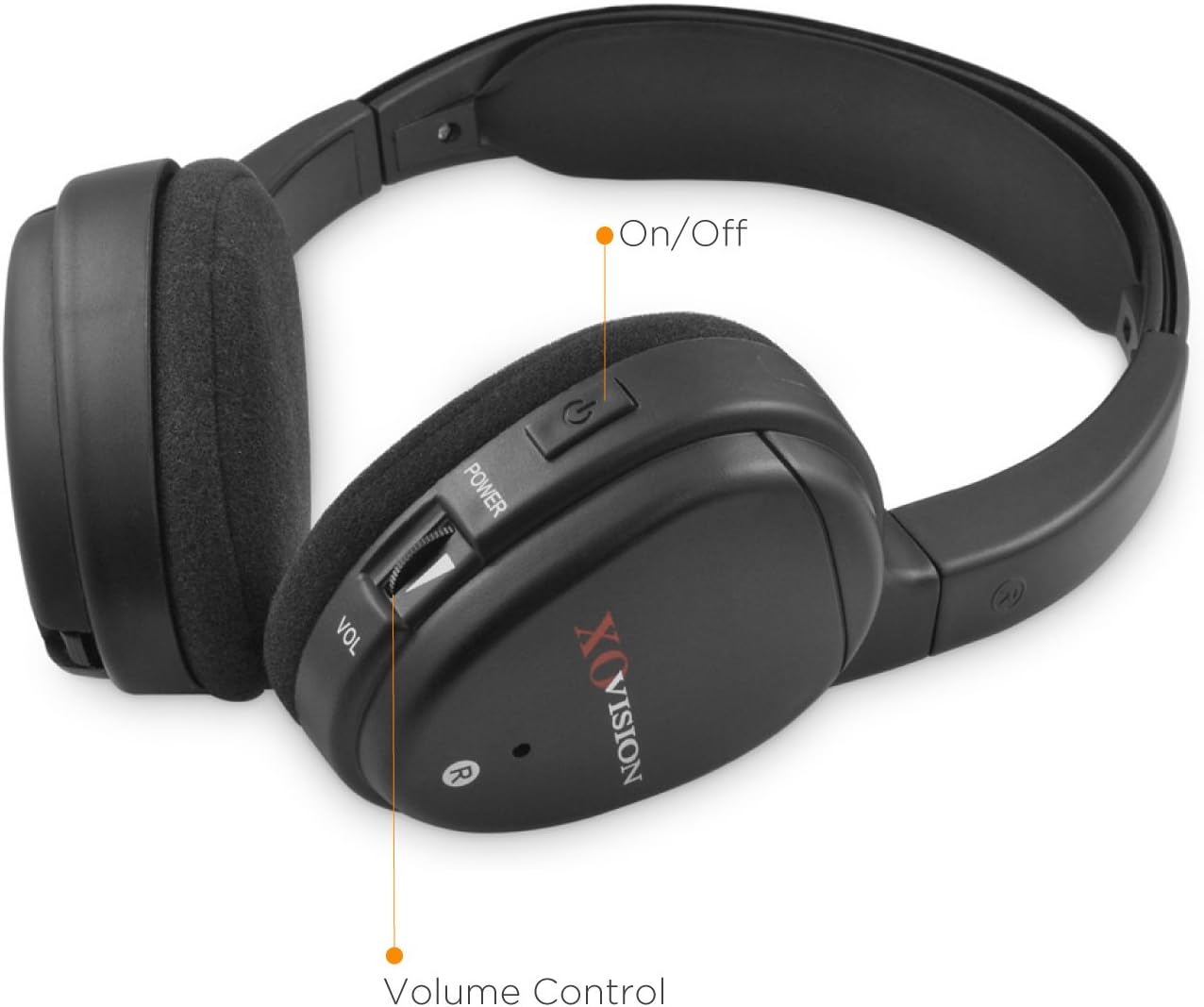
Image 6.1: Close-up view of the right earcup showing the On/Off switch and volume control dial.
To power on the headphones, locate the On/Off switch on one of the earcups (refer to Image 6.1). Slide or press the switch to the "On" position. An indicator light may illuminate to confirm the headphones are active. To power off, slide or press the switch to the "Off" position.
6.2. Volume Control
The volume control dial is located on the same earcup as the On/Off switch (refer to Image 6.1). Rotate the dial upwards to increase the volume and downwards to decrease it. Adjust the volume to a comfortable listening level.
6.3. Wearing the Headphones
Adjust the headband to ensure a snug yet comfortable fit over your head. The earcups should fully cover your ears for optimal sound quality and comfort. The headband is adjustable to accommodate various head sizes.
6.4. Auto Shut-off Feature
To conserve battery life, the headphones are equipped with an auto shut-off function. If no IR audio signal is detected for a certain period, the headphones will automatically power down. To reactivate, simply turn them off and then on again, or ensure an active IR signal is present.
7. Maintenance
7.1. Cleaning
Wipe the headphones with a soft, dry cloth. Do not use abrasive cleaners, solvents, or chemical sprays, as these can damage the surface and internal components. For the earpads, gently wipe with a slightly damp cloth if necessary, then dry thoroughly.
7.2. Storage

Image 7.1: The headphones demonstrating their foldable ear cup design for compact storage.
The XO Vision IR620 headphones feature a foldable design for convenient storage (refer to Image 7.1). Gently fold the earcups inward to reduce their size. Store the headphones in a cool, dry place, away from direct sunlight and extreme temperatures. Remove batteries if the headphones will not be used for an extended period to prevent leakage.
8. Troubleshooting
| Problem | Possible Cause | Solution |
|---|---|---|
| No sound |
|
|
| Poor sound quality / Static |
|
|
| Headphones not turning on |
|
|
9. Specifications
| Model Name | IR620 |
| Connectivity Technology | Wireless, Infrared |
| Wireless Communication Technology | Infrared |
| Ear Placement | Over Ear |
| Form Factor | On Ear |
| Control Type | Volume Control, Touch (On/Off) |
| Special Features | Foldable, Lightweight, Auto Shut-off |
| Compatible Devices | Infrared-enabled devices compatible with in-car entertainment systems |
| Material | Foam (ear cushioning) |
| Color | Black |
| Item Weight | 6.4 ounces (approx. 181 grams) |
| Product Dimensions | 6 x 2 x 7.5 inches (approx. 15.2 x 5.1 x 19.1 cm) |
| UPC | 875690003729 |
10. Warranty and Support
For warranty information and customer support, please refer to the documentation included with your purchase or visit the official XO Vision website. Keep your proof of purchase for any warranty claims.
Contact Information:
- For the most up-to-date support information, please visit the XO Vision Store on Amazon.
- Please retain your purchase receipt for warranty purposes.
