
Bose 277378-1100
Bose SoundDock Digital Music System User Manual
Model: 277378-1100 | Brand: Bose
Introduction
The Bose SoundDock Digital Music System (Series I) provides high-quality audio playback for your compatible iPod devices. Designed for simplicity, this system allows you to enjoy your music with minimal setup. This manual provides essential information for setting up, operating, maintaining, and troubleshooting your SoundDock system.
Key features include:
- Direct iPod docking for seamless music playback.
- Included remote control for convenient operation.
- Compact design suitable for various environments.
Setup
1. Unpacking the System
Carefully remove all components from the packaging. Ensure you have the Bose SoundDock system, power supply, and remote control. Inspect all items for any signs of damage.
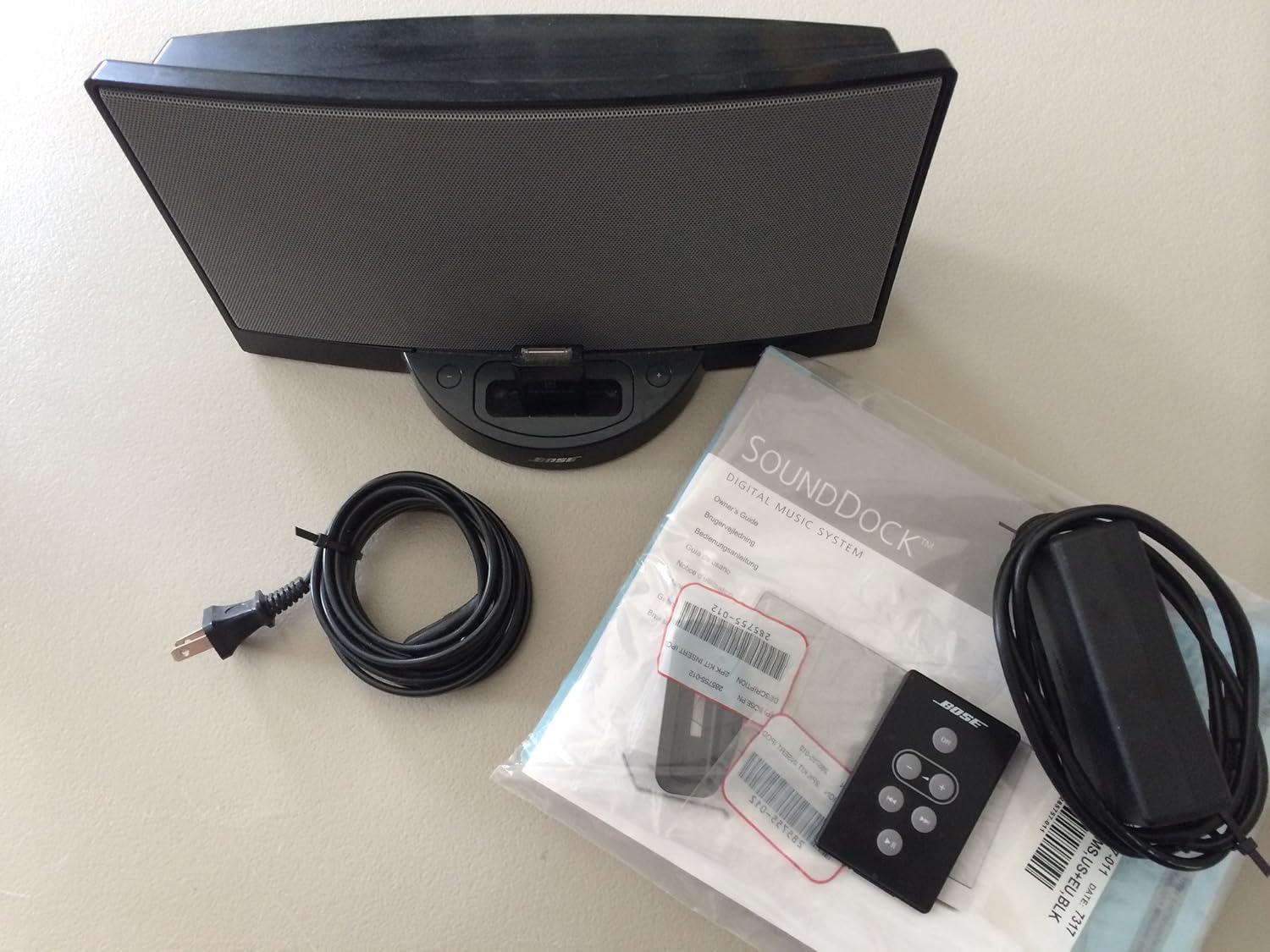
Figure 1: The Bose SoundDock Digital Music System, including the main unit, power cable, and remote control, as typically found in the packaging.
2. Connecting Power
- Connect the power supply cable to the DC input jack on the back of the SoundDock system.
- Plug the power supply into a functional electrical outlet.
3. Docking Your iPod
The SoundDock system is designed for iPod models with a dock connector. Gently place your iPod onto the dock connector located on the top front of the SoundDock system, ensuring it is seated firmly.

Figure 2: A close-up view of the Bose SoundDock's docking station, showing a compatible iPod device securely connected for audio playback and charging.
Operating Instructions
1. Powering On and Off
The SoundDock system powers on automatically when a docked iPod begins playback or when the system is connected to power. To turn off, simply stop playback on your iPod or disconnect the power.
2. Audio Playback
Once your iPod is docked, use the iPod's controls to select and play music. Audio will automatically be routed through the SoundDock system.
3. Volume Control
Adjust the volume using the volume buttons on the included remote control or directly on your docked iPod.
4. Using the Remote Control
The remote control allows you to manage basic playback functions from a distance. Functions typically include:
- Volume Up/Down: Adjusts the audio output level.
- Play/Pause: Starts or pauses music playback.
- Track Skip: Skips to the next or previous track.
Ensure the remote has a working battery and is pointed towards the front of the SoundDock system for optimal response.
5. iPod Compatibility
This SoundDock system (Series I) is compatible with iPod models featuring the standard 30-pin dock connector. Newer iPod models or iPhones with Lightning connectors will require an adapter (not included) for compatibility.
Maintenance
Cleaning the System
To maintain the appearance and performance of your SoundDock system:
- Unplug the system from the power outlet before cleaning.
- Use a soft, dry cloth to wipe the exterior surfaces.
- Do not use liquid cleaners, solvents, or aerosols, as these may damage the finish or internal components.
- Keep the dock connector free of dust and debris.
Troubleshooting
If you encounter issues with your SoundDock system, refer to the following common problems and solutions:
No Power
- Ensure the power cord is securely connected to both the SoundDock system and a working electrical outlet.
- Test the outlet with another device to confirm it is supplying power.
No Sound Output
- Verify that the iPod is properly docked and playing music.
- Increase the volume on both the SoundDock system (via remote) and the iPod.
- Ensure the iPod's headphone jack is not obstructed or has headphones connected, which might divert audio.
- Try removing and re-docking the iPod.
Remote Control Not Working
- Check the battery in the remote control and replace it if necessary.
- Ensure there are no obstructions between the remote and the SoundDock system.
- Point the remote directly at the front of the SoundDock system.
iPod Not Charging or Connecting
- Ensure the iPod is firmly seated on the dock connector.
- Check the dock connector on both the SoundDock and the iPod for any debris or damage.
- Confirm the SoundDock system is receiving power.
Specifications
| Feature | Detail |
|---|---|
| Brand | Bose |
| Model Number | 277378-1100 |
| Product Dimensions | 12 x 7 x 7 inches |
| Item Weight | 7 pounds |
| Color | Black |
| Connectivity Technology | Wired |
| Audio Output Mode | Stereo |
| Speaker Type | Stereo |
| Control Method | Remote |
| Batteries Required | 1 Lithium Ion (for remote) |
| UPC | 017817498678, 017817417778 |
Warranty Information
The Bose SoundDock Digital Music System comes with a Limited Warranty. For specific terms and conditions, including coverage details and duration, please refer to the warranty documentation included with your product or visit the official Bose website.
Customer Support
For further assistance, technical support, or to inquire about service, please visit the official Bose support website or contact their customer service department. You can typically find contact information and FAQs on the Bose Support website.
Related documents277378-1100


Ask a question about this manual
Ask about setup, troubleshooting, compatibility, parts, safety, or missing instructions. Manuals+ will review the question and use this page’s manual context to help answer it.