
1. Introduction
Thank you for choosing the Igloo Cool Fusion 40 Ice Tunes Cooler. This product combines the functionality of a high-capacity cooler with a portable music system, featuring an AM/FM radio and an MP3 connection. Designed for convenience, it includes a telescoping handle, durable wheels, and multiple exterior pockets for personal items, making it ideal for outdoor activities.
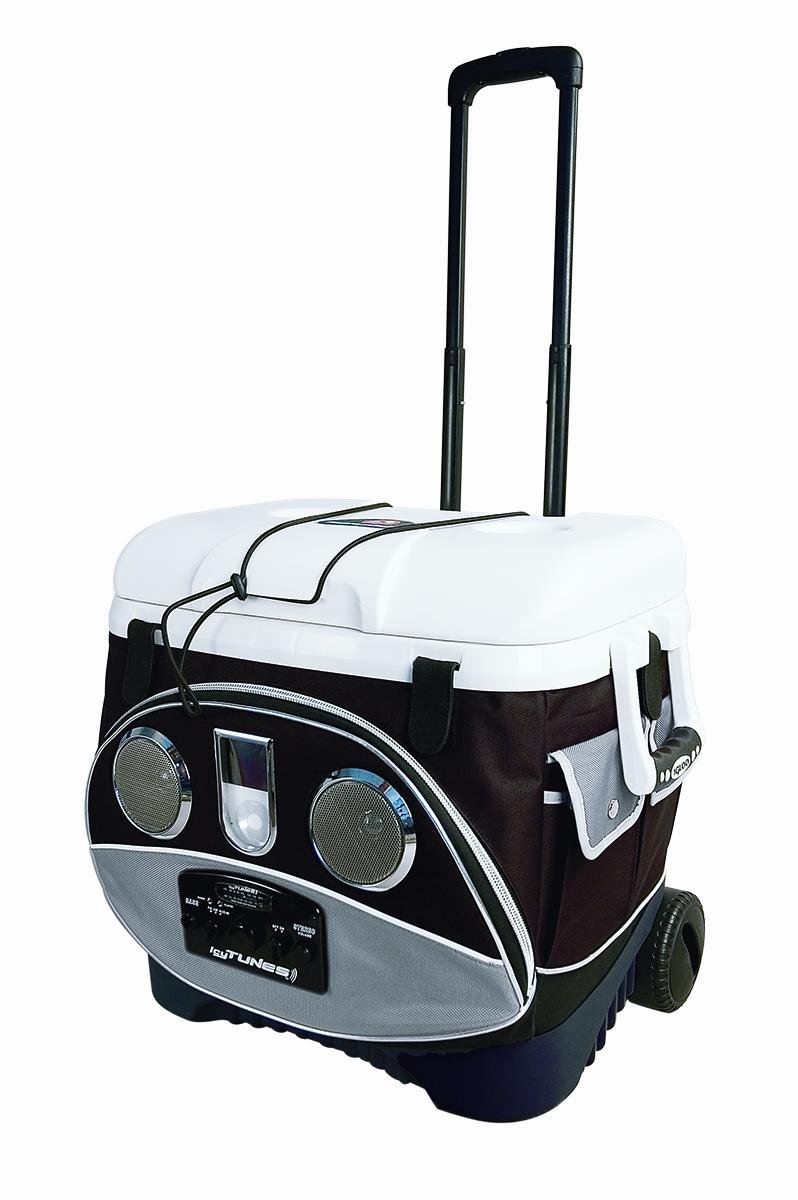
Figure 1: The Igloo Cool Fusion 40 Ice Tunes Cooler, showcasing its integrated music console, wheels, and telescoping handle.
2. Safety Information
- Battery Safety: Use only 4 "AA" alkaline batteries. Do not mix old and new batteries, or different types of batteries. Remove batteries if the unit will not be used for an extended period. Dispose of batteries properly.
- Water Exposure: The music console is not waterproof. Avoid exposing the console to rain, splashes, or submersion in water to prevent electrical damage.
- Electrical Components: Do not attempt to open or repair the music console. Refer all servicing to qualified personnel.
- Weight Distribution: When loading the cooler, distribute weight evenly to maintain stability, especially when using the wheels and telescoping handle.
- Child Safety: Keep small parts, such as batteries, out of reach of children.
3. Setup
3.1 Unpacking and Initial Inspection
Carefully remove the cooler from its packaging. Inspect the unit for any signs of damage that may have occurred during shipping. Ensure all components, including the music console, wheels, and handle, are intact and functional.
3.2 Battery Installation for Music Console
- Locate the battery compartment on the music console. This is typically on the underside or rear of the console.
- Open the battery compartment cover.
- Insert 4 "AA" alkaline batteries, ensuring correct polarity (+ and -) as indicated inside the compartment.
- Close the battery compartment cover securely.
Note: Batteries are sold separately.
4. Operation
4.1 Using the Cooler Function
- Pre-cooling: For optimal performance, pre-cool the cooler with ice or ice packs before adding contents.
- Loading: Place beverages and food inside. The cooler is designed to hold 58 cans plus ice, and 2-liter bottles upright.
- Lid Closure: Ensure the lid is securely closed to maintain internal temperature.
4.2 Operating the Music Console
- Power On/Off: Locate the power button or knob on the music console. Press or turn to power on the unit. The LED power indicator will illuminate.
- Volume Control: Adjust the volume using the dedicated volume control knob or buttons.
- Bass Control: Use the bass control to adjust the low-frequency audio output to your preference.
- AM/FM Radio:
- Switch to AM or FM mode using the mode selector.
- Tune to your desired station using the tuning knob or buttons. Extend the antenna for better reception if available.
- MP3 Connection (Auxiliary Input):
- Locate the MP3 input jack (typically a 3.5mm auxiliary input).
- Connect your MP3 player, smartphone, or other audio device using a standard 3.5mm audio cable (not included).
- Ensure your external device's volume is set to a moderate level before adjusting the console's volume.
4.3 Portability Features
- Telescoping Handle: Extend the telescoping handle by pressing the release button and pulling upwards. Retract it by pressing the button and pushing downwards until it locks into place.
- Wheels: Tilt the cooler and use the durable wheels to easily transport the unit over various terrains.
- Swing-Up Side Handles: For lifting or carrying over short distances, use the swing-up side handles. Ensure they are securely locked in the upright position before lifting.
4.4 Exterior Pockets
Utilize the several large exterior pockets for convenient storage of personal items such as mobile phones, sunscreen, keys, or other small accessories.
5. Maintenance
5.1 Cleaning the Cooler
- After each use, empty any remaining ice and liquids.
- Wipe the interior and exterior surfaces with a damp cloth and mild soap.
- Rinse thoroughly and allow to air dry completely before storing to prevent mold and mildew.
- Do not use abrasive cleaners or harsh chemicals, as these can damage the cooler's finish.
5.2 Cleaning the Music Console
Gently wipe the music console with a soft, dry cloth. Avoid using liquids or sprays directly on the console. Ensure the console is dry before use.
5.3 Battery Replacement
When the LED power indicator dims or audio performance degrades, it is time to replace the batteries. Follow the steps in Section 3.2 for battery installation.
5.4 Storage
Store the cooler in a cool, dry place away from direct sunlight. Ensure the lid is slightly ajar during storage to allow for air circulation and prevent odors.
6. Troubleshooting
| Problem | Possible Cause | Solution |
|---|---|---|
| Music console does not power on. | Dead or incorrectly installed batteries. | Replace batteries with fresh "AA" alkaline batteries, ensuring correct polarity. |
| No sound or low sound from speakers. | Volume too low; external device volume too low; loose MP3 connection. | Increase console volume and external device volume. Ensure MP3 cable is securely connected. |
| Poor radio reception. | Weak signal; antenna not extended. | Extend the antenna fully. Try repositioning the cooler for better signal. |
| Cooler not keeping items cold. | Lid not sealed properly; insufficient ice; cooler exposed to direct sunlight. | Ensure lid is tightly closed. Use adequate ice. Keep cooler in shade. |
7. Specifications
| Feature | Detail |
|---|---|
| Model | Cool Fusion 40 Ice Tunes |
| Brand | Igloo |
| Capacity | 58 cans plus ice; holds 2-liter bottles upright |
| Material | Plastic |
| Music Console | 2-speaker system, AM/FM radio, MP3 connection, bass & volume control, LED power indicator |
| Power Source (Music Console) | 4 "AA" alkaline batteries (sold separately) |
| Portability | Wheeled, telescoping locking handle, swing-up side handles |
| Exterior Storage | Several large exterior pockets |
| Dimensions (approx.) | 20.75" x 18" x 19" |
| Item Weight | 12.5 Pounds |
| UPC | 034223454685 |
8. Warranty & Support
8.1 Manufacturer's Warranty
This Igloo product is covered by a manufacturer's warranty against defects in material and workmanship. The specific terms and duration of the warranty may vary. Please refer to the warranty information provided with your purchase or visit the official Igloo website for detailed warranty policies.
8.2 Customer Support
For technical assistance, replacement parts, or any questions regarding your Igloo Cool Fusion 40 Ice Tunes Cooler, please contact Igloo Customer Service. Contact information can typically be found on the Igloo official website or on the product packaging.
When contacting support, please have your product model name (Cool Fusion 40 Ice Tunes) and UPC (034223454685) available.
