
Introduction
This manual provides instructions for the installation and use of the ACV 1324-45 ISO Radio Connection Cable. This adapter is designed to facilitate the installation of an aftermarket radio in compatible Audi, Seat, Skoda, and Volkswagen vehicles, specifically those requiring phantom power for the antenna and utilizing a Quadlock connector system.
Product Features
- Enables the installation of a replacement car radio.
- Includes an additional adapter for connecting antenna voltage supply to car radios.
- Compatible with all models featuring a Quadlock connector.
- Specifically designed for Audi vehicles from 2012 onwards.
- Also compatible with various Seat, Skoda, and Volkswagen models.
- Constructed from copper and plastic for durability.
Setup and Installation
The ACV 1324-45 cable simplifies the process of connecting an aftermarket car radio. Please follow these general steps for installation. Professional installation is recommended if you are unfamiliar with car audio wiring.
- Vehicle Preparation: Ensure the vehicle's ignition is off and the battery is disconnected before beginning any electrical work.
- Access Radio Compartment: Carefully remove the existing car radio or blanking plate to access the vehicle's wiring harness.
- Identify Vehicle Connector: Locate the vehicle's Quadlock connector. The ACV 1324-45 cable is designed to interface with this type of connector.
- Connect ACV Adapter: Connect the ACV 1324-45 adapter's vehicle-side connector to the vehicle's existing Quadlock harness. Ensure a secure fit.
- Connect to Aftermarket Radio: Connect the other end of the ACV 1324-45 adapter to the ISO connector of your new aftermarket car radio.
- Antenna Power Connection: The adapter includes a separate wire for antenna voltage supply. Connect this wire to the corresponding antenna power output on your aftermarket radio to ensure proper antenna function, especially for phantom-powered antennas.
- Wiring Verification: Double-check all connections for security and correct polarity. Some aftermarket radios or vehicle models may require minor adjustments to the power wires (e.g., swapping constant and switched 12V lines). Refer to your aftermarket radio's manual for specific wiring diagrams.
- Test Functionality: Reconnect the vehicle battery and test the radio's functionality, including power, audio, and antenna reception, before fully reassembling the dashboard.

Figure 1: Overview of the ACV 1324-45 ISO Radio Connection Cable, showing the main harness and phantom power adapter.

Figure 2: Detail of the Quadlock connector end of the ACV 1324-45 cable, which connects to the vehicle's wiring harness.
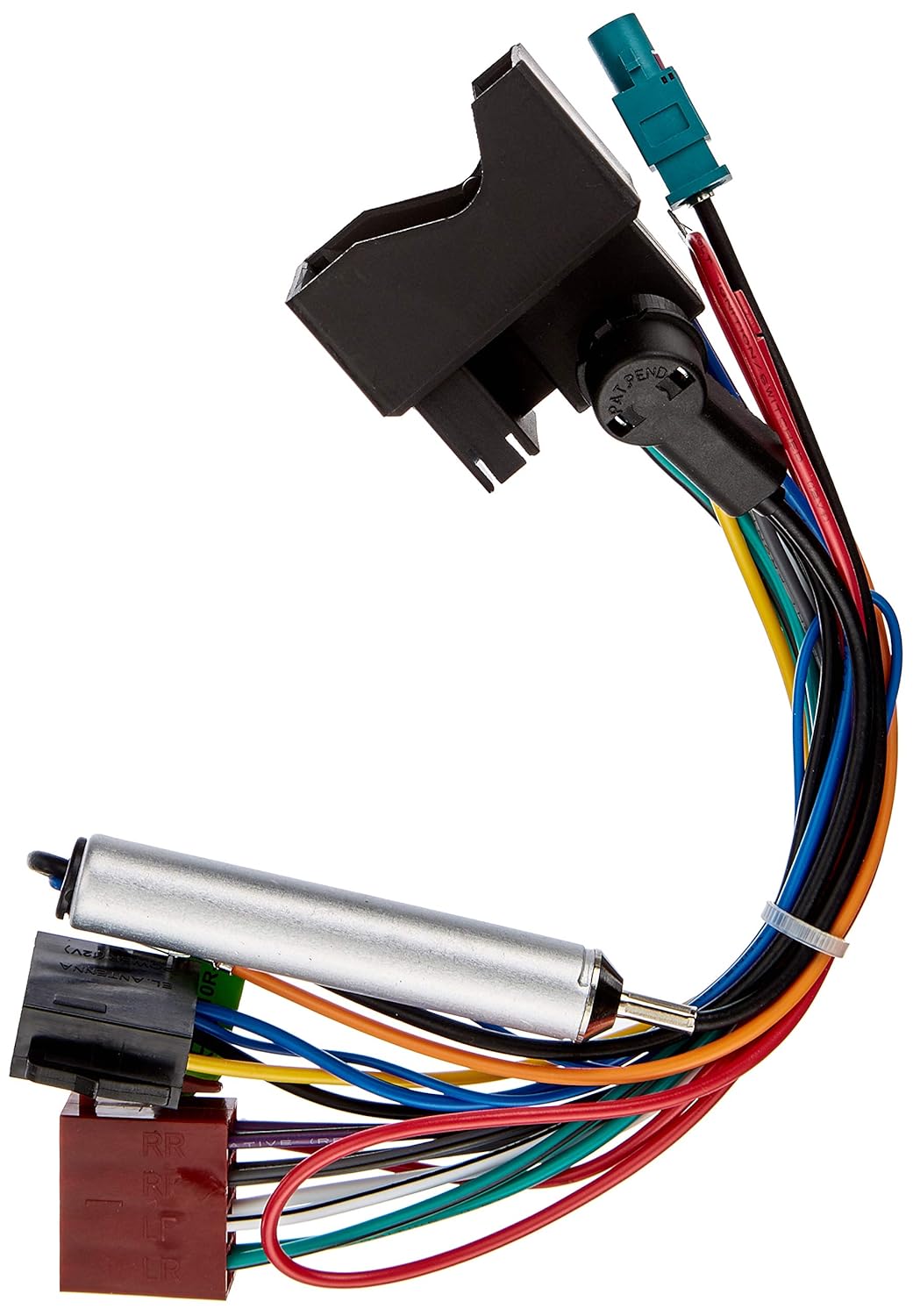
Figure 3: The ACV 1324-45 cable displaying both the vehicle-side Quadlock connector and the aftermarket radio's ISO connector, along with the antenna power line.
Operating Instructions
Once correctly installed, the ACV 1324-45 cable functions as a passive adapter, allowing your aftermarket radio to operate as intended. There are no specific operating procedures for the cable itself. Refer to your aftermarket car radio's user manual for its operational instructions.
Maintenance
The ACV 1324-45 radio connection cable requires minimal maintenance. Ensure all connections remain secure and free from moisture or physical damage. Avoid bending or crimping the wires excessively during installation or when routing the cable.
Troubleshooting
If you encounter issues after installing the ACV 1324-45 cable, consider the following:
- No Power to Radio: Verify that the vehicle's battery is properly connected and charged. Check all fuse connections. Ensure the constant 12V (yellow wire) and switched 12V (red wire) connections are correctly aligned between the vehicle harness, the ACV adapter, and the aftermarket radio. Some installations may require swapping these wires.
- Poor Radio Reception: Confirm that the antenna power wire from the ACV adapter is correctly connected to the aftermarket radio's antenna power output. This is crucial for phantom-powered antennas. Ensure the antenna itself is properly connected and undamaged.
- No Audio Output: Check all speaker wire connections for proper polarity and secure fit. Ensure the aftermarket radio is correctly configured for speaker output.
- Intermittent Functionality: Inspect all connections for looseness or corrosion. Ensure the cable is not pinched or damaged.
If problems persist, consult a professional car audio installer.
Specifications
| Feature | Detail |
|---|---|
| Brand | ACV |
| Model Number | 1324-45 |
| Product Dimensions (L x W x H) | 23 x 7 x 4.7 cm (9.06 x 2.76 x 1.85 inches) |
| Weight | 100 grams (0.22 lbs) |
| Material | Copper and Plastic |
| Connector Type | RF Connector (ISO to Quadlock adapter) |
| Recommended Use | Car Radio, Car Stereos |
| ASIN | B001K90KCS |
| International Article Code | 04026724006810 |
| Spare Parts Availability (EU) | 1 Year |
Warranty and Support
This product is manufactured by ACV. Information regarding specific warranty terms is not provided in this manual. Please refer to your point of purchase or the manufacturer's official website for detailed warranty information.
Spare parts availability in the EU is indicated for 1 year from the date of purchase. For technical support or inquiries, please contact your retailer or ACV customer service.