
1. Introduction
The Coast G20 Inspection Beam LED Penlight is a compact and durable lighting tool designed for precise illumination in various inspection tasks. Its optimized Inspection Beam optic provides a crisp, circular light pattern with minimal glare, making it ideal for close-up work. This manual provides essential information for the proper setup, operation, and maintenance of your G20 penlight.

Figure 1: Coast G20 Inspection Beam LED Penlight
2. Safety Information
WARNING: This product contains chemicals known to the State of California to cause cancer and birth defects or other reproductive harm.
Always handle batteries and electronic devices responsibly. Dispose of used batteries according to local regulations.
3. Package Contents
Verify that all items are present in your package:
- 1 x Coast G20 Inspection Beam LED Penlight
- 2 x AAA Alkaline Batteries
- 1 x Adjustable Pocket Clip (pre-installed)

Figure 2: G20 Penlight and included AAA batteries
4. Setup
4.1 Battery Installation
- Unscrew the tail cap of the penlight by turning it counter-clockwise.
- Insert two (2) AAA alkaline batteries into the battery compartment, ensuring the positive (+) and negative (-) terminals align correctly with the markings inside the penlight.
- Screw the tail cap back on clockwise until it is securely tightened. Avoid over-tightening.
The G20 penlight is designed for use with standard AAA alkaline batteries. For optimal performance, use high-quality batteries.

Figure 3: The G20 supports both Alkaline and compatible rechargeable batteries.
5. Operating Instructions
5.1 Turning On/Off
To turn the G20 penlight on or off, firmly press the rubber button located on the tail cap. A single press will activate the light, and another press will turn it off.
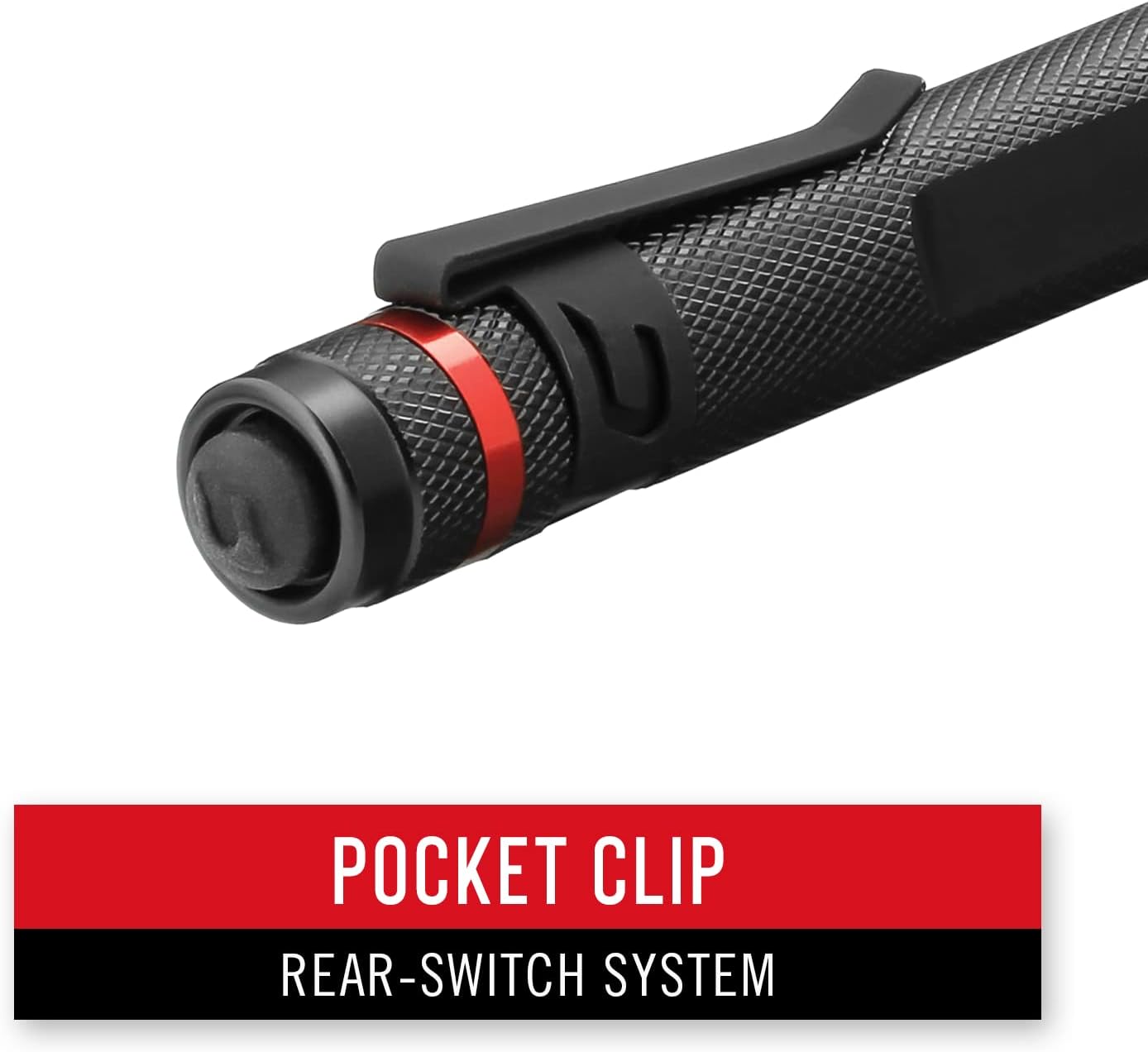
Figure 4: Rear switch for power control and adjustable pocket clip.
5.2 Inspection Beam
The G20 features an Inspection Beam optic, which produces a perfectly circular light pattern with consistent edge-to-edge brightness. This beam is optimized for illuminating defined areas up close, reducing glare and providing clear visibility for detailed inspection tasks.

Figure 5: The G20's Inspection Beam provides a clear, circular light.

Figure 6: Animated view of the Inspection Beam in action.
5.3 Pocket Clip
The adjustable pocket clip allows for secure attachment to a shirt pocket, belt, or tool bag, ensuring the penlight is readily accessible when needed.

Figure 7: The G20's compact size and clip make it convenient for various uses.
6. Maintenance
6.1 Cleaning
To clean the penlight, wipe the exterior with a soft, damp cloth. Do not use abrasive cleaners or solvents, as these may damage the finish or internal components. Keep the lens free of dirt and debris for optimal light output.
6.2 Battery Replacement
Replace batteries when the light output diminishes or the penlight fails to turn on. Always replace both AAA batteries simultaneously with new ones to ensure consistent performance. Refer to Section 4.1 for battery installation instructions.
6.3 Storage
When storing the penlight for extended periods, remove the batteries to prevent potential leakage and damage to the device. Store in a cool, dry place away from direct sunlight.
7. Troubleshooting
- Light does not turn on:
- Ensure batteries are inserted correctly with the proper polarity.
- Check if the batteries are depleted and replace them if necessary.
- Confirm the tail cap is fully tightened.
- Light flickers or is dim:
- Replace both AAA batteries with new ones.
- Ensure the tail cap is securely tightened, as a loose connection can cause flickering.
- Clean battery contacts if they appear dirty.
If issues persist after attempting these troubleshooting steps, contact Coast customer support for further assistance.
8. Specifications

Figure 8: Key features and specifications of the G20 Penlight.
| Feature | Specification |
|---|---|
| Brightness | 54 Lumens |
| Beam Distance | 22 meters (72 ft) |
| Runtime | 10 hours |
| Power Source | 2 x AAA Alkaline Batteries (included) |
| Material | Aluminum |
| Water Resistance | IPX4 (Weather Resistant) |
| Impact Resistance | 1-meter drop protection |
| Dimensions (L x D) | 5.7" x 0.63" |
| Weight | 2.29 Ounces |
| Special Features | Inspection Beam, Adjustable Pocket Clip |
9. Warranty and Support
9.1 Warranty Information
The Coast G20 Inspection Beam LED Penlight is backed by a Lifetime Warranty. For specific terms and conditions, please refer to the official Coast website or contact customer service.
9.2 Customer Support
For further assistance, technical support, or warranty claims, please visit the official Coast website or contact their customer service department. You can find contact information on the product packaging or the Coast website: www.coastportland.com
10. Important Information
This product has been tested and rated to ANSI/FL1 standards.
Proposition 65 Warning: This product contains chemicals known to the State of California to cause cancer and birth defects or other reproductive harm.


