
1. Introduction
Thank you for choosing the Topstar TEC 50 Counter Swivel Chair, model 72250 D10T. This manual provides essential information for the safe assembly, operation, and maintenance of your new chair. Please read these instructions carefully before use and retain them for future reference.
2. Safety Instructions
- Weight Limit: Do not exceed the maximum weight limit of 110 kg (242 lbs). Exceeding this limit may cause damage to the chair and potential injury.
- Assembly: Always assemble the chair strictly according to the instructions provided. Incorrect assembly can compromise the chair's stability and safety.
- Stability: Ensure all screws and fasteners are tightened securely before using the chair. Periodically check and re-tighten as necessary.
- Usage: Use the chair only for its intended purpose as a seating device. Avoid standing on the chair or using it as a ladder.
- Children: Keep small parts away from children during assembly. This chair is intended for adult use.
3. Package Contents
Before beginning assembly, please verify that all components are present and undamaged. If any parts are missing or damaged, contact your retailer immediately.
- Seat cushion with mechanism
- Backrest
- Gas lift cylinder
- Five-star base with gliders
- Foot ring
- Arm pads (if included with specific model variant)
- Assembly hardware (screws, washers, Allen key)
4. Assembly Instructions
Assembly typically requires one person and approximately 20-30 minutes. Lay out all components on a soft, clean surface to prevent scratches.
- Attach Gliders to Base: Insert the five gliders firmly into the openings at the end of each leg of the five-star base.
- Insert Gas Lift: Place the gas lift cylinder into the central hole of the five-star base. Ensure it is seated securely.
- Attach Foot Ring: Slide the foot ring over the gas lift cylinder. Secure it at the desired height using the provided screw and Allen key.
- Attach Seat Mechanism: Align the seat mechanism with the pre-drilled holes on the underside of the seat cushion. Secure it using the provided screws. Ensure the front of the mechanism faces the front of the seat.
- Attach Backrest: Connect the backrest support to the seat mechanism using the designated screws. Adjust the backrest height and angle as per your comfort, then tighten the fasteners.
- Attach Arm Pads (if applicable): If your model includes arm pads, attach them to the designated points on the seat mechanism or backrest support using the provided hardware.
- Connect Seat to Gas Lift: Carefully place the assembled seat and backrest onto the gas lift cylinder. Press down firmly to ensure a secure connection.
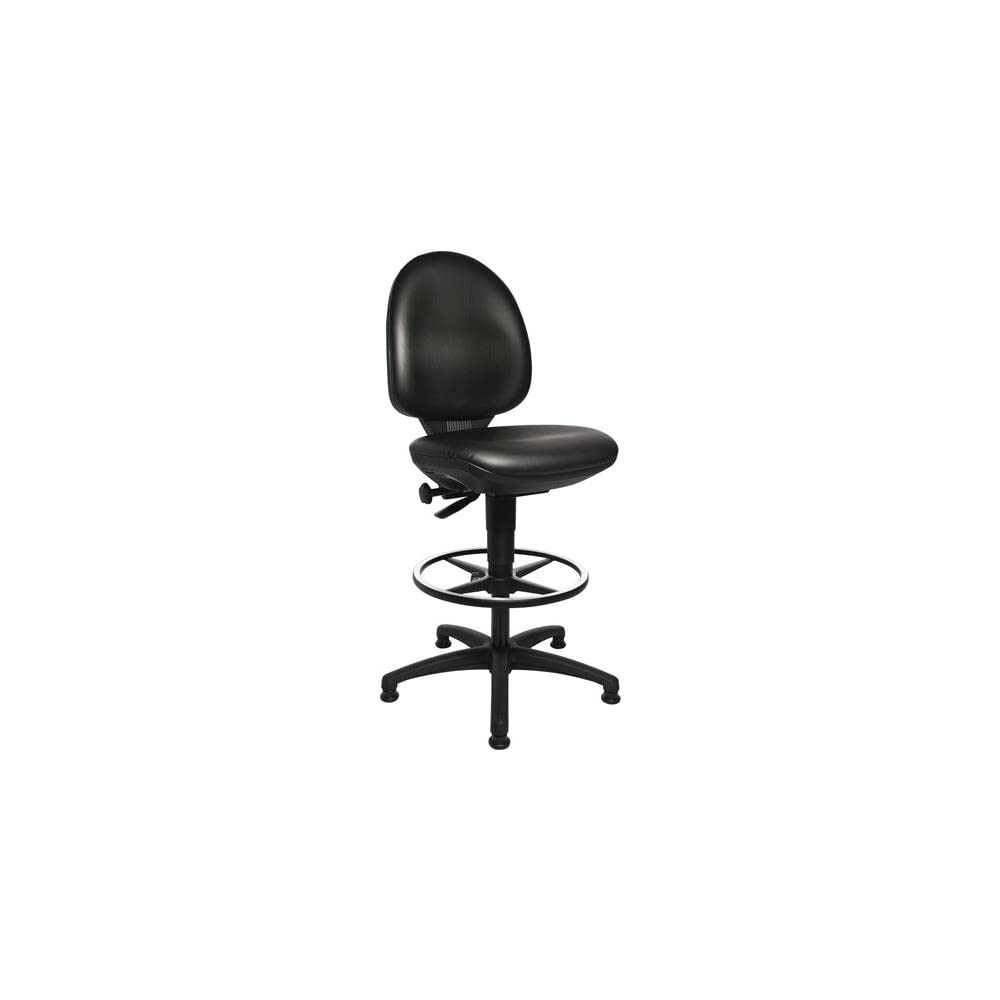
Figure 1: The Topstar TEC 50 Counter Swivel Chair in black, featuring its ergonomic backrest, trough seat, foot ring, and five-star base with gliders.
5. Operating Instructions
Your Topstar TEC 50 Counter Swivel Chair is designed for ergonomic comfort and adjustability.
- Seat Height Adjustment: To adjust the seat height, locate the lever on the right side, under the seat. While seated, pull the lever up to lower the seat. To raise the seat, stand up slightly and pull the lever up. Release the lever at the desired height.
- Backrest Adjustment: The backrest can be adjusted for height and angle. Use the knob or lever located on the side or rear of the backrest support to loosen, adjust, and then re-tighten to secure the backrest in your preferred position.
- Swivel Function: The chair is designed to swivel 360 degrees, allowing for easy movement and access to your workspace.
- Foot Ring: The foot ring provides support for your feet, especially at higher seating positions. Adjust its height during assembly or by loosening and re-tightening its fastener on the gas lift.
6. Maintenance and Care
Proper care will extend the life and appearance of your chair.
- Cleaning: The chair's faux leather (PVC/cotton blend) upholstery can be cleaned by wiping with a damp cloth. For stubborn stains, use a mild soap solution and wipe dry immediately. Avoid abrasive cleaners or harsh chemicals.
- Inspection: Periodically inspect all screws, bolts, and connections to ensure they are tight. Re-tighten any loose fasteners to maintain stability and safety.
- Moving the Chair: When moving the chair, lift it rather than dragging it to prevent damage to the gliders and floor.
7. Troubleshooting
If you encounter any issues with your chair, please refer to the following common solutions:
- Chair is unstable: Check that all assembly screws are fully tightened. Ensure the gliders are properly inserted into the base.
- Seat height adjustment not working: Verify that the gas lift cylinder is correctly seated in both the base and the seat mechanism. Ensure the adjustment lever is functioning freely and not obstructed.
- Squeaking noises: Check for any loose connections and tighten them. A small amount of silicone spray on moving parts (avoiding the gas lift piston) may help, but consult manufacturer guidelines if unsure.
If these steps do not resolve the issue, please contact customer support.
8. Specifications
| Brand | Topstar |
| Model Name | TEC 50 Counter |
| Model Number | 72250 D10T |
| Color | Black |
| Material | Faux Leather (88% PVC, 12% Cotton) |
| Seat Dimensions (W x D) | 460 mm x 440 mm (18.11" x 17.32") |
| Seat Height Adjustment | 590 mm - 840 mm (23.23" - 33.07") |
| Backrest Height | 430 mm (16.93") |
| Overall Product Dimensions (D x W x H) | 17.32"D x 18.11"W x 23.23"H (minimum height) |
| Maximum Load Capacity | 110 kg (242 lbs) |
| Item Weight | Approximately 1 Kilogram (Note: This weight seems unusually low for a chair and may refer to a component. Refer to packaging for actual full product weight.) |
| Frame Material | Polyamide Base |
| Assembly Required | Yes |
9. Warranty and Support
For warranty information, please refer to the documentation included with your purchase or contact your retailer. If you require technical assistance, replacement parts, or have any questions not covered in this manual, please contact Topstar customer support or your authorized dealer.
Contact information for Topstar customer support can typically be found on the manufacturer's official website or on your purchase receipt.

