
1. Introduction
This manual provides essential information for the safe and efficient operation, installation, and maintenance of your Dayton 4WT46 AC Axial Fan. The Dayton 4WT46 is a high-performance cooling fan designed for various applications requiring effective air circulation. It features a flow rate of 115 Cubic Feet Per Minute (CFM) and operates on 115 Volts AC.
Please read this manual thoroughly before installing or operating the fan and retain it for future reference.
2. Safety Information
WARNING: Failure to follow these safety instructions may result in electric shock, fire, or serious injury.
- Always disconnect power to the fan before performing any installation, maintenance, or troubleshooting.
- Ensure the fan is properly grounded according to local electrical codes.
- Do not operate the fan with damaged wiring or if the fan itself is damaged.
- Keep fingers and other objects away from the fan blades during operation.
- Install the fan in a location that allows for adequate airflow and prevents obstruction of the fan blades.
- This fan is designed for indoor use in dry environments. Do not expose to water or excessive humidity.
3. Setup and Installation
The Dayton 4WT46 fan is designed for straightforward installation. Ensure you have the necessary tools and mounting hardware before beginning.
3.1 Unpacking
Carefully remove the fan from its packaging. Inspect the fan for any signs of damage that may have occurred during shipping. If damage is found, do not proceed with installation and contact your supplier.

Figure 1: Dayton 4WT46 AC Axial Fan and packaging. The box label clearly shows '1 4WT46', identifying the model.
3.2 Mounting
The fan has dimensions of 4-3/4 x 4-3/4 x 1-1/2 inches. Mount the fan securely using appropriate fasteners for your application. Ensure the mounting surface is stable and can support the fan's weight (approximately 1 pound). Allow sufficient clearance around the fan for optimal airflow and to prevent vibration.
3.3 Electrical Connection
The Dayton 4WT46 fan operates on 115 Volts AC and uses a 3-Pin power connector. Connect the fan to a compatible power source. Ensure all electrical connections are secure and insulated to prevent short circuits.
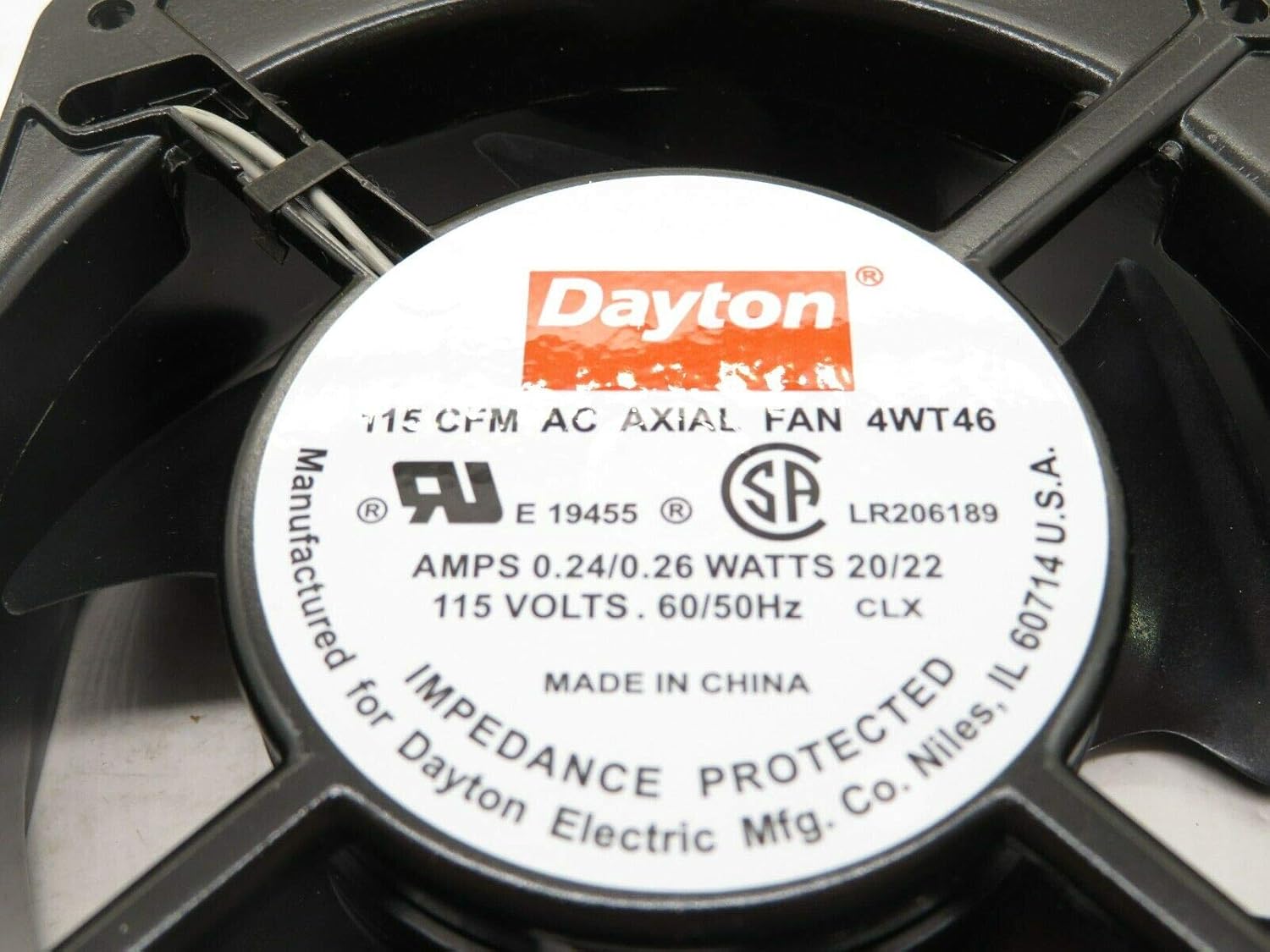
Figure 2: Close-up of the fan's specification label, detailing electrical requirements and performance.
4. Operating Instructions
Once properly installed and connected to power, the Dayton 4WT46 fan is ready for operation.
- Power On: Apply 115V AC power to the fan. The fan should start rotating immediately.
- Airflow: The fan is designed to provide 115 CFM of airflow. Ensure the direction of airflow meets your application's requirements.
- Noise Level: The fan operates at a noise level of approximately 49 Decibels.
- Continuous Operation: This fan is designed for continuous operation in suitable environmental conditions.
- Power Off: Disconnect the 115V AC power supply to stop the fan.
5. Maintenance
Regular maintenance ensures the longevity and optimal performance of your Dayton 4WT46 fan.
- Cleaning: Periodically clean the fan blades and housing to remove dust and debris. Accumulated dust can reduce airflow and increase motor strain. Use a soft brush or compressed air. Always disconnect power before cleaning.
- Inspection: Regularly inspect the fan for any signs of wear, such as loose connections, damaged blades, or unusual noises.
- Lubrication: This fan features sleeve bearings. While generally maintenance-free, if unusual noise or resistance is noted, consult a qualified technician for potential lubrication or replacement.
6. Troubleshooting
If you encounter issues with your Dayton 4WT46 fan, refer to the following troubleshooting guide:
| Problem | Possible Cause | Solution |
|---|---|---|
| Fan does not start | No power supply; Loose electrical connection; Damaged motor | Check power source; Secure connections; Contact support for motor issues |
| Reduced airflow | Blocked intake/exhaust; Dirty fan blades | Clear obstructions; Clean fan blades (after disconnecting power) |
| Unusual noise or vibration | Loose mounting; Debris in fan; Worn bearings | Tighten mounting screws; Remove debris (after disconnecting power); Contact support for bearing issues |
If the problem persists after attempting these solutions, contact a qualified technician or customer support.
7. Specifications
Key technical specifications for the Dayton 4WT46 AC Axial Fan:
- Model: 4WT46
- Brand: Dayton
- Voltage: 115 V-AC
- Flow Rate: 115 CFM (Cubic Feet Per Minute)
- Size: 4-3/4 x 4-3/4 x 1-1/2 inches
- Product Dimensions: 7 x 7 x 4 inches (overall package/shipping dimensions)
- Power Connector Type: 3-Pin
- Wattage: 20 watts
- Cooling Method: Air
- Compatible Devices: Desktop (general purpose cooling)
- Noise Level: 49 Decibels
- Material: Metal, Plastic
- Maximum Rotational Speed: 3100 RPM
- Item Weight: 1 pound
- UPC: 663001048664
8. Warranty and Support
Warranty information for the Dayton 4WT46 AC Axial Fan is typically provided with the product at the time of purchase or can be obtained directly from the manufacturer, Dayton, or your authorized dealer. Please refer to your purchase documentation for specific warranty terms and conditions.
For technical support, service, or replacement parts, please contact the retailer where the product was purchased or refer to the official Dayton website for customer service contact information.
