
Behringer SX2442FX
Behringer EURODESK SX2442FX Mixer User Manual
Model: SX2442FX
1. Introduction
This manual provides comprehensive instructions for the operation and maintenance of your Behringer EURODESK SX2442FX Ultra-Low Noise Design 24-Input 4-Bus Studio/Live Mixer. Please read this manual thoroughly to ensure proper usage and to maximize the performance of your mixer.
The EURODESK SX2442FX is a versatile audio mixing console designed for both studio recording and live sound applications. It features 24 inputs, 4 bus outputs, XENYX microphone preamplifiers, "British" style EQs, and dual multi-effects processors.
2. Important Safety Instructions
Always follow these basic safety precautions when using your mixer:
- Power Source: Connect the unit only to the specified power supply voltage.
- Grounding: Ensure the power cord has a protective grounding conductor.
- Moisture: Do not expose the unit to rain or moisture.
- Ventilation: Ensure adequate ventilation. Do not block ventilation openings.
- Heat: Avoid placing the unit near heat sources.
- Cleaning: Clean only with a dry cloth.
- Servicing: Do not attempt to service this product yourself. Refer all servicing to qualified service personnel.
3. Setup
3.1 Unpacking
Carefully unpack your EURODESK SX2442FX mixer. Inspect the unit for any signs of damage that may have occurred during transit. Retain the original packaging for future transport or storage.
3.2 Power Connection
Connect the supplied power cable to the mixer's power inlet and then to a suitable AC power outlet. Ensure the power switch is in the OFF position before connecting. The mixer operates on standard AC power.

Figure 3.1: Rear panel of the SX2442FX, illustrating the power connection point.
3.3 Basic Connections
The SX2442FX offers a variety of input and output options. Below are common connection types:
- Microphone Inputs (XLR): Connect microphones to the XLR inputs on channels 1-16. These inputs feature XENYX mic preamplifiers.
- Line Inputs (1/4" TRS): Connect line-level sources such as keyboards, drum machines, or other audio devices to the 1/4" TRS inputs.
- Stereo Line Inputs (1/4" TRS/TS): Channels 17/18, 19/20, 21/22, and 23/24 are designed for stereo line-level sources.
- Main Outputs (XLR/1/4" TRS): Connect these to your main PA system or studio monitors.
- Subgroup Outputs (1/4" TRS): Use these to route groups of channels to external processors or specific destinations.
- Aux Sends (1/4" TS): Connect to external effects processors or monitor wedges.
- FX Returns (1/4" TS): Connect the outputs of external effects processors here.

Figure 3.2: Overview of the SX2442FX control surface, highlighting various input and output sections.
4. Operating the Mixer
4.1 Channel Strip Overview
Each mono input channel (1-16) and stereo input channel (17/18 - 23/24) features a dedicated channel strip with various controls:
- GAIN Control: Adjusts the input sensitivity for microphones or line-level signals.
- EQ Section: "British" style 3-band equalizer with a semi-parametric mid-band for precise tone shaping.
- AUX Sends: Controls for sending signal to external effects or monitor mixes.
- PAN/BAL Control: Positions the signal in the stereo field (mono channels) or adjusts balance (stereo channels).
- MUTE Button: Silences the channel.
- SOLO Button: Isolates the channel for monitoring.
- SUB 1-4 Buttons: Assigns the channel to one or more of the four subgroups.
- MAIN Button: Assigns the channel directly to the main stereo mix.
- Channel Fader: Adjusts the output level of the channel.
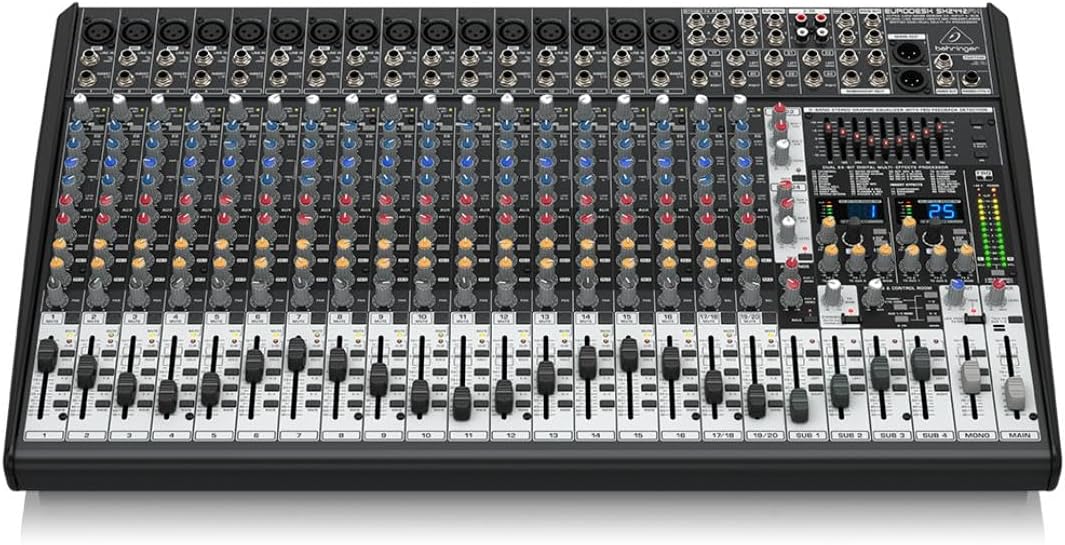
Figure 4.1: A closer look at the channel strip controls, including GAIN, EQ, AUX sends, and routing buttons.
4.2 Subgroup Operation
The SX2442FX features four subgroups (SUB 1-4) which allow you to group multiple channels and control their overall level with a single fader. This is useful for managing drums, vocals, or other instrument sections.
- Assign desired channels to a subgroup using the SUB 1-4 buttons on each channel strip.
- Adjust the overall level of the subgroup using its dedicated fader.
- Subgroups can be routed to the main mix using their respective MAIN buttons.
4.3 Main Mix Operation
The main stereo mix is controlled by the MAIN MIX faders. All channels and subgroups routed to the main mix will be combined here. The main mix also features a 9-band stereo graphic equalizer for overall frequency adjustment and a feedback detection system.
4.4 Dual Multi-FX Processor Usage
The mixer includes two independent 24-bit stereo FX processors with 99 presets. These can be assigned to channels via the FX send controls on each channel strip.
- Select a desired effect preset using the program selector on the FX section.
- Use the FX SEND controls on individual channels to send signal to the internal effects processor.
- Adjust the FX RETURN faders to control the overall level of the processed signal in the main mix or monitor sends.
4.5 Monitoring and Talkback
The mixer provides various monitoring options, including headphone output and control room outputs. A dedicated TALKBACK microphone input and control allow for communication with musicians on stage or in a separate room.
5. Maintenance
5.1 Cleaning
Regularly clean the mixer's surface with a soft, dry, lint-free cloth. Avoid using abrasive cleaners, solvents, or waxes, as these can damage the finish and controls. For stubborn dirt, a slightly damp cloth can be used, followed by a dry cloth.
5.2 Storage
When not in use for extended periods, store the mixer in a cool, dry environment, away from direct sunlight and extreme temperatures. It is recommended to use the original packaging or a protective case to prevent dust accumulation and physical damage.
6. Troubleshooting
This section addresses common issues you might encounter with your EURODESK SX2442FX mixer.
| Problem | Possible Cause | Solution |
|---|---|---|
| No sound output |
|
|
| Distorted audio |
|
|
| Effects not working |
|
|
7. Technical Specifications
Below are the key technical specifications for the Behringer EURODESK SX2442FX mixer:
- Item Weight: 18.96 pounds
- Product Dimensions: 26.85 x 3.94 x 16.14 inches
- Brand: Behringer
- Number of Channels: 24
- Power Source: Corded Electric
- Wattage: 50 watts
- Connectivity Technology: Auxiliary
- Model Number: SX2442FX
8. Warranty and Support
For detailed warranty information and technical support, please refer to the official Behringer website or contact your local authorized Behringer dealer. Keep your purchase receipt as proof of purchase for any warranty claims.
Behringer is committed to providing high-quality products and customer satisfaction. Should you encounter any issues not covered in this manual, professional assistance is available.
Related documentsSX2442FX


Ask a question about this manual
Ask about setup, troubleshooting, compatibility, parts, safety, or missing instructions. Manuals+ will review the question and use this page’s manual context to help answer it.