
Introduction
The Generac GP15000E portable generator is designed to provide dependable power for various applications, from home use and emergencies to camping and job sites. This model features an electric start, never-flat wheels, low-tone mufflers for quiet operation, low-oil shutdown, circuit breaker protected outlets, and an hour meter with maintenance resets. Idle control enhances fuel efficiency, and the included wheel kit and lifting eye simplify transportation.
Key Features
- Robust and Portable: Features a sturdy steel frame with an integrated lifting eye for easy transport and jobsite security.
- Durable and Long-Lasting Engine: Generac's OHVI engine is engineered for longevity with full pressure lubrication and an automotive-style spin-on oil filter.
- Extended Runtime: Equipped with a large-capacity steel fuel tank and a built-in fuel gauge.
- Built for Durability: Designed for rough environments with covered outlets, a rugged 1.25-inch steel-tube cradle, and heavy-duty wheels.
- Maintenance Made Easy: Includes an hour meter for tracking maintenance intervals and a low-oil level shutdown feature to protect the engine.
Setup
Unboxing and Initial Assembly
Carefully remove the generator and all components from the packaging. Inspect for any damage. Assemble the wheels and handles as per the instructions in the user manual. Ensure all connections are secure before proceeding.
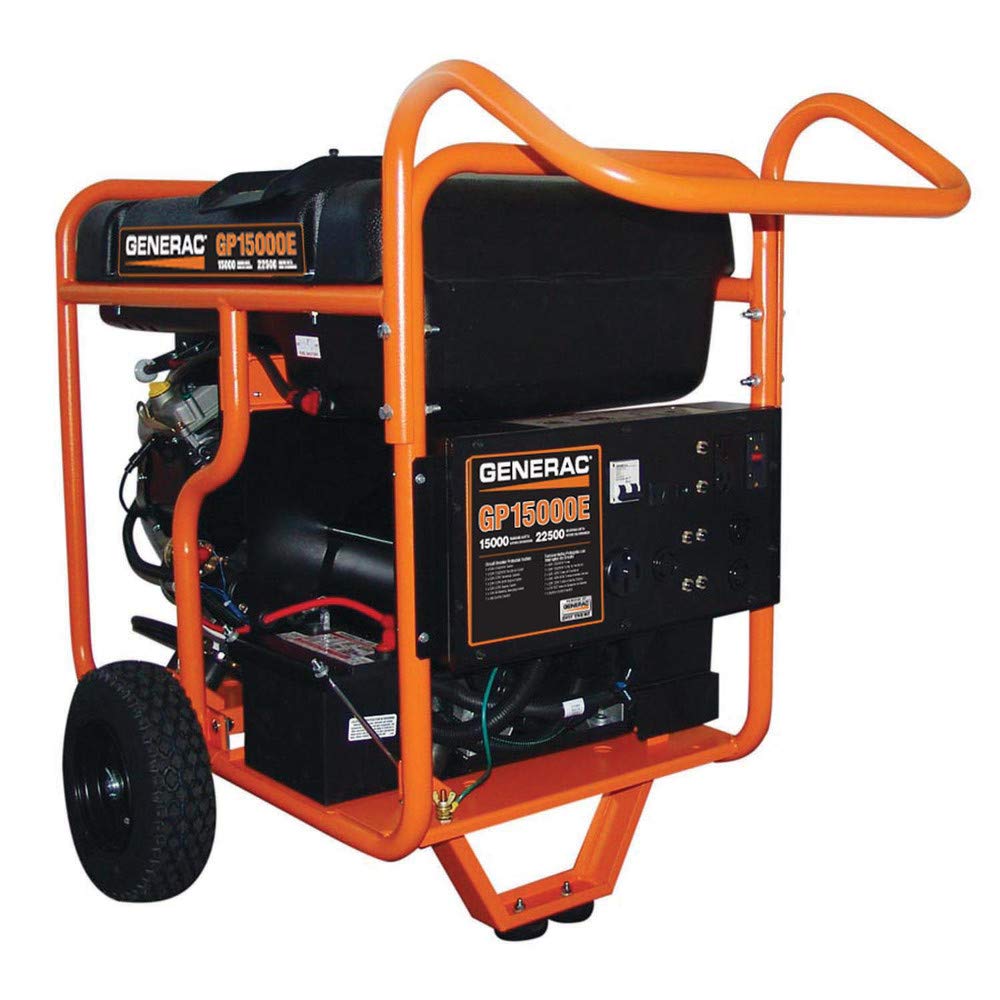
Image: Front-side view of the Generac GP15000E portable generator, showcasing its robust frame and control panel.

Image: Rear view of the Generac GP15000E portable generator, highlighting the engine and exhaust components.
Adding Engine Oil
Before starting the generator, ensure the engine oil is at the correct level. Remove the oil dipstick, wipe it clean, reinsert without threading, and then remove to check the oil level. Add the recommended type and amount of engine oil (typically 10W-30) using a funnel until the oil level is between the 'Full' and 'Add' marks on the dipstick. Do not overfill.
Adding Gasoline
Ensure the generator is on a level surface and the engine is off and cool. Remove the fuel cap and slowly add fresh, unleaded gasoline to the fuel tank. Do not overfill; leave space for fuel expansion. Replace the fuel cap securely. Refer to the fuel filter red line to avoid overfilling.

Image: Generac GP15000E portable generator connected and providing power to a building.
Operating Instructions
Starting the Generator
1. Ensure the generator is on a level surface and all electrical loads are disconnected.
2. Check the engine oil and fuel levels.
3. Turn the fuel valve to the 'ON' position.
4. If equipped, engage the choke (for cold starts).
5. Press and hold the electric start button until the engine starts. Release the button once the engine is running.
6. If the engine does not start, refer to the troubleshooting section.
Video: Official Generac video showcasing the GP15000E generator's running watts and operational capabilities.
Connecting Electrical Loads
Once the generator is running smoothly for a few minutes, you can connect your electrical devices. Ensure the total wattage of connected devices does not exceed the generator's running wattage. Use appropriate extension cords and adapters for the specific outlets.
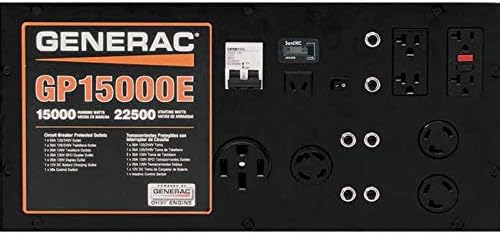
Image: Close-up view of the Generac GP15000E control panel, showing various outlets, circuit breakers, and the electric start button.

Image: A guide illustrating how to calculate wattage requirements for various household and jobsite devices when using a portable generator.
Stopping the Generator
1. Disconnect all electrical loads from the generator.
2. Allow the generator to run for a few minutes without load to cool down.
3. Turn the engine switch to the 'OFF' position.
4. Turn the fuel valve to the 'OFF' position.
Maintenance
Regular maintenance is crucial for the longevity and optimal performance of your Generac GP15000E generator. Always refer to the detailed maintenance schedule in your full user manual.
Engine Oil Change
Change the engine oil after the first 20 hours of operation, and then every 50-100 hours or annually thereafter, depending on usage. Ensure the engine is warm before draining the oil for better flow. Use the recommended oil type and capacity.
Spark Plug Inspection
Inspect the spark plug every 100 hours or annually. Clean or replace the spark plug if it is fouled, discolored, or has excessive wear. Ensure the gap is set correctly according to specifications in your manual.
Air Filter Cleaning
Clean the air filter element every 50 hours or more frequently in dusty conditions. Remove the air filter cover, take out the foam element, and wash it with warm, soapy water. Rinse thoroughly, squeeze dry, and lightly oil before reinstalling.
Troubleshooting
If your generator experiences issues, consult this basic guide before contacting support:
- Engine Fails to Start: Check fuel level, engine oil level, spark plug condition, and ensure the fuel valve is open and the engine switch is ON.
- No Power Output: Verify all circuit breakers are in the 'ON' position. Ensure no connected devices are overloading the generator.
- Engine Runs Rough: Check for stale fuel, dirty air filter, or a fouled spark plug.
- Low Oil Shutdown: If the generator shuts down unexpectedly, check the engine oil level and add oil if necessary.
Specifications
| Specification | Value |
|---|---|
| Brand | Generac |
| Model Number | 5734 |
| Running Wattage | 15000 Watts |
| Starting Wattage | 22.5 Kilowatts |
| Fuel Type | Gasoline |
| Engine Type | 4 Stroke |
| Engine Displacement | 992 Cubic Centimeters |
| Tank Volume | 16 Gallons |
| Ignition System Type | Electric Start |
| Total Power Outlets | 3 |
| Item Weight | 373 Pounds |
| Product Dimensions | 49"L x 35"W x 23"H |
| Material | Steel |
Warranty and Support
Generac products are backed by a manufacturer's warranty. For specific warranty details, registration, or technical assistance, please refer to the warranty information included with your product or visit the official Generac website. Always use genuine Generac replacement parts for repairs.


