
Introduction
The Altec Lansing M302 Moondance Home is a versatile alarm clock radio and speaker system designed for use with iPod and MP3 players. It offers clear audio, multiple alarm options, and a compact design suitable for various spaces. This manual provides detailed instructions for setting up, operating, and maintaining your device.
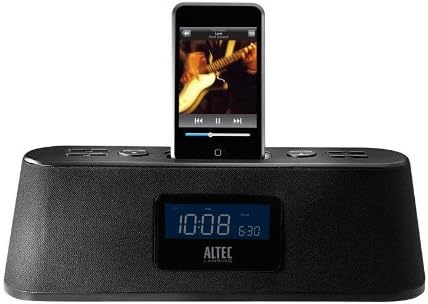
Figure 1: Altec Lansing M302 Moondance Home Alarm Clock Radio with an iPod docked. The front display shows the current time and alarm setting, while the top panel features control buttons.
Package Contents
Before beginning, ensure all components are present:
- Altec Lansing Moondance Home speaker system
- Adapters for iPod (various sizes)
- AC adapter
- FM radio antenna
- Wireless remote control (includes 2 batteries)
- User guide
- Quick connect instructions
Setup
1. Power Connection
- Connect the AC adapter to the DC IN port on the back of the Moondance Home unit.
- Plug the AC adapter into a standard wall outlet.
- The unit will power on and the display will illuminate.
2. FM Antenna Connection
- Locate the FM antenna port on the back of the unit.
- Connect the provided FM wire antenna to this port.
- Extend the antenna for optimal radio reception.
3. iPod/iPhone Docking
- Select the appropriate iPod adapter for your specific iPod or iPhone model.
- Insert the adapter into the docking well on top of the Moondance Home.
- Carefully place your iPod or iPhone onto the dock connector within the adapter. Ensure it is seated firmly.
- The device will begin charging automatically.
Note: While adapters provide better support, some iPod/iPhone models may function without a specific adapter by directly connecting to the dock connector. However, using the correct adapter is recommended for stability and protection of the dock connector. This unit is not compatible with the newest iPhone/iPod units without an extension purchased separately.
4. Auxiliary Input Connection
To connect other audio devices (CD player, DVD player, other MP3 players):
- Use a standard 3.5mm audio cable (not included).
- Connect one end of the cable to the headphone jack or line-out port of your external audio device.
- Connect the other end to the AUX IN port on the back of the Moondance Home unit.
Operating Instructions
Basic Controls (Onboard and Remote)
The Moondance Home can be operated using the buttons on the unit's top panel or the included wireless remote control. The remote offers full functionality for convenience.
- Power Button: Turns the unit on or off.
- Volume Up/Down: Adjusts the audio output level.
- Mode Button: Switches between iPod, FM Radio, and Auxiliary input modes.
- Snooze/Dimmer Button: Activates snooze during an alarm; also adjusts display brightness.
- Alarm Set: Enters alarm setting mode.
- Time Set: Enters time setting mode.
- Tuning/Track Skip: Navigates radio frequencies or skips tracks on iPod.
Setting the Time
- Press the Time Set button. The hour display will flash.
- Use the Tuning/Track Skip buttons (or Up/Down on remote) to adjust the hour.
- Press Time Set again to confirm the hour and move to minutes.
- Adjust minutes using the Tuning/Track Skip buttons.
- Press Time Set one more time to save the time.
Setting Alarms (Dual Alarms)
The unit supports two independent alarms (Alarm 1 and Alarm 2).
- Press the Alarm Set button. "AL1" will appear, and the hour will flash.
- Use the Tuning/Track Skip buttons to set the desired alarm hour.
- Press Alarm Set to confirm the hour and move to minutes.
- Adjust minutes using the Tuning/Track Skip buttons.
- Press Alarm Set to select the alarm source (iPod, Radio, or Buzzer). Use Tuning/Track Skip to cycle through options.
- Press Alarm Set again to save Alarm 1 settings.
- To set Alarm 2, repeat steps 1-6, pressing Alarm Set until "AL2" appears.
- To activate/deactivate an alarm, press the corresponding Alarm button (e.g., AL1 or AL2 on remote) until the alarm icon appears/disappears on the display.
Note: Alarms feature progressive alert volume, starting softly and gradually increasing.
Using the FM Radio
- Press the Mode button until "FM" appears on the display.
- Use the Tuning/Track Skip buttons to manually tune to a desired frequency.
- To auto-scan for stations, press and hold the Tuning/Track Skip buttons.
- To save a preset station, tune to the station, then press and hold a Preset Number button (on remote) until the display flashes. Use Tuning/Track Skip to select a preset number, then press the Preset Number button again to save.
- To recall a preset, simply press the corresponding Preset Number button.
Using the iPod/iPhone
- Ensure your iPod/iPhone is properly docked.
- Press the Mode button until "iPod" appears on the display.
- Use the Play/Pause, Next Track, and Previous Track buttons (on unit or remote) to control playback.
- Volume is controlled by the unit's volume buttons.
Using Auxiliary Input
- Ensure your external audio device is connected to the AUX IN port.
- Press the Mode button until "AUX" appears on the display.
- Control playback directly from your external audio device.
- Volume is controlled by the Moondance Home unit's volume buttons.
Sleep Timer
The sleep timer allows you to fall asleep to music, with the unit automatically turning off after a set period.
- While the unit is playing, press the Sleep button (on remote).
- Each press will cycle through available sleep times (e.g., 15, 30, 60, 90 minutes, OFF).
- Select your desired sleep duration. The unit will turn off automatically after this time.
Display Dimmer
Adjust the brightness of the LCD display to your preference.
- Press the Snooze/Dimmer button repeatedly to cycle through different brightness levels, including off.
- Note: Some users may find the lowest setting still too bright or the contrast difficult to read at very low brightness. Adjust to a comfortable level.
Maintenance
Cleaning
- Disconnect the power adapter before cleaning.
- Use a soft, dry cloth to wipe the exterior surfaces of the unit.
- Do not use liquid cleaners, aerosols, or abrasive cleaning agents.
- Keep the docking connector free of dust and debris.
Remote Control Battery Replacement
The remote control uses two AAA batteries (included). Replace them when the remote's range or responsiveness decreases.
- Open the battery compartment on the back of the remote control.
- Remove the old batteries.
- Insert two new AAA batteries, observing the correct polarity (+/-).
- Close the battery compartment securely.
Troubleshooting
| Problem | Possible Cause | Solution |
|---|---|---|
| Unit does not power on. | AC adapter not connected or faulty. | Ensure AC adapter is securely plugged into the unit and a working wall outlet. Try a different outlet. |
| No sound from iPod/iPhone. | iPod/iPhone not properly docked; unit in wrong mode; volume too low. | Re-seat iPod/iPhone firmly. Press Mode button to select iPod mode. Increase unit volume. Ensure iPod/iPhone volume is not muted or too low. |
| Poor FM radio reception. | Antenna not extended or positioned incorrectly; weak signal. | Fully extend the FM wire antenna and reposition it for better reception. Try auto-scanning for stations. |
| Remote control not working. | Batteries dead or incorrectly inserted; obstruction between remote and unit. | Replace remote batteries, ensuring correct polarity. Remove any obstructions. Point remote directly at the unit. |
| Alarm does not sound. | Alarm not set or activated; volume too low. | Verify alarm time and source are correctly set. Ensure alarm icon is visible on display. Increase unit volume. |
| Display is too bright or too dim. | Dimmer setting needs adjustment. | Press the Snooze/Dimmer button repeatedly to cycle through brightness levels until desired setting is reached. |
| Buttons are confusing/non-intuitive. | Unfamiliarity with control logic. | Refer to the "Operating Instructions" section of this manual for detailed steps on specific functions. Practice using the controls. |
Specifications
- Model: M302 Moondance Home
- Brand: Altec Lansing
- Product Dimensions: 2.3 x 11 x 3.5 inches (H x W x D)
- Item Weight: 2 pounds
- Color: Black
- Compatible Devices: iPhone, iPod (models with Universal Dock Connector; newer models may require adapter)
- Hardware Interface: Lightning
- Number of Ports: 1 (Docking) + Auxiliary Input
- Wattage: 100.00 W
- UPC: 021986800088
- Manufacturer: Altec Lansing
- First Available Date: September 23, 2008
Warranty and Support
Limited Warranty
The Altec Lansing M302 Moondance Home comes with a 1 Year limited warranty. This warranty covers defects in materials and workmanship under normal use. Please retain your proof of purchase for warranty claims.
Legal Disclaimer
This item is not compatible with the newest iPhone/iPod units. An extension must be purchased separately for compatibility with newer models.
Customer Support
For technical assistance, warranty inquiries, or additional support, please visit the official Altec Lansing website or contact their customer service department. Refer to the packaging or the Altec Lansing website for the most current contact information.
Note: While Altec Lansing aims to provide adapters for common models, not all iPod/iPhone models may have a perfectly fitting adapter included. Direct connection to the dock connector is often possible, but an adapter provides better physical support.


