1. Introduction
This manual provides essential information for the safe and effective operation, maintenance, and care of your BLACK+DECKER LI4000 4V MAX Cordless Screwdriver. Please read this manual thoroughly before using the tool and retain it for future reference.
The BLACK+DECKER LI4000 is a lithium-ion battery-powered cordless screwdriver designed for various household tasks, including furniture assembly and general screw driving. It features SmartSelect technology for torque control, a retractable screw holder with a magnetic tip, and a built-in LED work light.
2. Safety Information
WARNING: Read all safety warnings, instructions, illustrations, and specifications provided with this power tool. Failure to follow all instructions listed below may result in electric shock, fire, and/or serious injury.
- Always wear eye protection when operating power tools.
- Keep work area clean and well lit. Cluttered or dark areas invite accidents.
- Do not operate power tools in explosive atmospheres, such as in the presence of flammable liquids, gases, or dust.
- Keep children and bystanders away while operating a power tool.
- Avoid accidental starting. Ensure the switch is in the off-position before connecting to battery pack, picking up or carrying the tool.
- Use the correct power tool for your application.
- Do not overreach. Keep proper footing and balance at all times.
- Disconnect the battery pack from the power tool before making any adjustments, changing accessories, or storing power tools.
- Store idle power tools out of the reach of children and do not allow persons unfamiliar with the power tool or these instructions to operate the power tool.
3. Package Contents
Your BLACK+DECKER LI4000 Cordless Screwdriver package includes:
- BLACK+DECKER LI4000 4V MAX Cordless Screwdriver
- Lithium-Ion Battery (integrated)
- Wall-mountable/Table-top Charging Cradle with bit storage
- Assorted Screwdriver Bits
4. Setup
4.1 Charging the Screwdriver
The LI4000 screwdriver is equipped with an integrated Lithium-Ion battery. Before first use, fully charge the battery. The battery is designed to hold a charge for up to 18 months when not in use.
- Place the screwdriver into the charging cradle. Ensure the metal contacts on the screwdriver align with those in the cradle.
- Plug the charging cradle into a standard electrical outlet.
- A charging indicator light on the cradle will illuminate to show that the battery is charging.
- Allow the screwdriver to charge until the indicator light signals a full charge (refer to your specific model's light behavior for full charge indication).
4.2 Inserting Screwdriver Bits
To insert a screwdriver bit:
- Ensure the screwdriver is turned off.
- Push the desired screwdriver bit firmly into the chuck until it clicks into place.
- To remove, pull the bit straight out.
5. Operating Instructions
5.1 SmartSelect Dial and Torque Control
The SmartSelect dial allows you to choose the appropriate torque setting for your task, helping to prevent stripped screws. Rotate the dial to align the desired project icon with the indicator mark. The icons typically represent different screw sizes or material types, indicating increasing torque levels.
5.2 Retractable Screw Holder with Magnetic Tip
The exclusive retractable screw holder with a magnetic tip is designed to hold screws in place, allowing for one-handed operation and preventing screws from dropping, especially in tight spaces.
- To use, extend the screw holder forward. The magnetic tip will secure the screw to the bit.
- Once the screw is started, the holder can retract as the screw drives into the material.
5.3 Forward/Reverse Indicator
A clearly marked forward/reverse window allows for easy selection of the driving direction. Push the switch to the left for forward (driving screws) and to the right for reverse (removing screws).
5.4 Built-in LED Work Light
The integrated LED light illuminates the work area, providing improved visibility when working in dimly lit or confined spaces.
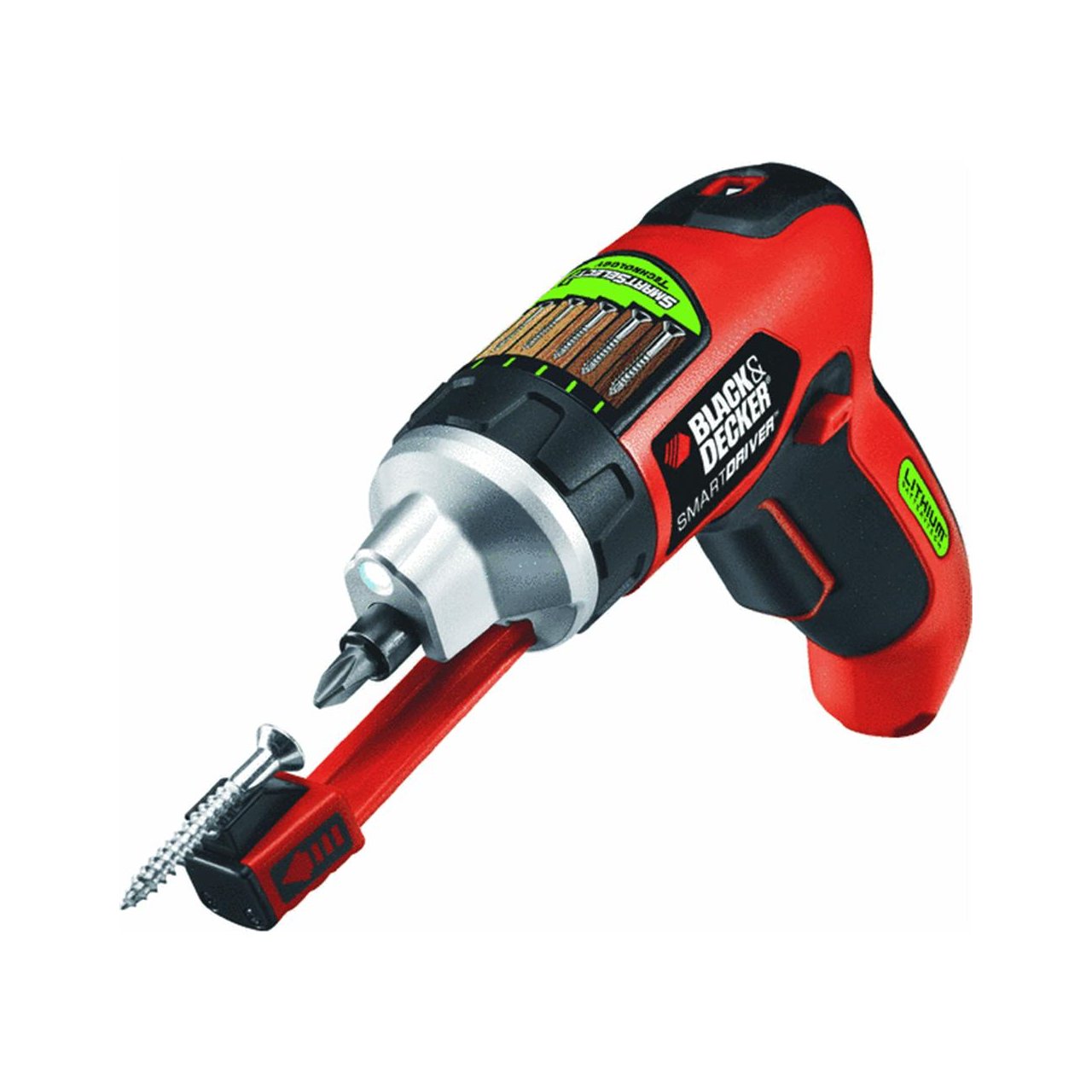
Image: The BLACK+DECKER LI4000 cordless screwdriver in use, highlighting its compact size and LED work light for improved visibility during tasks like hanging items on a wall.
Video: Demonstration of the BLACK+DECKER LI4000 Smart Select Cordless Screwdriver's features, including the SmartSelect dial, retractable screw holder, and built-in LED light, showcasing its ease of use for various tasks.
6. Maintenance
6.1 Cleaning
Regularly clean the ventilation slots of the tool to prevent overheating. Use a soft brush or dry cloth. Do not use water or chemical cleaners.
6.2 Battery Care
To ensure optimal battery life:
- Store the tool in a cool, dry place away from direct sunlight and extreme temperatures.
- Charge the battery fully before storing for extended periods.
- Do not attempt to disassemble the battery pack.
7. Troubleshooting
If your BLACK+DECKER LI4000 screwdriver is not functioning as expected, refer to the following common issues and solutions:
- Tool not turning on: Ensure the battery is charged. Check the forward/reverse switch is not in the neutral (locked) position.
- Reduced power/torque: The battery may need recharging. Ensure the SmartSelect dial is set to an appropriate torque level for the task.
- Screws stripping: Adjust the SmartSelect dial to a lower torque setting. Ensure you are using the correct bit for the screw head.
- Charging indicator not working: Verify the charging cradle is properly plugged into a working outlet and the screwdriver is correctly seated in the cradle.
For issues not resolved by these steps, contact BLACK+DECKER customer support.
8. Specifications
| Brand | BLACK+DECKER |
| Model Number | LI4000 |
| Voltage | 3.6 Volts (4V MAX) |
| Power Source | Battery Powered (Lithium-Ion) |
| Speed | 2500 RPM |
| Item Torque | 70 Inch Pounds |
| Item Weight | 0.01 Ounces |
| Product Dimensions | 11.25 x 4 x 10 inches |
| Head Style | Binding |
| Display Style | LED |
9. Warranty and Support
9.1 Manufacturer's Warranty
This BLACK+DECKER LI4000 Cordless Screwdriver comes with a 2-year manufacturer's warranty from the date of purchase. This warranty covers defects in material or workmanship. Please retain your proof of purchase for warranty claims.
9.2 Customer Support
For technical assistance, warranty service, or to order replacement parts, please contact BLACK+DECKER customer support. Refer to the official BLACK+DECKER website or product packaging for current contact information.


