
1. Introduction
The Levana BABYVIEW20 is a digital wireless video baby monitor designed to provide secure and clear monitoring of your child. This system includes a camera unit with night vision, lullabies, and a night light, and a portable monitor unit with a rechargeable battery. This manual provides instructions for setting up, operating, and maintaining your BABYVIEW20 monitor.
2. Package Contents
Before beginning, please ensure all items are present in the package:
- Wireless Monitor
- Wireless Camera
- Rechargeable Lithium-ion Battery (for monitor)
- Power Adapter for Monitor
- Power Adapter for Camera
- Magnetic Base for Camera
- Quick Start Guide
- Instruction Manual (this document)
3. Setup
3.1 Camera Placement
Place the camera in a location that provides a clear view of your child. The camera can be powered by the included power adapter or by 4x AAA batteries (not included) for ultimate portability. The magnetic base allows for easy adjustment of the camera angle.

Figure 1: Levana BABYVIEW20 Camera on its magnetic base.
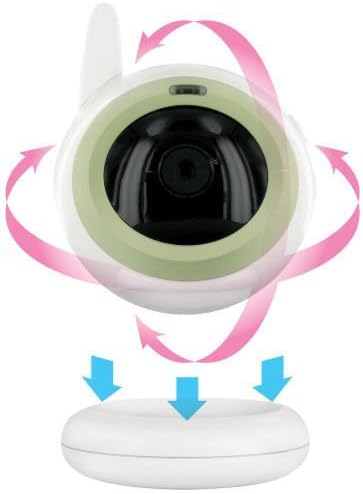
Figure 2: The camera unit can be rotated and attached to its magnetic base for flexible positioning.
3.2 Powering the Units
- Camera: Connect the camera power adapter to the camera and a wall outlet. Alternatively, insert 4x AAA batteries (not included) for battery operation.
- Monitor: Insert the rechargeable Lithium-ion battery into the monitor unit. Connect the monitor power adapter to the monitor and a wall outlet to charge the battery or for continuous use. A low battery indicator will signal when recharging is needed.
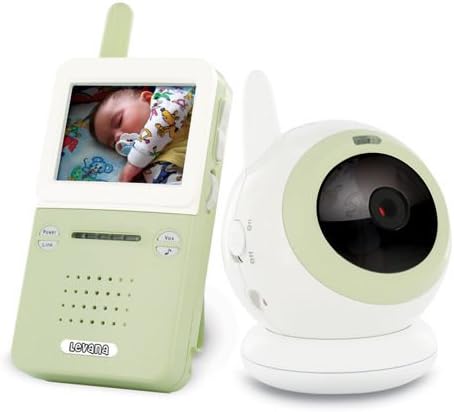
Figure 3: The Levana BABYVIEW20 monitor and camera units.
3.3 Initial Connection
Once both the camera and monitor are powered on, the system is ready to use. The monitor will automatically display the camera's view. The digital wireless system ensures a secure and private connection.
4. Operating Instructions
4.1 ClearVu Technology
The BABYVIEW20 utilizes digital wireless technology for a clear and secure video and audio feed. This ensures privacy and prevents interception of the signal. The monitor provides a clear picture of your baby up to 150 feet away.

Figure 4: The portable monitor unit displaying a live video feed.
4.2 Standby Mode (VOX)
The standby mode (VOX) conserves battery life by turning off the monitor's screen and audio. The monitor will automatically reactivate (turn on the LCD and audio) when your child makes a sound or cries, alerting you instantly.
4.3 Night Vision
The camera is equipped with infrared LEDs for automatic night vision. When the ambient light is low, the night vision activates, allowing you to see your child up to 15 feet away in the dark. It automatically deactivates in sufficient light to save energy.
4.4 Lullabies and Night Light
The camera features a built-in night light and can play a selection of lullabies. These functions can be controlled directly from the monitor unit. You can start/stop music, change songs, and turn the night light on or off without entering the child's room.

Figure 5: The camera unit with its integrated night light activated.

Figure 6: The camera's night light provides a soft glow.
4.5 Audio Monitoring
The camera includes a built-in microphone to transmit audio from your child's room. LEDs on the monitor indicate the detected audio level, even if the volume is turned down.
5. Maintenance
To ensure optimal performance and longevity of your Levana BABYVIEW20 monitor, follow these maintenance guidelines:
- Cleaning: Use a soft, dry cloth to clean the camera and monitor units. Do not use liquid cleaners or aerosols.
- Battery Care: For the monitor's rechargeable battery, avoid complete discharge for extended periods. Charge the monitor regularly. If using AAA batteries in the camera, replace them when low to ensure continuous operation.
- Storage: When not in use for an extended period, store the units in a cool, dry place.
6. Troubleshooting
If you encounter issues with your BABYVIEW20 monitor, refer to the following common solutions:
| Problem | Possible Cause / Solution |
|---|---|
| No picture/audio on monitor |
|
| "Out of Range" message |
|
| Picture/audio interference or choppy signal |
|
| Night vision not activating or poor quality |
|
| Monitor battery drains quickly |
|
7. Specifications
| Feature | Detail |
|---|---|
| Model Number | BABYVIEW20 |
| Brand | Levana |
| Connectivity Technology | Wireless (Digital) |
| Recommended Use | Baby Monitoring |
| Indoor/Outdoor Usage | Indoor, Outdoor |
| Power Source | Battery Powered (Monitor), AC Adapter (Camera & Monitor) |
| Night Vision | Yes (Infrared LEDs, up to 15ft) |
| Special Features | Video, Lullabies, Built-in Night Light, Standby Mode (VOX) |
| Monitor Battery Life | Up to 4.5 hours continuous use (Lithium-ion) |
| Camera Battery (Optional) | 4x AAA (not included) |
| Wireless Range | Up to 150 ft (line of sight) |
| Item Dimensions | 2.5 x 1.06 x 5.75 inches (Monitor) |
| Item Weight | 3 Pounds (Total package) |
| Compliance | RoHS Compliant |
8. Warranty Information
The Levana BABYVIEW20 Digital Wireless Video Baby Monitor comes with a 1 Year Manufacturer Warranty. Please retain your proof of purchase for warranty claims. For detailed warranty terms and conditions, please contact Levana customer support.
9. Customer Support
For any questions, setup assistance, or troubleshooting not covered in this manual, Levana customer support representatives are available 24/7.
- Toll-Free Support: 1-866-946-7828
- Online Support: Available 24 hours


