
Introduction
Thank you for purchasing the Jwin JXM10 Mini AM/FM Pocket Radio. This compact and portable radio is designed for convenient listening on the go. This manual provides detailed instructions on how to set up, operate, and maintain your radio to ensure optimal performance and longevity.
Product Overview
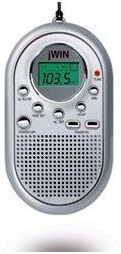
This image displays the front of the Jwin JXM10 Mini AM/FM Pocket Radio. It features a silver oval-shaped casing with a digital display showing '103.5'. Below the display are various control buttons, and at the bottom, a speaker grille. A small red indicator light is visible near the top right of the display, likely indicating tuning or power status.
Key Components:
- Digital Display: Shows frequency and other operational information.
- Power/Volume Dial: Controls power on/off and adjusts audio volume.
- Tuning Buttons: Used to scan or manually tune to radio stations.
- Band Selector: Switches between AM and FM bands.
- Speaker: Integrated speaker for audio output.
- Headphone Jack: For private listening with headphones (not included).
- Battery Compartment: Located on the back for battery installation.
- Antenna: Integrated for reception.
Setup
1. Battery Installation
- Locate the battery compartment cover on the back of the radio.
- Slide or lift the cover to open the compartment.
- Insert the required batteries (e.g., 2 x AAA batteries, not included) according to the polarity indicators (+ and -) inside the compartment.
- Close the battery compartment cover securely.
2. Initial Power On
After installing batteries, rotate the Power/Volume dial clockwise to turn on the radio. The digital display should illuminate, indicating the radio is active.
Operating Instructions
1. Power On/Off and Volume Control
- To turn the radio ON, rotate the Power/Volume dial clockwise.
- To turn the radio OFF, rotate the Power/Volume dial counter-clockwise until it clicks.
- Adjust the volume by rotating the Power/Volume dial clockwise to increase and counter-clockwise to decrease.
2. Selecting a Band (AM/FM)
- Press the BAND button (or similar labeled button) to switch between AM and FM radio bands. The selected band will be indicated on the digital display.
3. Tuning to Stations
- Automatic Scan: Press and hold the SCAN or TUNE+ / TUNE- button for a few seconds. The radio will automatically scan for and stop at the next available strong station.
- Manual Tuning: Briefly press the TUNE+ or TUNE- buttons to incrementally adjust the frequency up or down.
4. Using Headphones
Insert a standard 3.5mm headphone jack into the headphone port located on the side or top of the radio. The internal speaker will automatically mute when headphones are connected.
5. Display Backlight (if applicable)
Some models may feature a display backlight. If present, press the LIGHT button (or similar) to illuminate the display for easier viewing in low-light conditions. The backlight may turn off automatically after a few seconds to conserve battery life.
Maintenance
- Cleaning: Wipe the radio's exterior with a soft, dry cloth. Do not use abrasive cleaners, waxes, or solvents.
- Battery Care: If the radio will not be used for an extended period, remove the batteries to prevent leakage and corrosion.
- Storage: Store the radio in a cool, dry place away from direct sunlight, extreme temperatures, and high humidity.
- Water Exposure: This radio is not waterproof. Avoid exposing it to water or moisture.
Troubleshooting
| Problem | Possible Cause | Solution |
|---|---|---|
| No power / Radio does not turn on. | Dead or incorrectly installed batteries. | Replace batteries with new ones, ensuring correct polarity. |
| Poor reception / Static. | Weak signal; interference; antenna position. | Move to a different location; rotate the radio for better reception; extend the antenna fully if applicable. |
| No sound from speaker. | Volume too low; headphones connected; faulty speaker. | Increase volume; disconnect headphones; if problem persists, contact support. |
| Display not working correctly. | Low battery; internal fault. | Replace batteries. If issue continues, contact support. |
Specifications
- Model: JXM10
- Brand: jWIN
- Radio Bands: AM/FM
- Power Source: Battery operated (specific battery type not provided, typically AAA or AA)
- Audio Output: Integrated speaker, 3.5mm headphone jack
- ASIN: B001FAC7IC
- Manufacturer Reference: JXM10
- Date First Available: 16 Nov. 2010
Note: Specifications are subject to change without notice.
Warranty and Support
For warranty information or technical support, please refer to the warranty card included with your purchase or visit the official jWIN website. Keep your proof of purchase for warranty claims.
For further assistance, please contact jWIN customer service.


