
1. Introduction
The Olympus DS-65 Digital Voice Recorder is designed for clear and convenient audio capture. Featuring tactile buttons and an optional Voice Guidance system, it simplifies navigation and operation. This device supports high-quality recording and playback of WMA files, and also allows listening to MP3 and AA (Audible) files. With 2GB of internal storage, it provides ample space for recordings, music, audiobooks, and podcasts.
2. Package Contents
Please verify that all items listed below are included in your product package:
- Olympus DS-65 Digital Voice Recorder
- Instruction Manual (this document)
- Stereo Earphones
- USB Cable
- Protective Case
- DSS Player Software CD
3. Key Features
The Olympus DS-65 offers a range of features designed for efficient audio recording and playback:
- Up to 530 hours of recording capacity (in LP mode).
- High-quality stereo recording capability.
- Playback support for WMA, MP3, and AA (Audible) audio formats.
- Intuitive tactile buttons for easy control.
- Optional Voice Guidance system for simplified navigation.
- 2GB internal storage for extensive audio file management.
4. Setup
4.1 Battery Installation
Locate the battery compartment on the back of the device. Insert two AAA batteries, ensuring correct polarity (+/-) as indicated inside the compartment. Close the compartment securely.
4.2 Powering On
Slide the POWER/HOLD switch, located on the right side of the device, upwards to the 'POWER' position. The display will illuminate, indicating the device is ready for use.

Figure 1: Angled view of the Olympus DS-65, highlighting the side controls including the POWER/HOLD switch.
4.3 Connecting to a Computer
Use the provided USB cable to connect the DS-65 to a USB port on your computer. The device will be recognized as a removable storage drive, allowing you to transfer files.
4.4 Software Installation
Install the included DSS Player software from the provided CD onto your computer. This software facilitates advanced file management, device settings configuration, and transcription support.
5. Operating Instructions

Figure 2: Front view of the Olympus DS-65, displaying the screen and primary control buttons.
5.1 Recording Audio
- Ensure the device is powered on and not in 'HOLD' mode.
- Press the REC button (typically red, located on the side) to begin recording. The recording indicator will illuminate.
- Speak clearly into the built-in stereo microphones located at the top of the device.
- To pause recording, press REC again. To resume, press REC once more.
- To stop recording, press the STOP button. The recording will be saved automatically to the current folder.
5.2 Playback
- Navigate through your saved files using the FOLDER/A-BC and LIST/INDEX buttons to select the desired folder and file.
- Press the PLAY button to start playback.
- Adjust the volume using the VOLUME buttons (+/-) on the front panel.
- To pause playback, press PLAY. To resume, press PLAY again.
- To stop playback, press the STOP button.
5.3 File Management
- The DS-65 organizes recordings into folders. Use the FOLDER/A-BC button to switch between folders.
- To erase a file, select the file using the navigation buttons and then press the ERASE button. Confirm deletion when prompted on the display.
5.4 Voice Guidance
The device offers an optional Voice Guidance feature to assist with navigation and operation. Refer to the DSS Player software manual for detailed instructions on how to activate and customize this feature.
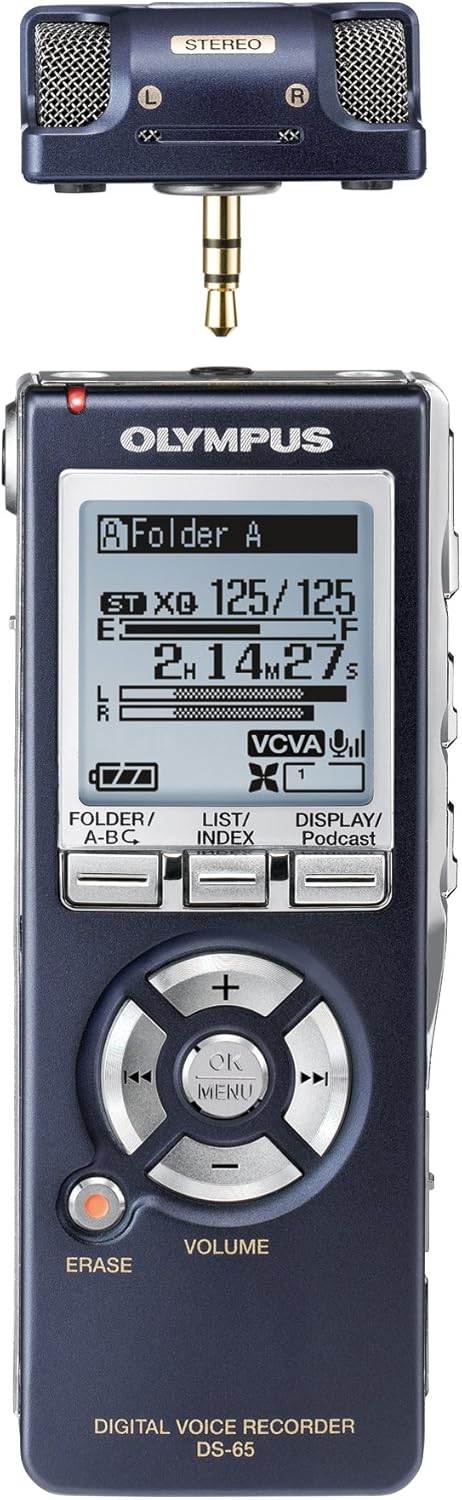
Figure 3: Olympus DS-65 showing the 3.5mm jack, suitable for connecting stereo earphones or an external microphone.
6. Maintenance
6.1 Cleaning
Gently wipe the device with a soft, dry cloth to remove dust or smudges. Do not use liquid cleaners, abrasive materials, or solvents, as these can damage the device's finish or internal components.
6.2 Storage
Store the DS-65 in a cool, dry place, away from direct sunlight, high humidity, and extreme temperatures. If storing the device for an extended period, remove the batteries to prevent potential leakage and damage.
6.3 Battery Care
Replace batteries promptly when the low battery indicator appears on the display. For optimal performance and longevity, use high-quality alkaline AAA batteries.
7. Troubleshooting
If you encounter issues with your Olympus DS-65, please refer to the following common troubleshooting steps:
- Device does not power on:
Check battery installation and ensure correct polarity. Replace batteries with new ones. Verify the POWER/HOLD switch is not in the 'HOLD' position. - No sound during playback:
Check the volume level using the VOLUME buttons. Ensure earphones are properly connected if used. Verify that the audio file is not corrupted. - Recording quality is poor:
Ensure the built-in microphones are not obstructed. Adjust microphone sensitivity settings if available through the device menu or DSS Player software. Record in a quieter environment to minimize background noise. - Cannot transfer files to computer:
Ensure the USB cable is securely connected to both the device and the computer. Try a different USB port or cable. Verify the DSS Player software is correctly installed and running on your computer.
For more complex issues, consult the comprehensive DSS Player software manual or the Olympus support website.
8. Specifications
| Feature | Specification |
|---|---|
| Brand | Olympus |
| Model Number | DS-65 |
| Memory Storage Capacity | 2 GB |
| Battery Life (Recording) | Up to 530 Hours |
| Audio Formats Supported | WMA, MP3, AA (Audible) |
| Hardware Interface | USB |
| Microphone Form Factor | Built-In Stereo |
| Headphone Jack | 3.5 millimeters |
| Item Weight | 80 Grams |
| Screen Size | 2.4 inches |
9. Warranty and Support
For detailed warranty information, terms, and conditions, please refer to the warranty card or documentation included with your Olympus DS-65 Digital Voice Recorder. For technical support, product inquiries, or service, please visit the official Olympus support website or contact their customer service department. Keep your proof of purchase for any warranty claims.


