
1. Introduction
The TP-Link TL-SG1008D 8-Port Gigabit Desktop Switch provides a straightforward method to upgrade your network to Gigabit Ethernet. This unmanaged switch is designed to enhance the speed of network server and backbone connections, facilitating Gigabit speeds directly to desktop devices. Featuring innovative energy-efficient technology, the TL-SG1008D optimizes power consumption, offering an environmentally conscious solution for both home and office network environments.
2. Package Contents
Verify that your package contains the following items:
- One (1) TP-Link TL-SG1008D 8-Port Gigabit Desktop Switch
- One (1) Power Adapter
- One (1) Installation Guide

3. Physical Overview
The TL-SG1008D switch features a compact design with essential ports and indicators for easy network management.
3.1 Front Panel

The front panel typically features a power indicator LED, which illuminates when the device is powered on.
3.2 Rear Panel
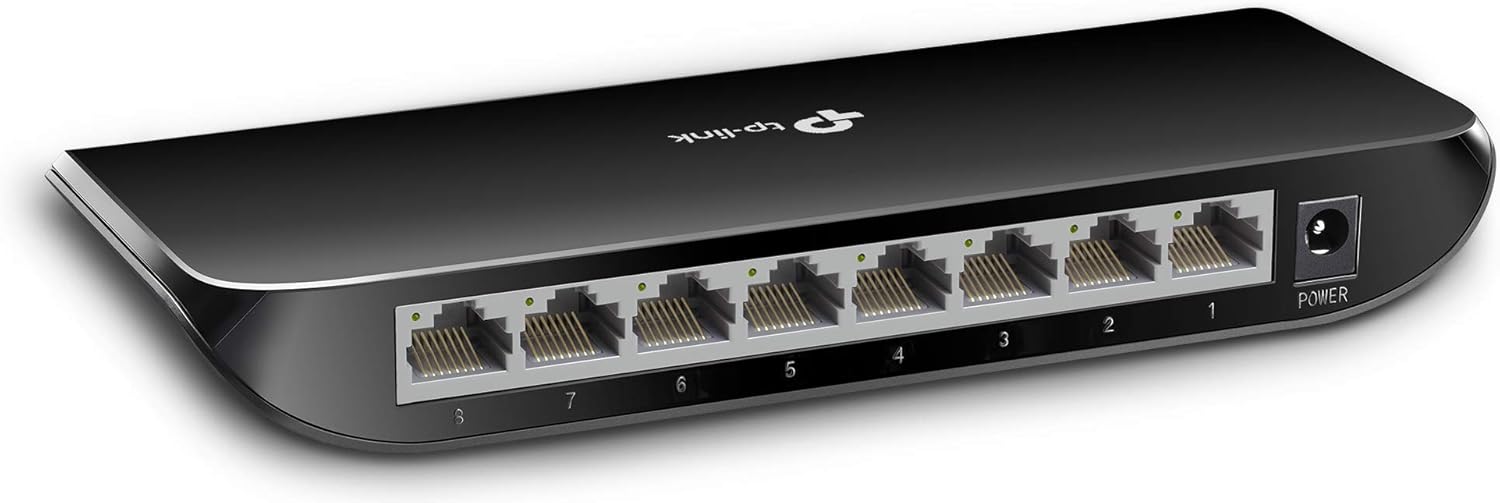
- RJ45 Ports (1-8): Eight 10/100/1000 Mbps auto-negotiation ports for connecting network devices. Each port has an associated LED indicator that shows link status and activity.
- Power Port: Connects to the provided power adapter.
3.3 Top and Side Views


The device features a durable plastic case suitable for desktop placement or wall-mounting. The bottom panel includes keyhole slots for wall-mounting.
4. Setup Instructions
The TL-SG1008D is a plug-and-play device, requiring no software installation or complex configuration.
- Connect the Power Adapter: Plug the provided power adapter into the switch's power port and then into a standard electrical outlet. The power LED on the switch should illuminate.
- Connect to Your Router/Modem: Use an Ethernet cable to connect one of the switch's RJ45 ports to an available LAN port on your router or modem.
- Connect Your Devices: Connect your network devices (e.g., computers, gaming consoles, printers, smart TVs) to the remaining RJ45 ports on the switch using Ethernet cables.
Once connected, the switch will automatically detect and configure the devices, providing immediate network access.
5. Operating Instructions
The TL-SG1008D operates automatically once connected. It functions as an Ethernet splitter, expanding the number of wired connections available from your router.
- Gigabit Speed: All 8 ports support 10/100/1000 Mbps Gigabit Ethernet, ensuring high-speed data transfer for connected devices.
- Auto-Negotiation: Each port automatically detects the link speed of a connected network device and intelligently adjusts for compatibility and optimal performance.
- Auto-MDI/MDIX: This feature eliminates the need for crossover cables, simplifying network setup. You can use either straight-through or crossover cables for any port.
- Flow Control: IEEE 802.3x flow control provides reliable data transfer by preventing packet loss during periods of high network traffic.
6. Maintenance
The TL-SG1008D is designed for minimal maintenance due to its fanless and unmanaged nature.
- Fanless Design: The absence of a fan ensures silent operation and reduces potential points of failure, eliminating the need for fan cleaning.
- Energy Efficiency: The switch automatically adjusts power consumption based on link status and cable length, contributing to energy savings without user intervention.
- Environmental Conditions: Ensure the device is placed in a location with adequate ventilation and within the specified operating temperature range (up to 40°C) to prevent overheating.
- Cleaning: Periodically wipe the exterior of the device with a soft, dry cloth to remove dust. Do not use liquid cleaners or abrasive materials.
7. Troubleshooting
If you encounter issues with your TL-SG1008D switch, consider the following common solutions:
- No Power: Ensure the power adapter is securely connected to both the switch and a working electrical outlet. Check if the power LED on the switch is illuminated.
- No Link/Activity on a Port:
- Verify that the Ethernet cable is securely plugged into both the switch port and the connected device.
- Try using a different Ethernet cable to rule out cable malfunction.
- Ensure the connected device is powered on and its network adapter is functioning correctly.
- If a port is not responding, try unplugging and re-plugging the Ethernet cable into that specific port.
- Slow Network Speed:
- Confirm that your Ethernet cables are rated for Gigabit speeds (e.g., Cat5e or Cat6). Older Cat5 cables may limit speed.
- Check the network settings of your connected devices to ensure they are configured for Gigabit speeds if supported.
- Ensure your router/modem is also capable of Gigabit speeds.
- Intermittent Connection: Check for loose cable connections. Ensure the switch is placed on a stable surface and not subject to physical disturbance.
8. Specifications
| Feature | Detail |
|---|---|
| Model Number | TL-SG1008D |
| Brand | TP-Link |
| Number of Ports | 8 |
| Interface Type | 8 10/100/1000Mbps RJ45 Ports, AUTO Negotiation/AUTO MDI/MDIX |
| Data Transfer Rate | 1000 Megabits Per Second |
| Product Dimensions | 7.09"L x 3.54"W x 0.98"H |
| Item Weight | 10.56 ounces |
| Voltage | 9 Volts |
| Current Rating | 1 Amps |
| Case Material | Plastic |
| Upper Temperature Rating | 40 Degrees Celsius |
| Compatible Devices | Desktop, Gaming Console, Laptop, Printer, Server |
9. Warranty and Support
TP-Link provides comprehensive support for the TL-SG1008D switch:
- Warranty: This product comes with a 2-year warranty.
- Technical Support: Unlimited 24/7 technical support is available for free.
For further assistance, please contact TP-Link support:
- Phone: (866) 225-8139
- Website: myproducts.tp-link.com/us
- Email: support.USA@tp-link.com


