
1. Introduction
The Nikon D90 is a DX-format digital single-lens reflex (DSLR) camera designed for passionate photographers seeking advanced control and high-quality imaging. It features a 12.3-megapixel CMOS sensor, inherited from the D300, delivering exceptional image quality with low noise. The D90 integrates advanced technologies such as EXPEED image processing and Nikon's Scene Recognition System to enhance performance across various shooting conditions.
Key features include a fast 4.5 frames-per-second continuous shooting rate, an 11-area autofocus system, and a 3-inch 920,000-dot color LCD monitor. A notable innovation for DSLRs at its release, the D90 also offers a D-Movie mode for cinematic-quality HD video recording.
2. Setup and Initial Preparation
2.1. Unpacking the Camera
Carefully unpack all components from the box. The standard package for the Nikon D90 (Body Only) includes the following items:
- Nikon D90 SLR Digital Camera (Body Only)
- EN-EL3e Rechargeable Lithium-ion Battery
- MH-18a Quick Charger
- UC-E4 USB Cable
- EG-D2 Audio/Video Cable
- AN-DC1 Neck Strap
- BM-10 LCD Monitor Cover
- BF-1A Body Cap
- DK-5 Eyepiece Cap
- DK-21 Rubber Eyecup
- BS-1 Accessory Shoe Cap
- Nikon Software Suite CD-ROM
- User Guides
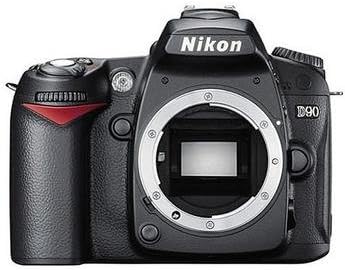
Figure 2.1: Included accessories with the Nikon D90 camera body.
2.2. Charging and Installing the Battery
Before first use, fully charge the EN-EL3e Lithium-ion battery using the supplied MH-18a Quick Charger. Insert the battery into the charger, ensuring proper alignment. The charging indicator light will show the charging status. Once fully charged, insert the battery into the camera's battery compartment, located at the bottom of the camera body. Ensure it clicks securely into place.
2.3. Inserting a Memory Card
The D90 uses SD/SDHC memory cards (not included). Open the memory card slot cover on the side of the camera. Insert the memory card with the label facing the rear of the camera until it clicks into place. Close the cover securely.

Figure 2.2: Location of the memory card slot on the Nikon D90.
2.4. Attaching a Lens
Align the mounting mark on the lens with the lens mounting mark on the camera body. Rotate the lens counter-clockwise until it clicks into place. The D90 is compatible with a wide range of NIKKOR lenses. Ensure the camera is powered off before attaching or detaching a lens.

Figure 2.3: Front view of the Nikon D90 camera body, showing the lens mount.
3. Operating the Camera
3.1. Power On/Off and Basic Controls
To power on the camera, rotate the power switch located around the shutter release button to the "ON" position. To power off, rotate it to "OFF". The D90 has a quick start-up time of approximately 0.15 seconds.

Figure 3.1: Top controls of the Nikon D90, including the power switch and mode dial.
3.2. Shooting Modes
The mode dial on the top of the camera allows selection of various shooting modes:
- P (Programmed Auto): Camera sets aperture and shutter speed for optimal exposure.
- S (Shutter-Priority Auto): User sets shutter speed, camera sets aperture.
- A (Aperture-Priority Auto): User sets aperture, camera sets shutter speed.
- M (Manual): User controls both aperture and shutter speed.
- Scene Modes: Includes Portrait, Landscape, Close-up, Sports, and Night Portrait, which automatically optimize settings for specific subjects.
3.3. Autofocus System
The D90 features an 11-point AF system with the Multi-CAM 1000 autofocus module, providing fast and precise autofocus coverage. The system includes Face Priority, which detects and focuses on human faces within the frame. Various AF-area modes are available to suit different shooting situations.
3.4. ISO Sensitivity
The camera offers a wide ISO sensitivity range from 200 to 3200, expandable to Hi 1 (ISO 6400 equivalent) and Lo 1 (ISO 100 equivalent). This allows for shooting in diverse lighting conditions with minimal image noise.
3.5. Live View and D-Movie Mode
Press the dedicated Live View button to activate Live View, allowing composition and focusing using the LCD monitor. In Live View, three contrast-detect AF modes are available. The D90 also features a D-Movie mode, enabling recording of high-definition video at 1280 x 720 pixels (720p) at 24 frames per second. Note that focusing in D-Movie mode is manual.

Figure 3.2: Rear panel of the Nikon D90, featuring the 3-inch LCD monitor and control buttons.
3.6. Continuous Shooting
The D90 can capture images at a continuous shooting rate of up to 4.5 frames per second, ideal for capturing fast-moving subjects or sequences of action.
3.7. Active D-Lighting and In-Camera Editing
Nikon's Active D-Lighting technology helps preserve details in both shadows and highlights, especially in high-contrast scenes. The camera also offers extensive in-camera image editing options, including Fisheye effect, Straighten, Distortion Control, D-Lighting, Red-eye Reduction, and Image Overlay.
3.8. Connectivity
The D90 is HDMI compatible, allowing direct connection to an HDTV for viewing photos and videos. It uses an HDMI Mini connector. An optional GP-1 GPS unit can be attached for automatic real-time geo-tagging of images.
4. Maintenance
4.1. Sensor Cleaning
The D90 features an Integrated Dust Reduction System that uses 4-frequency ultrasonic vibrations to free image-degrading dust particles from the sensor's optical low-pass filter. Regular use of this function helps maintain image clarity. For stubborn dust, professional cleaning may be required.
4.2. General Cleaning
Use a soft, lint-free cloth to clean the camera body. For the LCD monitor, use a specialized LCD cleaning cloth. Avoid using harsh chemicals or abrasive materials. Keep the lens and sensor free from dust and fingerprints by using appropriate cleaning tools (e.g., a blower brush for dust, lens cleaning solution for smudges).
4.3. Battery Care
To prolong battery life, store the battery in a cool, dry place when not in use. Avoid extreme temperatures. Fully charge the battery before extended shooting sessions. If the camera will not be used for a long period, remove the battery.
5. Troubleshooting
This section provides solutions to common issues encountered with the Nikon D90. If the problem persists, consult the full user manual or contact Nikon support.
| Problem | Possible Cause / Solution |
|---|---|
| Camera does not power on. |
|
| Images are blurry. |
|
| Memory card error. |
|
| Flash does not fire. |
|
6. Specifications
Below are the key technical specifications for the Nikon D90 DX-Format CMOS DSLR Camera:
| Feature | Detail |
|---|---|
| Sensor Type | DX-format CMOS |
| Effective Pixels | 12.3 megapixels |
| Image Processor | EXPEED |
| ISO Sensitivity | ISO 200-3200 (expandable to Lo 1 (ISO 100) and Hi 1 (ISO 6400)) |
| Autofocus System | 11-point AF (Multi-CAM 1000) with Face Priority |
| Continuous Shooting Speed | Up to 4.5 frames per second |
| Shutter Speed | 30 seconds to 1/4000 sec., Bulb |
| LCD Monitor | 3-inch, 920,000-dot (VGA x 3 colors) TFT-LCD |
| Video Recording | HD 1280 x 720 (720p) at 24 fps (Motion JPEG) |
| Storage Media | SD/SDHC memory cards |
| Battery | EN-EL3e Rechargeable Lithium-ion Battery |
| Dimensions (W x H x D) | 5.2 x 4.1 x 3 inches (approx.) |
| Weight (Body Only) | 1.37 pounds (approx. 620 grams) |
| Connectivity | USB, Audio/Video Out, HDMI Mini |
| Special Features | Live View, Active D-Lighting, Integrated Dust Reduction System, In-camera editing |
7. Warranty and Support
The Nikon D90 SLR Digital Camera (Body Only) typically comes with a 1-Year Nikon U.S.A. Warranty. Please refer to the warranty card included in your product packaging for specific terms and conditions.
For technical support, service, or further inquiries, please visit the official Nikon support website or contact their customer service department. Keep your purchase receipt and product serial number readily available when seeking support.
For more information, you may visit the Nikon Store on Amazon.


