
Olympus OM-4
Olympus OM-4 35mm Film SLR Camera User Manual
Model: OM-4
Introduction
Welcome to the user manual for your Olympus OM-4 35mm Film SLR Camera. This manual provides essential information for setting up, operating, and maintaining your camera to ensure optimal performance and longevity. The Olympus OM-4 is a classic 35mm SLR camera known for its advanced metering system and robust build quality, offering photographers precise control over their images.
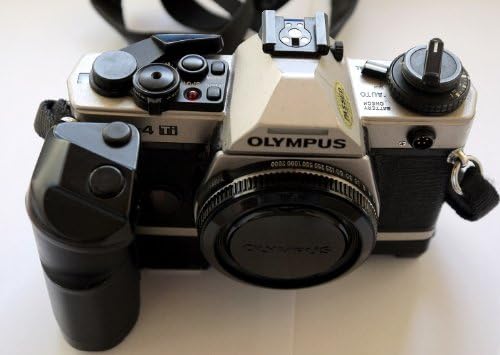
Figure 1: Front view of the Olympus OM-4 35mm Film SLR Camera, showing the lens, body, and attached grip.
Setup
1. Battery Installation
The Olympus OM-4 requires batteries for its metering and electronic functions. A battery is included with your camera. To install:
- Locate the battery compartment, typically on the bottom of the camera body.
- Open the compartment cover.
- Insert the battery, ensuring correct polarity as indicated inside the compartment.
- Close the battery compartment cover securely.
2. Film Loading
The OM-4 uses standard 35mm film. Follow these steps to load film:
- Open the camera back by pulling up the film rewind knob.
- Place the film cassette into the film chamber on the left side.
- Pull the film leader across to the take-up spool on the right side and insert it into one of the slots.
- Advance the film slightly using the film advance lever to ensure it catches on the take-up spool.
- Close the camera back firmly.
- Advance the film two frames, pressing the shutter release button each time, until the frame counter shows '1'. This ensures the exposed leader is wound onto the take-up spool.
3. Strap and Lens Cap Attachment
A strap and lens cap are included for convenience and protection.
- Attach the camera strap to the strap lugs on the camera body for secure carrying.
- Place the lens cap on the front of the lens when the camera is not in use to protect the lens element from dust and scratches.
Operating Instructions
1. Basic Operation
- Power On: Rotate the main switch to the 'ON' position.
- Shutter Speed: Adjust the shutter speed dial on the top of the camera to select your desired speed.
- Aperture: Adjust the aperture ring on your lens to control the depth of field.
- Focusing: Look through the viewfinder and rotate the focusing ring on your lens until the image appears sharp. The OM-4 typically features a split-image or microprism focusing screen for precise focusing.
- Shutter Release: Gently press the shutter release button on the top of the camera to take a picture.
- Film Advance: After each shot, advance the film using the film advance lever until it stops, preparing the next frame.
2. Auto Exposure Feature
The Olympus OM-4 features an advanced auto exposure system. To utilize this:
- Set the shutter speed dial to 'AUTO' or 'APERTURE PRIORITY' mode, if available on your specific model.
- The camera will automatically select the appropriate shutter speed based on the light conditions and your chosen aperture.
- Monitor the exposure indicators in the viewfinder to ensure a correct exposure.
3. Film Rewinding
Once all frames on the film roll have been exposed:
- Press the film rewind release button on the bottom of the camera.
- Rotate the film rewind knob clockwise until you feel the tension release, indicating the film is fully rewound into its cassette.
- Open the camera back and remove the film cassette.
Maintenance
Proper maintenance ensures the longevity and performance of your Olympus OM-4 camera.
- Cleaning: Use a soft, lint-free cloth to wipe the camera body. For the lens, use a dedicated lens cleaning solution and cloth. Avoid touching the lens surface directly.
- Storage: Store the camera in a cool, dry place away from direct sunlight and extreme temperatures. If storing for extended periods, remove the batteries to prevent leakage.
- Handling: Always handle the camera with care. Avoid dropping or subjecting it to strong impacts.
Troubleshooting
| Problem | Possible Cause | Solution |
|---|---|---|
| Camera does not power on. | Dead or incorrectly installed batteries. | Check battery installation; replace batteries if necessary. |
| Film does not advance. | Film not properly loaded or end of roll reached. | Re-load film correctly; if at end of roll, rewind and replace. |
| Images are blurry. | Incorrect focus or camera shake. | Ensure proper focusing; use a tripod or faster shutter speed in low light. |
| Exposure issues (too dark/bright). | Incorrect exposure settings or metering error. | Check shutter speed, aperture, and ISO settings. Ensure metering mode is appropriate for the scene. |
Specifications
- Brand: Olympus
- Model Name: OM-4
- Film Format Type: 35mm
- Special Feature: Auto Exposure
- Shutter Type: Focal Plane Shutter
- Exposure Control Type: Automatic
- Included Components: Strap, Battery, Lens Cap
- Item Weight: 2.2 pounds
- Package Dimensions: 3.9 x 3.9 x 3.9 inches
- Date First Available: September 3, 2015
Warranty Information
This Olympus OM-4 camera comes with a 100 DAYS WARRANTY. Please retain your proof of purchase for any warranty claims. The warranty covers manufacturing defects and malfunctions under normal use. For specific terms and conditions, please refer to the warranty card included with your purchase or contact customer support.
Support
For further assistance, technical support, or inquiries regarding your Olympus OM-4 camera, please visit the official Olympus Store on Amazon:
You may also refer to the contact information provided with your product packaging for direct support channels.
Related documentsOM-4


Ask a question about this manual
Ask about setup, troubleshooting, compatibility, parts, safety, or missing instructions. Manuals+ will review the question and use this page’s manual context to help answer it.