
1. Introduction
This instruction manual provides essential information for the proper use and care of your Minolta Maxxum 300si film camera. Please read this manual thoroughly before using your camera to ensure optimal performance and longevity. The Minolta Maxxum 300si is a 35mm single-lens reflex (SLR) camera designed for ease of use, offering both automatic and manual shooting modes.
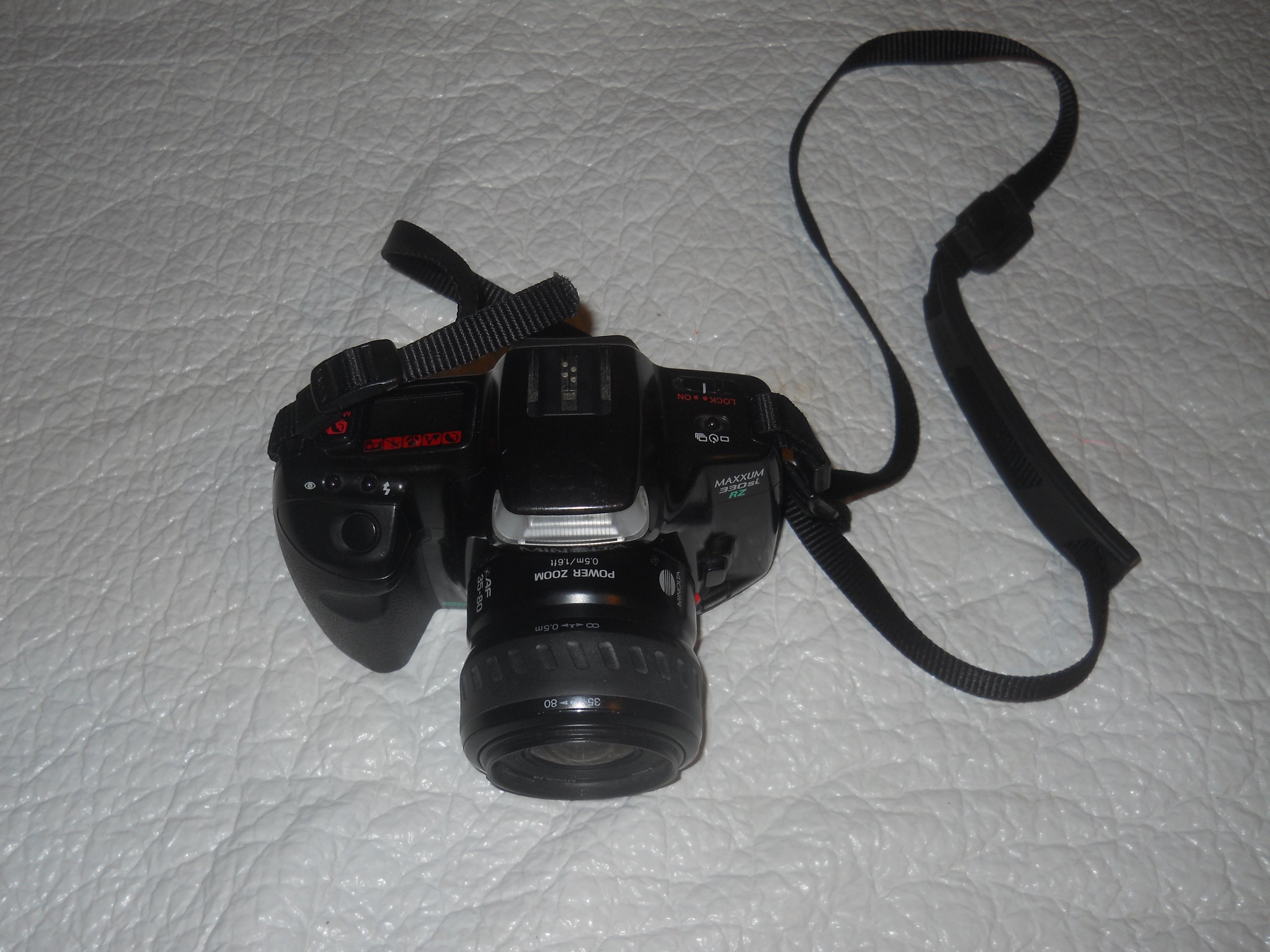
Figure 1: Front view of the Minolta Maxxum 300si camera with a lens attached.
2. Setup
2.1. Battery Installation
The Minolta Maxxum 300si requires a 2 CR5 type battery for operation. Follow these steps to install or replace the battery:
- Locate the battery compartment on the bottom of the camera.
- Slide the small switch to open the battery door.
- Remove the old battery if present.
- Insert the new 2 CR5 battery, ensuring the contacts align correctly with the camera's terminals.
- Close the battery door securely until it clicks into place.
Video 1: Instructions on how to change the battery in the Minolta Maxxum 300si camera.

Figure 2: Bottom view of the camera, highlighting the battery compartment.
2.2. Lens Attachment and Detachment
To attach or detach a lens from your Minolta Maxxum 300si camera, follow these steps:
- To Detach: Press the small lens release button located next to the lens mount on the camera body. While holding the button, turn the lens counter-clockwise until it detaches.
- To Attach: Align the red dot (or white dot on some lenses) on the lens with the corresponding red dot on the camera body's lens mount. Gently insert the lens and rotate it clockwise until it clicks into place. Do not force the lens.
Video 2: Demonstrating how to swap lenses on the Minolta Maxxum 300si camera.

Figure 3: Front view of the camera, indicating the lens release button.
2.3. Film Loading
To load 35mm film into your Minolta Maxxum 300si, follow these instructions:
- Locate the film door release switch on the side of the camera. Slide it to open the film door.
- Insert the film canister into the film chamber on the left side, with the tip of the film leader pointing towards the right.
- Pull the film leader across to the right, ensuring it aligns with the orange line and engages with the take-up spool.
- Close the film door firmly until it latches.
- Turn on the camera. The camera will automatically advance the film to the first frame. The display should show '1'. If it shows 'E' or '0', the film did not catch, and you will need to re-open the door and re-load the film.
Video 3: Step-by-step guide on how to load film into the Minolta Maxxum 300si.

Figure 4: Back view of the camera with the film door open, showing the film chamber and take-up spool.
3. Operating the Camera
The Minolta Maxxum 300si offers various shooting modes to suit different photographic situations. These include:
- Auto Mode: The camera automatically sets exposure and focus for general photography.
- Manual Mode: Allows the user full control over aperture and shutter speed settings.
- Portrait Mode: Optimizes settings for portraits, often using a wider aperture to blur the background.
- Landscape Mode: Optimizes settings for landscapes, typically using a smaller aperture for greater depth of field.
Refer to the camera's top display and mode dial for selecting your desired shooting mode. The camera features autofocus capabilities and an integrated flash for low-light conditions.

Figure 5: Top view of the camera, showing the mode dial and LCD display.
4. Maintenance
Proper maintenance ensures the longevity and performance of your Minolta Maxxum 300si camera:
- Cleaning: Use a soft, lint-free cloth to clean the camera body. For the lens, use a specialized lens cleaning solution and cloth. Avoid touching the lens or mirror with bare hands.
- Storage: Store the camera in a cool, dry place away from direct sunlight and extreme temperatures. If storing for an extended period, remove the battery to prevent leakage.
- Handling: Always handle the camera with care. Avoid dropping it or exposing it to excessive shock or vibration.
5. Troubleshooting
Here are some common issues and their potential solutions:
- Camera not powering on: Check if the battery is correctly installed and fully charged. Replace the battery if necessary.
- Film not advancing (display shows 'E' or '0'): The film leader may not be properly engaged with the take-up spool. Open the film door, re-seat the film canister, and ensure the leader is correctly positioned before closing the door and turning the camera on again.
- Lens not focusing: Ensure the lens is securely attached and the autofocus/manual focus switch on the lens (if applicable) is set to the desired mode.
If you encounter persistent issues, consult a professional camera repair service.
6. Specifications
| Feature | Detail |
|---|---|
| Product Dimensions | 7 x 6.5 x 6.4 inches |
| Item Weight | 1.8 pounds |
| Item Model Number | 300SI |
| Manufacturer | Minolta |
| Shooting Modes | Auto, Manual, Portrait, Landscape |
| Exposure Control Type | Manual and Automatic |
| Zoom Type | Fixed (Lens dependent) |
| Water Resistance Level | Not Water Resistant |
| First Available | August 22, 2012 |
7. Warranty and Support
This Minolta Maxxum 300si camera is a previously owned item. As such, it may not come with a manufacturer's warranty. For technical support or repair inquiries, it is recommended to consult independent camera repair specialists or online photography forums dedicated to vintage camera models. Please retain your purchase receipt for any potential seller-provided guarantees.


