1. Introduction
This manual provides detailed instructions for the installation, operation, and maintenance of your SCHLAGE FE595 CAM 619 GEO Camelot Keypad Entry with Flex-Lock and Georgian Style Knobs. This electronic lock offers enhanced security and convenient keyless access for residential applications.
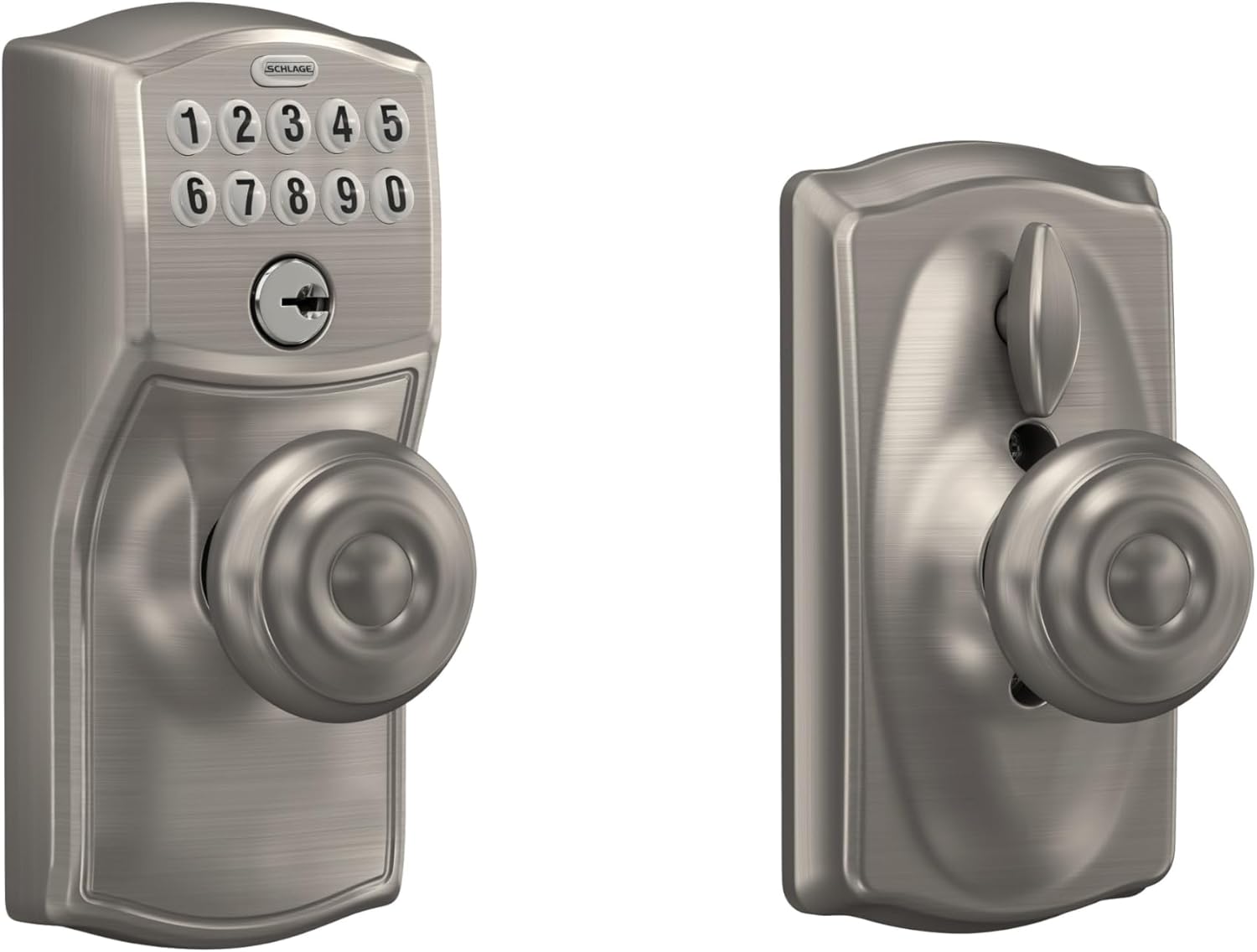
Figure 1: SCHLAGE FE595 CAM 619 GEO Keypad Entry Lock in Satin Nickel finish.
2. Setup and Installation
2.1 Package Contents
Verify that all components are present before beginning installation:
- Exterior Keypad Assembly
- Interior Knob/Lever Assembly
- Latch and Strike Plate
- Mounting Screws
- 9-Volt Battery
- 2 Keys
- Installation Instructions (this manual)
2.2 Door Preparation
Ensure your door meets the following specifications:
- Door Thickness: 1 3/8 inches to 1 3/4 inches thick.
- Backset: Universal latches and deadbolts fit 2 3/8 inches (60 mm) or 2 3/4 inches (70 mm) backset.
2.3 Installation Steps
Installation typically takes about 30 minutes with a screwdriver. Follow the detailed instructions provided in the included installation hardware guide.
- Install the latch into the door edge.
- Install the exterior keypad assembly.
- Install the interior knob/lever assembly, ensuring wires are not pinched.
- Install the strike plate on the door frame.
- Insert the 9-volt battery.

Figure 2: Knob identification and installation diagram. The outside knob is typically longer than the inside knob.
2.4 Initial Programming
The lock comes preset with one unique 6-digit programming code and two unique 4-digit user codes. These are provided in the packaging and should be stored in a safe place. No initial programming is required for basic operation.
3. Operating Instructions
3.1 Keyless Entry
To unlock the door using a user code:
- Enter your 4-digit user code on the keypad. The keypad illuminates for visibility.
- Rotate the knob/lever to open the door.

Figure 3: The illuminated keypad for easy night access.
3.2 Flex-Lock Feature
The Flex-Lock feature allows you to switch between an unlocked state and an automatic re-locking state. This is controlled by a button or switch on the interior assembly.
- Automatic Re-locking: When engaged, the lock will automatically re-lock after a short period once the door is closed.
- Unlocked: When disengaged, the lock remains unlocked until manually locked.

Figure 4: Interior assembly with the Flex-Lock switch.
3.3 Adding and Deleting User Codes
You can add or delete up to 19 different 4-digit user codes directly at the keypad using the unique 6-digit programming code. Refer to the detailed programming instructions in your product guide for specific steps.
3.4 Key Override
In case of battery failure or forgotten codes, a patented key override feature is available. Use one of the provided keys to manually unlock the door.
4. Maintenance
4.1 Battery Replacement
The lock operates on a 9-volt alkaline battery. A low battery visual and audible warning will indicate when the battery needs replacement. To replace the battery, follow the instructions in your installation guide to access the battery compartment within the interior assembly.
4.2 Cleaning
Clean the keypad and lock surfaces with a soft, damp cloth. Avoid abrasive cleaners or solvents that may damage the finish or electronic components.
4.3 Durability
The keypad features silicone rubber, wear-resistant buttons with LED backlight, designed to withstand regular use and weather conditions without numbers wearing off.
5. Troubleshooting
- Lock not responding: Check battery level. Replace the 9-volt battery if the low battery warning is active or if the keypad does not illuminate.
- Code not working: Ensure the correct 4-digit user code is entered. If issues persist, try using the key override.
- Lock mechanism issues after rekeying: If the lock was rekeyed, ensure all internal components, especially springs and spindles, are correctly reassembled and seated. Improper reassembly can lead to malfunction.
- Flex-Lock not engaging/disengaging: Verify the internal switch is correctly positioned.
6. Specifications
| Feature | Specification |
|---|---|
| Brand | SCHLAGE |
| Model Name | Camelot Keypad Entry with Flex-Lock and Georgian Knob |
| Model Number | FE595CAM619GEO |
| Lock Type | Keypad |
| Material | Zinc, Brass (Handle) |
| Color | Satin Nickel |
| Finish Type | Brushed |
| Item Dimensions (L x W x H) | 2.75 x 3.01 x 6.84 inches |
| Item Weight | 1.5 Pounds |
| Power Source | 1 x 9V Alkaline Battery (included) |
| User Code Capacity | 19 codes |
| Security Rating | ANSI/BHMA Grade 2 Certified |

Figure 5: ANSI/BHMA Grade 2 certification for Security, Durability, and Finish.
7. Warranty and Support
7.1 Warranty Information
Your SCHLAGE FE595 CAM 619 GEO Keypad Entry Lock is covered by a Lifetime Mechanical and Finish Warranty and a One-Year Electronic Warranty. Please retain your proof of purchase for warranty claims.
7.2 Customer Support
For further assistance, troubleshooting, or warranty inquiries, please contact SCHLAGE customer support through their official website or the contact information provided in your product packaging.


