
1. Introduction
This manual provides essential information for the safe and efficient installation, operation, and maintenance of your Goobay 30003 LED Transformer. This device is designed to convert AC power to 12V DC, suitable for powering LED lighting systems with a total load of up to 30 watts.
Please read these instructions carefully before use and retain them for future reference.
2. Safety Instructions
- Electrical Safety: Installation and connection must be performed by a qualified electrician or competent person in accordance with local electrical codes and regulations.
- Power Disconnection: Always disconnect the power supply before performing any installation, maintenance, or troubleshooting.
- Load Capacity: Do not exceed the maximum load of 30 watts. Overloading can damage the transformer and connected LEDs, and poses a fire risk.
- Ventilation: Ensure adequate ventilation around the transformer to prevent overheating. Do not cover the unit.
- Environment: This transformer is designed for indoor use. Avoid exposure to moisture, direct sunlight, and extreme temperatures.
- Protection Class II: The transformer features safe electronic separation as per protection class II, meaning it has reinforced insulation and does not require a protective earth connection.
- Furniture Installation: This unit is approved for installation in furniture, provided proper ventilation and safety clearances are maintained.
3. Product Overview
The Goobay 30003 LED Transformer is a compact and efficient power supply for 12V DC LED applications. Key features include:
- DC current source for LEDs with electronic ballast unit.
- Flat design for space-saving installation.
- Approved for installation in furniture.
- Safe electronic separation as per protection class II.
- Constant output voltage for parallel circuits.

Figure 1: Goobay 30003 LED Transformer. This image displays the top view of the white rectangular transformer, showing the input terminals (PRI: 200-240V~) on the left and output terminals (SEC: 12V===) on the right, with clear labeling for N, L, + and - connections.
4. Setup and Installation
Follow these steps for proper installation:
- Power Disconnection: Ensure the main power supply is switched off before beginning any installation work.
- Mounting: Select a suitable location for the transformer, ensuring it is dry, well-ventilated, and within the specified operating temperature range. The flat design allows for space-saving installation, including within furniture.
- Input Connection (PRI): Connect the AC mains supply (200-240V~, 50/60 Hz) to the input terminals labeled 'N' (Neutral) and 'L' (Live) on the transformer. Use appropriate wiring and ensure secure connections.
- Output Connection (SEC): Connect your 12V DC LED lighting system to the output terminals labeled '+' and '-' on the transformer. Ensure correct polarity (+ to + and - to -) for your LED devices. The transformer provides a constant 12V DC output suitable for parallel circuits.
- Load Check: Verify that the total wattage of all connected LED devices does not exceed 30 watts.
- Secure Connections: Double-check all wiring connections to ensure they are tight and correctly insulated.
- Power On: Once all connections are secure and verified, restore power to the circuit.
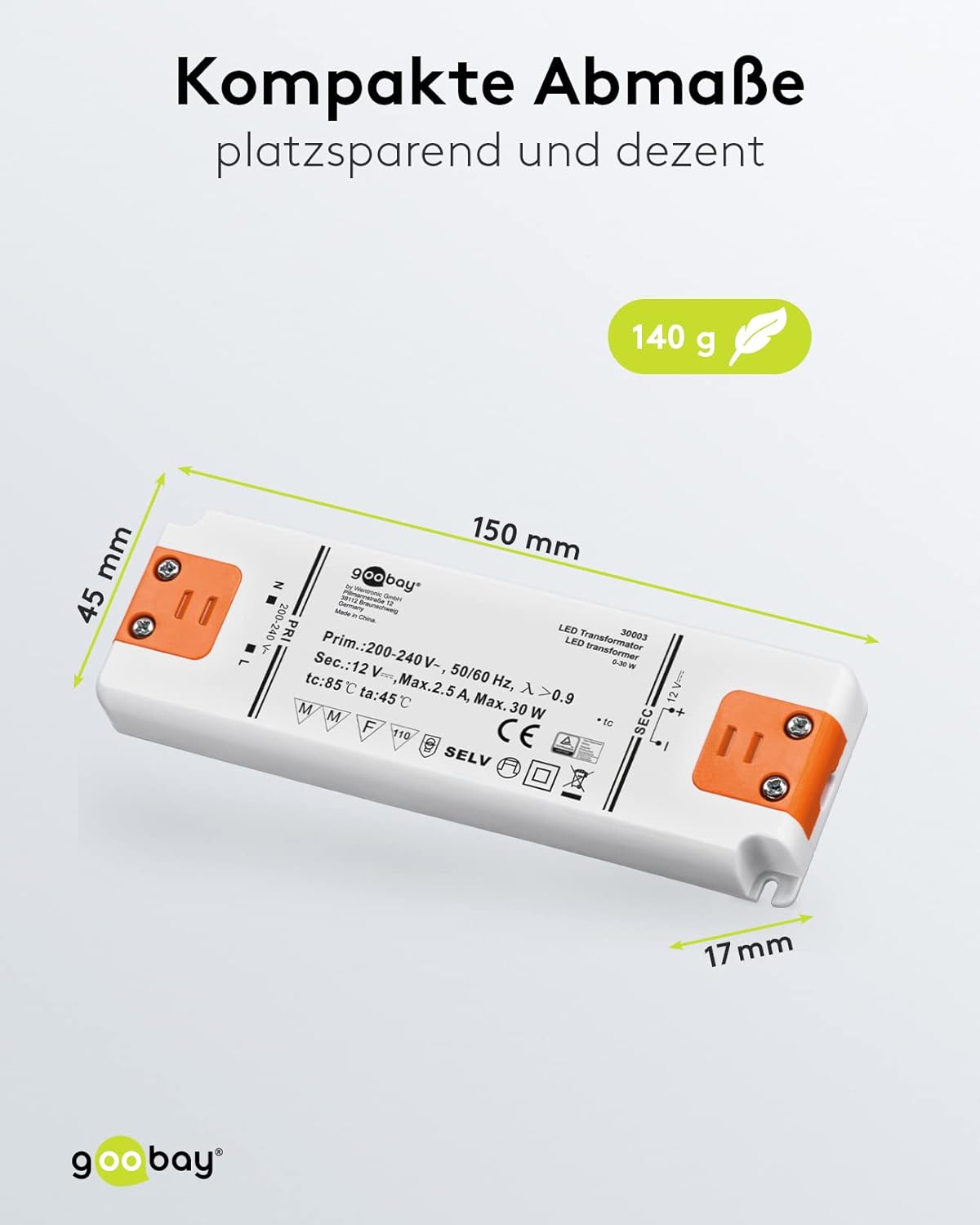
Figure 2: Goobay 30003 LED Transformer with dimensions. This image shows the transformer with its length (150 mm), width (45 mm), and height (17 mm) clearly indicated, alongside its weight (140 g).
5. Operating Instructions
The Goobay 30003 LED Transformer operates automatically once correctly installed and powered. It provides a stable 12V DC output for your connected LED devices.
- Ensure the total load of connected LEDs does not exceed 30W.
- The transformer is designed for continuous operation within its specified parameters.
6. Maintenance
The Goobay 30003 LED Transformer requires minimal maintenance.
- Cleaning: Disconnect power before cleaning. Use a dry, soft cloth to wipe the exterior. Do not use liquid cleaners or solvents.
- Inspection: Periodically check the wiring for any signs of damage or loose connections.
- Ventilation: Ensure that ventilation openings are not obstructed.
7. Troubleshooting
If you encounter issues with your transformer, refer to the following table:
| Problem | Possible Cause | Solution |
|---|---|---|
| LEDs do not light up | No power supply Incorrect wiring Faulty LED(s) Overload protection activated | Check mains power and circuit breaker. Verify input and output connections and polarity. Test LEDs with a known working power source. Reduce the total load; disconnect power, wait a few minutes, then reconnect. |
| LEDs flicker or dim | Loose connection Insufficient power (near max load) Faulty LED(s) | Check all wiring connections. Ensure total load is well within the 30W limit. Test individual LEDs. |
| Transformer makes buzzing noise | Loose components Incompatible LED load (rare for constant voltage) Overload | Ensure secure mounting. If noise persists and performance is affected, discontinue use. Verify total load is within specifications. |
| Transformer is hot | Poor ventilation Overload | Ensure adequate airflow around the unit. Do not cover. Reduce the total load of connected LEDs. |
If the problem persists after following these steps, disconnect the power and contact customer support or a qualified electrician.
8. Specifications
- Model Number: 30003
- Brand: Goobay
- Input Voltage (Primary): 200-240V~, 50/60 Hz
- Output Voltage (Secondary): 12V DC
- Maximum Output Current: 2.5 Amps
- Maximum Total Load: 30 Watts
- Power Source: Electricity, Male Plug
- Protection Class: II (Safe electronic separation)
- Certification: CE
- Mounting Type: Bodenmontage (Floor Mounting - typically refers to surface mounting)
- Product Dimensions: 1.77 x 0.67 x 5.91 inches (45 x 17 x 150 mm)
- Weight: Approximately 5.59 ounces (140 g)
- Operating Temperature (ta): 45 °C
- Case Temperature (tc): 85 °C
9. Warranty and Support
For warranty information or technical support, please refer to the documentation provided with your purchase or contact your retailer. Keep your proof of purchase for warranty claims.


