
1. Introduction
This manual provides comprehensive instructions for the operation and maintenance of your Kodak EasyShare M1063 Digital Camera. Designed for ease of use, this camera features a 10.3-megapixel sensor and a 3x optical zoom lens, enabling high-quality still images and video recording.
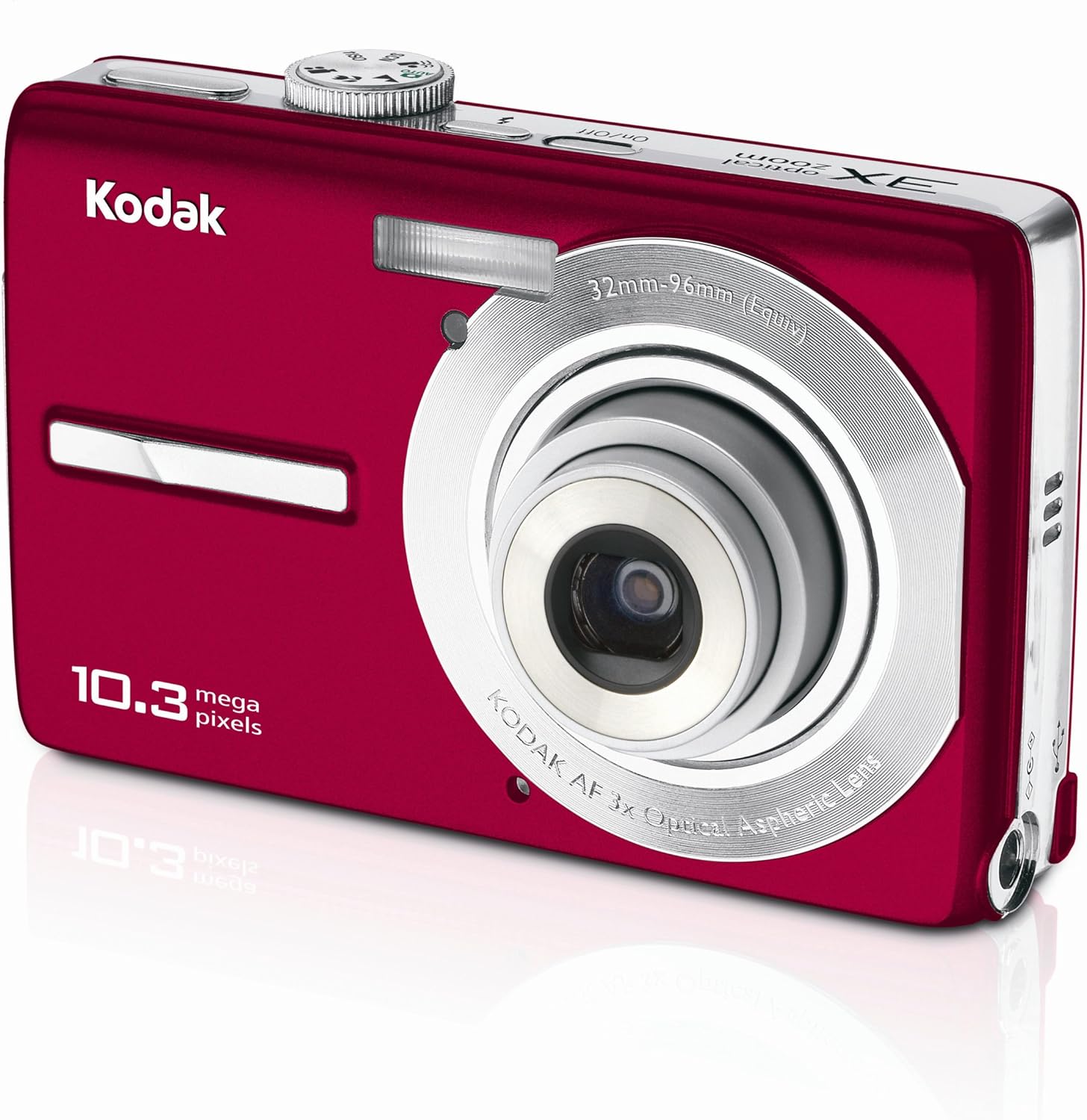
Figure 1: Front view of the Kodak EasyShare M1063 Digital Camera, showcasing its red finish, lens, flash, and 10.3-megapixel branding.
2. Setup
2.1. Battery Installation and Charging
The camera uses a Kodak Li-Ion rechargeable digital camera battery (KLIC-7001). Ensure the battery is fully charged before first use.
- Open the battery compartment cover located on the bottom of the camera.
- Insert the Li-Ion battery, ensuring correct orientation as indicated by the markings inside the compartment.
- Close the battery compartment cover securely.
- Connect the camera to the AC adapter using the provided USB cable for in-camera charging. The charging indicator light will show the charging status.
2.2. Memory Card Installation
The camera supports SD/SDHC memory cards (not included). It also features 16 MB of internal memory for temporary storage.
- Locate the memory card slot, typically adjacent to the battery compartment.
- Insert the SD/SDHC card with the metal contacts facing the correct direction, pushing until it clicks into place.
- To remove, gently press the card until it springs out.
2.3. Initial Power-On
Press the On/Off button located on the top of the camera to power it on. Follow any on-screen prompts for initial setup, such as setting the date and time.
3. Operating the Camera
3.1. Taking Photos
- Power On: Press the On/Off button.
- Select Mode: Use the mode dial or menu to select your desired shooting mode (e.g., Auto, Program AE, Scene modes).
- Frame Your Shot: Use the 2.7-inch LCD to compose your image.
- Zoom: Use the zoom control to adjust the 3x optical zoom.
- Focus: Press the shutter button halfway down to allow the camera to focus.
- Capture: Press the shutter button fully to take the picture.
3.2. Key Photography Features
- Face Detection: Automatically detects and optimizes settings for faces in your shot.
- Blur Reduction: Minimizes blur from camera shake or subject movement.
- Kodak Perfect Touch Technology: Enhances picture quality for brighter, more vivid results.
- High ISO: Capture details in low-light conditions with ISO settings up to 1000 (or 1600 in some modes).
- Scene Modes: Choose from 20 preset scene modes (e.g., portrait, landscape, night, sport) for optimized settings.
- Panorama Stitch Mode: Combine up to three shots into one panoramic image directly in-camera.
3.3. Recording Videos
The camera can record continuous VGA video (640 x 480) at 15 frames per second with sound.
- Switch the camera to video recording mode.
- Press the shutter button to start recording.
- Press the shutter button again to stop recording.
- On-camera editing features allow for basic video adjustments.
3.4. Viewing and Sharing
- Playback: Use the playback button to review photos and videos on the 2.7-inch LCD.
- Multimedia Slideshow: Create and view slideshows with pre-loaded sound themes and transitions.
- Auto Picture Rotation: Images are automatically displayed right-side up regardless of how they were captured.
- On-Camera Share Button: Tag photos for easy printing or emailing later using the dedicated Share button.
- Kodak EasyShare Software: Use the included software to organize, edit, and share your pictures on a computer.
4. Maintenance
4.1. Cleaning the Camera
- Use a soft, lint-free cloth to clean the camera body.
- For the lens and LCD screen, use a specialized lens cleaning cloth and solution, applying gently to avoid scratches.
- Avoid using harsh chemicals or abrasive materials.
4.2. Battery Care
- Store the battery in a cool, dry place when not in use.
- Avoid fully discharging the battery frequently to prolong its lifespan.
- If the camera will not be used for an extended period, remove the battery.
5. Troubleshooting
This section addresses common issues you might encounter with your Kodak EasyShare M1063 camera.
| Problem | Possible Cause | Solution |
|---|---|---|
| Camera does not power on. | Battery is discharged or incorrectly inserted. | Ensure battery is fully charged and correctly seated. |
| Pictures are blurry. | Camera shake, subject movement, or incorrect focus. | Hold camera steady, use blur reduction, ensure proper focus before shooting. Check lighting conditions. |
| No sound in recorded videos. | Microphone issue or setting. | Check camera settings for audio recording. If issue persists, contact support. |
| Memory card error. | Card is full, corrupted, or incompatible. | Delete unnecessary files, format the card (this will erase all data), or try a different compatible SD/SDHC card. |
For further assistance, please refer to the official Kodak support resources.
6. Specifications
| Feature | Detail |
|---|---|
| Model Name | M1063 |
| Photo Sensor Resolution | 10.3 MP |
| Optical Zoom | 3x |
| Digital Zoom | 5x |
| Image Stabilization | Digital, Optical |
| Screen Size | 2.7 Inches |
| Display Type | LCD |
| Supported File Format | JPEG |
| Video Resolution | 640 x 480, 15 fps (VGA) |
| ISO Range | Auto, 50, 100, 200, 400, 800, 1000 |
| Flash Modes | Auto, Red-eye Reduction, Fill-in, Off |
| Memory | 16 MB Internal, SD/SDHC Card Slot |
| Connectivity | USB |
| Battery Type | Li-Ion Rechargeable (KLIC-7001) |
| Item Weight | 0.39 Pounds |
7. Warranty and Support
For information regarding product warranty, please refer to the warranty card included with your camera or visit the official Kodak support website. Technical support and additional resources are available through Kodak's customer service channels.
No official product videos are available for embedding in this manual.


