
1. Product Overview
The RCA RS2135I is a compact audio system designed for versatile audio playback. It features a 5-disc CD changer, a universal dock for iPod devices, an AM/FM radio tuner, and a USB port for playing and recording audio. This system is equipped with a 160-watt digital amplifier for clear sound output.
Key Features:
- Universal iPod dock with charging capability.
- 5-disc CD changer supporting CD-DA, MP3, and WMA formats.
- AM/FM stereo radio tuner.
- USB port for playback of MP3/WMA files and recording from CD, radio, or auxiliary input.
- Integrated clock function.
- Includes main unit, two speakers, AM loop antenna, and remote control.
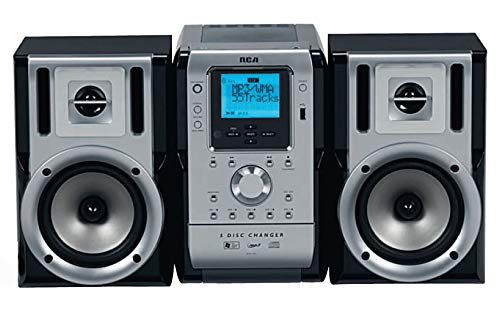
Figure 1: Front view of the RCA RS2135I Compact Audio System, showing the central unit with a 5-disc changer and two detached speakers.
2. Setup Instructions
2.1 Unpacking and Placement
Carefully remove all components from the packaging. Place the main unit and speakers on a stable, flat surface. Ensure adequate ventilation around the unit.
2.2 Speaker Connection
Connect the speaker wires from the main unit to the corresponding terminals on each speaker. Ensure correct polarity (positive to positive, negative to negative) for optimal sound quality.
2.3 Antenna Connection
- AM Antenna: Connect the supplied AM loop antenna to the AM antenna terminals on the rear of the main unit. Position the antenna for best reception.
- FM Antenna: Extend the FM wire antenna fully for optimal FM reception.
2.4 Power Connection
Plug the AC power cord into a standard wall outlet. The unit will enter standby mode.
2.5 iPod Dock Setup
The universal iPod dock connects to the main unit via a single cable. Insert the appropriate dock adapter for your iPod model into the dock. Place your iPod into the dock for playback and charging.

Figure 2: The RCA RS2135I with an iPod device securely placed in its universal docking station, ready for playback and charging.
3. Operating Instructions
3.1 Power On/Off
Press the POWER button on the unit or remote control to turn the system on or off (standby mode).
3.2 Source Selection
Press the SOURCE button repeatedly to cycle through available input sources: CD, iPod, AM, FM, USB, AUX.
3.3 CD Player Operation
- Press the CD button or select CD as the source.
- Press the OPEN/CLOSE button to open the CD tray.
- Place up to five CDs onto the disc trays.
- Press OPEN/CLOSE again to close the tray.
- Press PLAY/PAUSE to begin playback.
- Use SKIP buttons to navigate tracks and STOP to end playback.
- The system supports CD-DA, MP3, and WMA formats on CD-R/RW discs.
3.4 iPod Operation
- Ensure your iPod is correctly docked.
- Select iPod as the source.
- Use the system's controls or the supplied remote to play, pause, skip tracks, and adjust volume. The iPod will charge while docked.
3.5 Radio Operation (AM/FM)
- Select AM or FM as the source.
- Use the TUNE +/- buttons to manually tune to a station.
- Press and hold TUNE +/- for automatic station scanning.
- To save a station, press PROGRAM, then use PRESET +/- to select a preset number, and press PROGRAM again to confirm.
3.6 USB Playback and Recording
- Insert a USB device into the USB port.
- Select USB as the source for playback of MP3/WMA files.
- To record (Rip & Go technology), select the desired source (CD, Radio, AUX). Press the RECORD button. The system will record the audio to the connected USB device. Refer to the full manual for detailed recording options.
3.7 Clock Setting
In standby mode, press and hold the CLOCK button. Use the TUNE +/- buttons to set the hour and minute, then press CLOCK to confirm each setting.

Figure 3: The RCA RS2135I system shown with its included remote control, highlighting the various control options available for the user.
4. Maintenance
4.1 Cleaning the Unit
Wipe the exterior of the unit with a soft, dry cloth. Do not use abrasive cleaners, waxes, or solvents as they may damage the finish. Ensure the unit is unplugged before cleaning.
4.2 CD Lens Care
Avoid touching the CD lens. If the lens becomes dirty, use a commercially available CD lens cleaner disc. Do not attempt to clean the lens manually.
4.3 Speaker Care
Keep speakers free from dust. Do not place heavy objects on the speakers or expose them to direct sunlight or moisture.
5. Troubleshooting
Before contacting service, please check the following common issues:
| Problem | Possible Cause | Solution |
|---|---|---|
| No power | Power cord not securely plugged in. | Check power cord connection to the unit and wall outlet. |
| No sound | Volume too low; incorrect source selected; speaker wires disconnected. | Increase volume; select correct source; check speaker wire connections. |
| CD not playing | CD inserted incorrectly; disc is dirty or scratched; disc format not supported. | Insert CD with label side up; clean or replace disc; ensure disc is CD-DA, MP3, or WMA. |
| iPod not playing/charging | iPod not properly docked; incorrect dock adapter; iPod software issue. | Reseat iPod; ensure correct dock adapter is used; try resetting iPod. |
| Poor radio reception | Antenna not properly positioned or connected; local interference. | Adjust AM loop antenna or FM wire antenna position; check antenna connections. |
| Display difficult to read | Viewing angle or distance. | Adjust viewing position. Note: Display visibility can vary based on ambient light and distance. |
6. Specifications
- Model: RS2135I
- Brand: RCA
- Output Power: 160W (RMS)
- CD Capacity: 5 Discs
- Playback Modes: CD-DA, MP3, WMA
- Media Support: CD-R/RW
- Tuner: AM/FM Stereo
- Connectivity: Universal iPod Dock, USB, Auxiliary Input
- Dimensions (L x W x H): Approximately 48.3 x 47.6 x 35.6 cm (19 x 18.7 x 14 inches)
- Weight: Approximately 10.32 kg (22.75 lbs)
- Color: Black
7. Warranty and Support
7.1 Limited Warranty
This RCA RS2135I Compact Audio System comes with a 1 Year Limited Warranty from the date of purchase. This warranty covers manufacturing defects in materials and workmanship under normal use. It does not cover damage caused by misuse, accident, modification, or unauthorized repair. Please retain your proof of purchase for warranty claims.
7.2 Customer Support
For technical assistance, warranty service, or further inquiries, please refer to the contact information provided in your product's packaging or visit the official RCA support website. When contacting support, please have your model number (RS2135I) and proof of purchase readily available.


