
1. Introduction
The Sangoma A104E is a high-performance Quad T1/E1/J1 interface card designed for robust telecommunications applications. This manual provides essential information for the proper installation, configuration, and maintenance of your A104E card, ensuring optimal performance within your system.
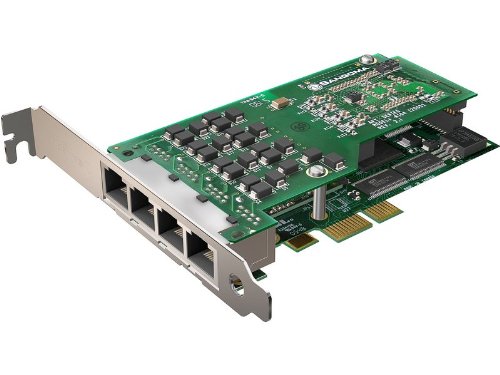
Image showing the Sangoma A104E QuadT1/E1 AFT Interface Card, highlighting its four RJ45 ports and PCIe connector.
2. Product Features
- Provides 4 T1/E1 ports for versatile connectivity.
- PCIe interface for high-speed data transfer.
- Equipped with 4 RJ45 connections.
- Supports mixing T1 Channel banks and E1 networks with full channel synchronization.
- Line decoding capabilities: HDB3, AMI, B8ZS.
- Framing options: CRC-4, Non CRC4, ESF, SF, D4, J1.
- Supports both T1/E1 and fractional T1/E1 configurations.
- Includes support for Robbed Bit Channel Associated Signaling (CAS) and ISDN PRI.
- Designed in a 2U form factor for rack-mount server compatibility.
- Comes with high-quality, tested RF45 cables and short 2U mounting clips.
- Features field-upgradeable firmware for future enhancements.
3. System Requirements and Compatibility
Software Compatibility:
- Asterisk
- Yate
- FreeSwitch
- Other Open Source and proprietary PBX, Switch, IVR, and VoIP gateway applications.
Operating System Support:
- Windows 2003, Windows XP, Windows Server 2008, Windows Vista, Windows 7
- Linux (all versions, releases, and distributions from 1.0 up)
Hardware Requirements:
- Desktop PC with an available PCI Express (PCIe) slot.
4. Package Contents
Verify that your package contains the following items:
- 1 x Sangoma A104E QuadT1/E1 AFT Interface Card
- 4 x RF45 cables
- 1 x Set of short 2U mounting clips
5. Setup
5.1 Physical Installation
- Power Down: Completely power down your computer and disconnect all power cables and peripherals.
- Open Case: Open the computer case to access the internal components.
- Locate PCIe Slot: Identify an available PCI Express (PCIe) slot on your motherboard.
- Remove Slot Cover: Carefully remove the metal slot cover corresponding to the chosen PCIe slot. If installing in a 2U rack-mount server, replace the standard bracket on the A104E card with the provided short 2U mounting clips.
- Insert Card: Align the A104E card with the PCIe slot and gently but firmly press it down until it is fully seated.
- Secure Card: Secure the card in place using the retaining screw or clip provided by your computer case.
- Close Case: Close the computer case and reconnect all power cables and peripherals.
5.2 Driver Installation
After physically installing the card and powering on your system, you will need to install the appropriate drivers. Refer to the official Sangoma website for the latest driver downloads and specific installation instructions tailored for your Linux or Windows operating system. Follow the on-screen prompts during the driver installation process.
6. Operating
6.1 Initial Configuration
Once the drivers are successfully installed, the A104E card will need to be configured within your chosen PBX or VoIP gateway application (e.g., Asterisk, FreeSwitch). This involves setting up the T1/E1 ports to match your telecommunication provider's specifications.
- Line Decoding: Configure the appropriate line decoding method (HDB3, AMI, B8ZS).
- Framing: Set the correct framing type (CRC-4, ESF, D4, etc.).
- Signaling: Define the signaling type, such as Robbed Bit Channel Associated Signaling (CAS) or ISDN PRI.
- Synchronization: If you are mixing T1 channel banks and E1 networks, ensure proper channel synchronization is configured within your application.
6.2 Software Integration
For detailed instructions on integrating and managing your Sangoma A104E hardware, consult the official documentation and community resources for your specific PBX software (e.g., Asterisk, Yate, FreeSwitch). These resources will provide guidance on creating extensions, configuring trunks, and managing call routing.
7. Maintenance
7.1 Firmware Upgrades
Periodically check the Sangoma website for firmware updates. Firmware upgrades can introduce new features, improve performance, and address potential issues. Always follow the provided instructions carefully when performing firmware updates to avoid damaging the device.
7.2 General Care
Ensure the computer environment where the A104E card is installed is kept clean and free of dust. Proper airflow and a clean environment contribute to the longevity and stable operation of the card.
8. Troubleshooting
This section provides solutions to common issues you might encounter.
8.1 Card Not Detected
- Verify the card is correctly seated in the PCIe slot.
- Ensure the correct drivers are installed for your operating system.
- Check the system's BIOS/UEFI settings to confirm the PCIe slot is enabled.
8.2 No Dial Tone or Connection Issues
- Confirm that the RJ45 cables are securely connected to both the A104E card and the telecommunication equipment.
- Verify that the T1/E1 line decoding, framing, and signaling configurations in your software match your provider's specifications.
- Check the status indicators (LEDs) on the card for any error codes or to confirm operational status.
8.3 Software Configuration Errors
- Review the configuration files of your PBX software for any syntax errors or incorrect parameters related to the A104E card.
- Consult the Sangoma support resources or community forums for common configuration issues and solutions.
9. Specifications
| Brand | Sangoma |
| Model Number | A104E |
| Hardware Interface | PCI Express |
| Ports | 4 x T1/E1/J1 |
| Connectors | 4 x RJ45 |
| Line Decoding | HDB3, AMI, B8ZS |
| Framing | CRC-4, Non CRC4, ESF, SF, D4, J1 |
| Signaling | Robbed Bit Channel Associated Signaling (CAS), ISDN PRI |
| Form Factor | 2U (with included clips) |
| Compatible Devices | Desktop PCs |
| Data Link Protocol | IEEE 802.3 |
| Item Weight | 3 Pounds |
| UPC | 812431010271 |
10. Warranty and Support
10.1 Warranty Information
For detailed warranty terms and conditions applicable to your Sangoma A104E card, please refer to the official Sangoma website or the documentation included with your product purchase. Keep your proof of purchase for warranty claims.
10.2 Technical Support
For technical assistance, driver downloads, and additional resources, visit the Sangoma support portal. When contacting support, ensure you have your product model number (A104E) and any relevant system information ready to facilitate a quicker resolution.
