
BRESSER 4940100
BRESSER Camera Adapter 31.7mm/1.25" User Manual
Model: 4940100
Introduction
The BRESSER Camera Adapter 31.7mm/1.25" is an essential accessory designed to connect your 35mm SLR camera or digital camera to a telescope. This adapter facilitates astrophotography by allowing your camera to capture images through the telescope's optics. This manual provides comprehensive instructions for its proper use and care.
Setup
Proper setup is crucial for optimal performance and image quality. Follow these steps to connect your camera adapter:
- Attach the T-Mount (if required): For certain camera models, an optional T-Mount (T2 ring) is needed. This ring screws onto your camera's lens mount and provides the necessary threading to connect to the camera adapter. Ensure the T-Mount is securely fastened to your camera body.
- Connect the Camera Adapter to the T-Mount: Screw the BRESSER Camera Adapter onto the T-Mount attached to your camera. Ensure it is tightened securely but do not overtighten.
- Insert into Telescope Focuser: The adapter features a 31.7 mm (1.25") barrel. Insert this barrel into your telescope's 1.25" focuser. Secure the adapter in the focuser using the focuser's thumbscrew(s).
- Eyepiece Insertion (Optional): If your setup requires an eyepiece for projection, insert the eyepiece into the adapter's barrel before attaching the camera. Ensure the eyepiece is compatible with the adapter's internal diameter.
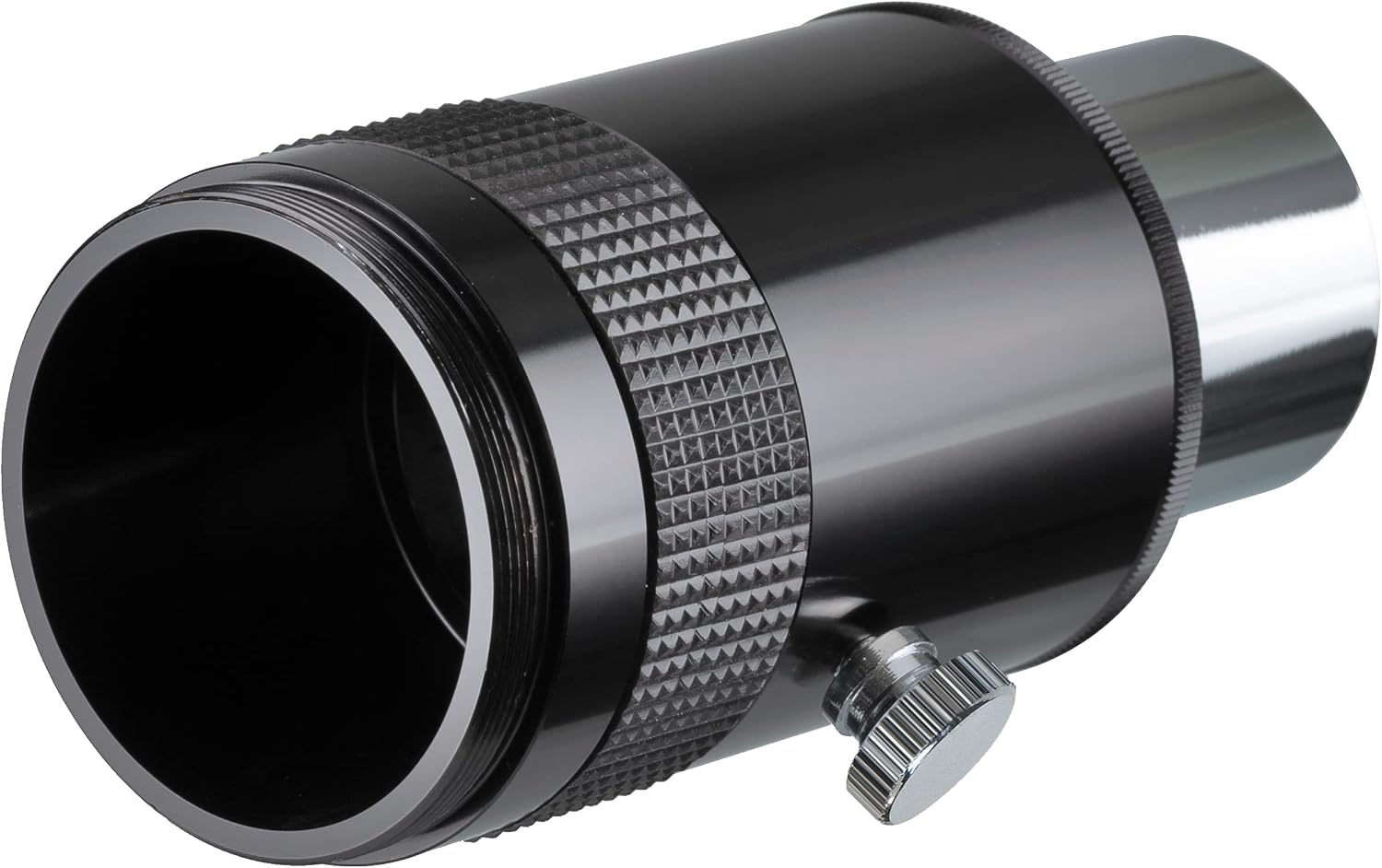
Figure 1: The BRESSER Camera Adapter shown with a T2 ring, illustrating how the two components connect for camera attachment.

Figure 2: An exploded view demonstrating the assembly of the BRESSER Camera Adapter with a T2 ring, highlighting the separate components.
Operating
Once the camera adapter is securely attached to your camera and telescope, you can begin your astrophotography session:
- Focusing: Use your telescope's focuser to achieve sharp focus. Note that some cameras with autofocus may attempt to focus on the internal mirror, which can be resolved by using an extension tube if needed to reach prime focus.
- Camera Settings: Adjust your camera's settings (ISO, shutter speed, aperture if applicable) according to the celestial object you are observing and the ambient light conditions. Manual mode is often preferred for astrophotography.
- Eyepiece Removal: When using smaller eyepieces (e.g., 4mm) with the adapter, they might become fully recessed. To remove them, gently push from the back with a non-abrasive tool, being careful not to damage the eyepiece lens.
Maintenance
To ensure the longevity and optimal performance of your BRESSER Camera Adapter, follow these maintenance guidelines:
- Cleaning: Use a soft, lint-free cloth to wipe the exterior of the adapter. Avoid using harsh chemicals or abrasive materials. If any optical surfaces are present (e.g., if using an eyepiece within the adapter), use specialized optical cleaning solutions and cloths.
- Storage: Store the adapter in a clean, dry environment, away from direct sunlight and extreme temperatures. Keep it in its original packaging or a protective case when not in use to prevent dust accumulation and physical damage.
- Handling: Always handle the adapter with clean hands to avoid transferring oils or dirt to its surfaces.
Troubleshooting
If you encounter issues while using your camera adapter, consider the following common problems and solutions:
| Problem | Possible Cause | Solution |
|---|---|---|
| Adapter does not fit telescope focuser. | Incorrect focuser size. | Ensure your telescope has a 1.25" focuser. The adapter is designed for 31.7mm (1.25") focusers. |
| Adapter does not attach to camera. | Missing or incompatible T-Mount. | An optional T-Mount (T2 ring) specific to your camera's lens mount is required. Ensure it is correctly attached. |
| Cannot achieve focus. | Insufficient back focus or camera autofocus interference. | Adjust your telescope's focuser. If using a DSLR, ensure the mirror is locked up if possible. Consider using an extension tube if prime focus cannot be reached. |
| Eyepiece stuck inside adapter. | Small eyepiece fully recessed. | Gently push the eyepiece out from the opposite end using a soft, non-abrasive tool. Avoid touching optical surfaces. |
Specifications
Key specifications for the BRESSER Camera Adapter 31.7mm/1.25":
- Brand: BRESSER
- Model Number: 4940100
- Eyepiece Diameter: 31.7 mm (1.25")
- Compatible Devices: Camera (requires specific T-Mount for connection)
- Color: Black
- Product Dimensions: 3.86 x 1.73 x 1.73 inches
- Item Weight: 4.6 ounces
Warranty and Support
For information regarding warranty coverage, technical support, or service inquiries, please refer to the warranty card included with your product or visit the official BRESSER website. You may also contact BRESSER customer service directly for assistance.
BRESSER Official Website: www.bresser.de
Ask a question about this manual
Ask about setup, troubleshooting, compatibility, parts, safety, or missing instructions. Manuals+ will review the question and use this page’s manual context to help answer it.