
Introduction
This manual provides comprehensive instructions for the safe and efficient operation of your Crown D-45 Power Amplifier. Please read this manual thoroughly before installation and use to ensure optimal performance and longevity of the unit.
Important Safety Information
Always observe the following safety precautions to prevent electric shock, fire, or damage to the unit:
- Power Source: Connect the amplifier only to a power supply of the type specified on the unit's rear panel.
- Grounding: Ensure the amplifier is properly grounded to prevent electrical hazards.
- Ventilation: Do not block ventilation openings. Allow adequate airflow around the unit to prevent overheating.
- Moisture: Do not expose the unit to rain or moisture. Do not place objects filled with liquids on the amplifier.
- Servicing: Refer all servicing to qualified service personnel. Do not attempt to service this product yourself.
- Fuse Replacement: Replace fuses only with the same type and rating as specified on the unit.
Key Features
The Crown D-45 Power Amplifier offers advanced features for high-quality audio amplification:
- Stereo power amplifier with accurate, uncolored sound and very low distortion.
- AB+B class circuitry for maximum efficiency and minimal crossover distortion.
- Ultra-low harmonic and inter-modulation distortion for superior dynamic transfer function.
- IOC (Input/Output Comparator) alerts for distortion exceeding 0.05%, ensuring distortion-free performance.
- Supports both bridged mono and stereo operation modes.
Setup and Connections
Before connecting the amplifier, ensure all equipment is powered off. Refer to the diagrams below for proper connection procedures.

Figure 1: Front view of the Crown D-45 Power Amplifier, showing the main unit and attached power cord.

Figure 2: Rear panel of the Crown D-45, detailing input (XLR, RCA) and output (speaker terminals) connections.
Audio Input Connections
Connect your audio source (e.g., mixer, preamplifier) to the amplifier's input jacks. The D-45 supports both XLR and RCA input connectors.
- For XLR inputs, use balanced XLR cables.
- For RCA inputs, use unbalanced RCA cables.
- Important: When operating in mono mode, use only the CH-1 input.
Speaker Output Connections
Connect your speakers to the output terminals on the rear panel. Ensure correct polarity (+ to + and - to -) for each channel.
- Channel 1 Outputs: Connect your left speaker.
- Channel 2 Outputs: Connect your right speaker.
- For Bridged Mono Operation: Consult the specific wiring diagram provided in the full manual for proper connection to a single speaker.
Power Connection
After all audio connections are made, connect the amplifier's power cord to a suitable AC outlet (120V, 60Hz for US models). Ensure the power switch on the front panel is in the "OFF" position before plugging in.
Operating Instructions
Follow these steps to power on and operate your Crown D-45 Power Amplifier.
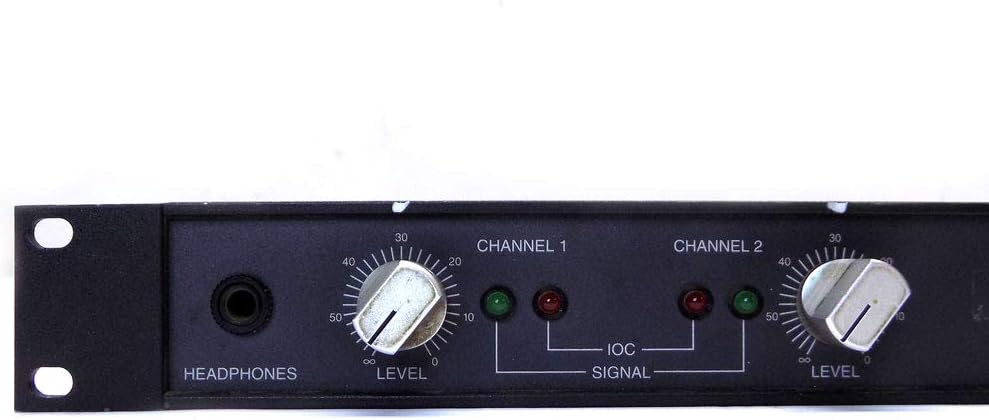
Figure 3: Close-up of the left side of the front panel, showing the Headphone jack, Channel 1 Level control, and Signal/IOC indicators.

Figure 4: Close-up of the right side of the front panel, showing the Power ON/OFF switch.
Powering On
- Ensure all level controls (Channel 1 and Channel 2) are set to their minimum (fully counter-clockwise) position.
- Flip the POWER switch to the "ON" position (refer to Figure 4). The power indicator should illuminate.
- Slowly increase the level controls for Channel 1 and Channel 2 to your desired listening volume.
Controls and Indicators
- Level Controls (Channel 1 & Channel 2): Adjust the output volume for each respective channel.
- Headphones Jack: Connect stereo headphones for monitoring the output.
- SIGNAL Indicators: These LEDs illuminate when an audio signal is present on the corresponding channel.
- IOC (Input/Output Comparator) Indicators: These LEDs illuminate if distortion exceeds 0.05%. If an IOC indicator lights up, reduce the input level or the channel's level control to prevent clipping and distortion.
Powering Off
- Reduce both Channel 1 and Channel 2 level controls to their minimum position.
- Flip the POWER switch to the "OFF" position.
Maintenance
Proper maintenance ensures the longevity and optimal performance of your D-45 amplifier.
- Cleaning: Use a soft, dry cloth to clean the exterior of the amplifier. Do not use liquid cleaners or solvents.
- Ventilation: Periodically check that the ventilation openings are clear of dust and debris.
- Connections: Ensure all input and output connections are secure and free from corrosion.
- Fuse Replacement: If a fuse blows, replace it only with a fuse of the identical type and rating as specified on the unit's rear panel. Disconnect power before replacing fuses.
Troubleshooting
If you encounter issues with your Crown D-45 amplifier, consult the following table before seeking professional service.
| Problem | Possible Cause | Solution |
|---|---|---|
| No power | Power cord not connected; Power switch off; Blown fuse; No AC power from outlet. | Check power cord connection; Turn power switch ON; Replace fuse (if necessary, with correct type); Test AC outlet with another device. |
| No sound output | Input cables disconnected; Speaker cables disconnected or incorrect polarity; Level controls set to minimum; Source device not playing. | Check all input and output cable connections; Verify speaker polarity; Increase level controls; Ensure audio source is active. |
| Distorted sound / IOC indicator lit | Input signal too high; Amplifier overloaded; Faulty speaker. | Reduce input signal level from source; Decrease amplifier level controls; Check speaker connections and integrity. |
| Hum or noise | Ground loop; Faulty cables; Interference from other equipment. | Ensure proper grounding; Try different cables; Move amplifier away from other electronic devices. |
Specifications
Below are the technical specifications for the Crown D-45 Power Amplifier.

Figure 5: Product label showing model number, serial number, AC voltage, amps, max power in watts, and patent information.
- Model Name: D-45
- Item Model Number: D45
- Brand: Crown
- Output Wattage: 45 Watts
- Power Source: Corded Electric
- Connector Type: RCA
- Compatible Devices: All
- Color: Black
- Item Weight: 10.8 pounds
- Package Dimensions: 21.3 x 12.7 x 2.7 inches
- AC Volts (as per label): 120
- Amps (as per label): 1
- Max Power In (as per label): 120 Watts
Warranty and Support
Warranty information and detailed customer support contacts are typically provided with the product packaging or available on the manufacturer's official website. Please refer to the official Crown website or your purchase documentation for specific warranty terms and support options.
For technical assistance or service inquiries, please contact Crown customer support.


