
Product Overview
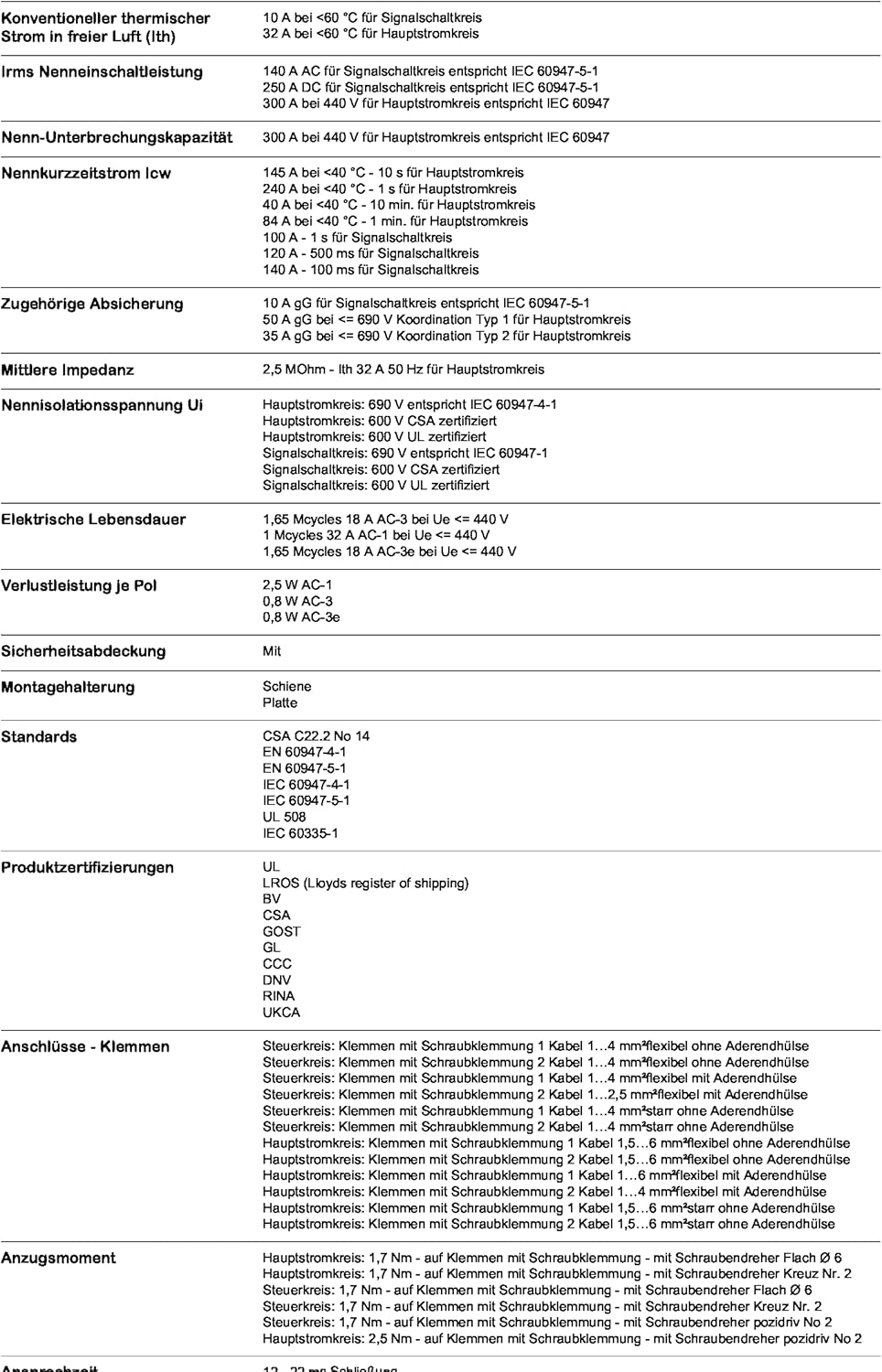
The Schneider Electric TeSys D contactor, model LC1D18P7, is designed for motor control applications. This 3-pole (3NO) contactor is suitable for use with motors up to 18A/690V AC-3 (7.5kW at 400V). It features a 230V 50/60Hz AC coil and includes 1NO+1NC built-in auxiliary contacts (NC mirror certified). Connection is facilitated by screw clamp terminals. Engineered for high reliability and durability, it can operate at rates up to 3600 cycles per hour in environments up to 60°C. Its compact design (45mm width) allows for both DIN-rail mounting and screw fixing. The product is certified to multiple standards including IEC, UL, CSA, CCC, EAC, and Marine, and is Green Premium compliant (RoHS/REACh).
Key Features
- Contactor type: 3P(3 NO)
- Rated for AC-3 applications: 440 V, 18 A
- Coil voltage: 230 V AC
- Built-in auxiliary contacts: 1 Normally Open (NO) + 1 Normally Closed (NC)
- Connection type: Screw clamp terminals
- Compact design for versatile mounting (DIN-rail or screw fixing)
- High reliability and durability for industrial environments
Setup and Installation
Proper installation of the TeSys D contactor is crucial for safe and reliable operation. Installation should only be performed by qualified personnel in accordance with all local and national electrical codes and regulations.
Mounting
The contactor can be mounted on a DIN rail or secured using screws. Ensure the mounting surface is stable and free from excessive vibration. Maintain adequate clearance around the contactor for ventilation and access to terminals.
Wiring
- Power Circuit Wiring: Connect the main power supply to terminals 1L1, 3L2, and 5L3. Connect the motor or load to terminals 2T1, 4T2, and 6T3. Ensure correct phase sequence.
- Control Circuit Wiring: Connect the 230V AC control voltage to the A1 and A2 coil terminals.
- Auxiliary Contact Wiring: Utilize the 13 NO (Normally Open) and 21 NC (Normally Closed) auxiliary contacts as required for control logic or signaling.
- Terminal Tightening: Use appropriate tools to tighten all screw clamp terminals to the specified torque to ensure secure electrical connections and prevent overheating. Refer to the product label or technical data sheet for specific torque values.
Warning: Disconnect all power before performing any installation or wiring work to prevent electric shock.
Operating Instructions
The TeSys D contactor operates by energizing its coil, which causes the main contacts to close, thereby connecting the load to the power supply. When the coil is de-energized, the main contacts open, disconnecting the load.
Normal Operation
- Apply 230V AC to the A1 and A2 coil terminals to close the main power contacts (1L1-2T1, 3L2-4T2, 5L3-6T3).
- Remove power from the A1 and A2 coil terminals to open the main power contacts.
Auxiliary Contacts
The built-in auxiliary contacts change state simultaneously with the main contacts. The 13 NO contact closes when the coil is energized, and the 21 NC contact opens when the coil is energized. These can be used for interlocking, signaling, or control circuit feedback.
Maintenance
The TeSys D contactor is designed for long-term, reliable operation with minimal maintenance. However, periodic inspection is recommended to ensure optimal performance and safety.
Recommended Checks (Annually or as needed)
- Visual Inspection: Check for any signs of physical damage, discoloration due to overheating, or loose connections.
- Terminal Tightness: Verify that all screw terminals are securely tightened. Retighten if necessary, adhering to specified torque values.
- Contact Condition: While the contacts are generally maintenance-free, if the contactor is frequently switching high inductive loads, inspect for excessive pitting or wear.
- Dust and Debris: Ensure the contactor is free from excessive dust or debris accumulation, which can impede operation or lead to overheating. Use compressed air for cleaning if necessary.
Caution: Always de-energize the circuit and ensure no residual voltage is present before performing any maintenance or inspection.
Troubleshooting
This section provides guidance for common issues that may arise during the operation of the TeSys D contactor. For complex issues, consult a qualified electrician or Schneider Electric technical support.
| Problem | Possible Cause | Solution |
|---|---|---|
| Contactor does not energize (contacts do not close) |
|
|
| Contactor hums excessively or overheats |
|
|
| Main contacts fail to open |
|
|
Specifications
| Attribute | Value |
|---|---|
| Brand | Schneider Electric |
| Model Number | LC1D18P7 |
| Item Weight | 11.6 ounces |
| Product Dimensions | 3.66 x 4.49 x 2.05 inches |
| Voltage | 230 Volts (Coil) |
| Maximum Voltage | 540 Volts |
| Current Rating (AC-3) | 18 Amps at 440 V |
| Poles | 3P (3 NO) |
| Auxiliary Contacts | 1 NO + 1 NC |
| Connector Type | Screw Terminal |
| Material | Metal |
| Insulation Material | Plastic |
| Color | White / Black |
| Manufacturer | Schneider Electric |
| Date First Available | August 7, 2012 |
| Included Components | Product, Instructions |
Product Images and Diagrams



Warranty and Support
Schneider Electric products are manufactured to high quality standards. For information regarding warranty coverage, terms, and conditions, please refer to the documentation included with your purchase or visit the official Schneider Electric website.
For technical support, product inquiries, or assistance with troubleshooting beyond the scope of this manual, please contact Schneider Electric customer service or an authorized distributor. Contact information can typically be found on the Schneider Electric website or on the product packaging.
Online Resources:
- Official Schneider Electric Website: www.se.com
- Product Support Page (if available): Refer to the product page on the Schneider Electric website for specific documentation and FAQs related to the TeSys D contactor series.


