
Introduction
The BOSS DD-7 Digital Delay pedal offers advanced delay capabilities in a compact stompbox format. Building upon its predecessors, the DD-7 provides extended delay times, new delay modes including Modulation Delay and Analog Delay, and enhanced external control options. This manual provides detailed instructions for setup, operation, and maintenance of your DD-7 pedal.
Safety Information
To ensure safe operation and prevent damage, please observe the following precautions:
- Do not attempt to repair the unit yourself. Refer all servicing to qualified personnel.
- Do not use or store the unit in areas subject to extreme temperatures, humidity, or direct sunlight.
- Avoid strong impacts and vibrations.
- Use only the specified power supply (9V DC, center negative) or a 9V battery.
- Keep out of reach of children.
Panel Layout and Controls
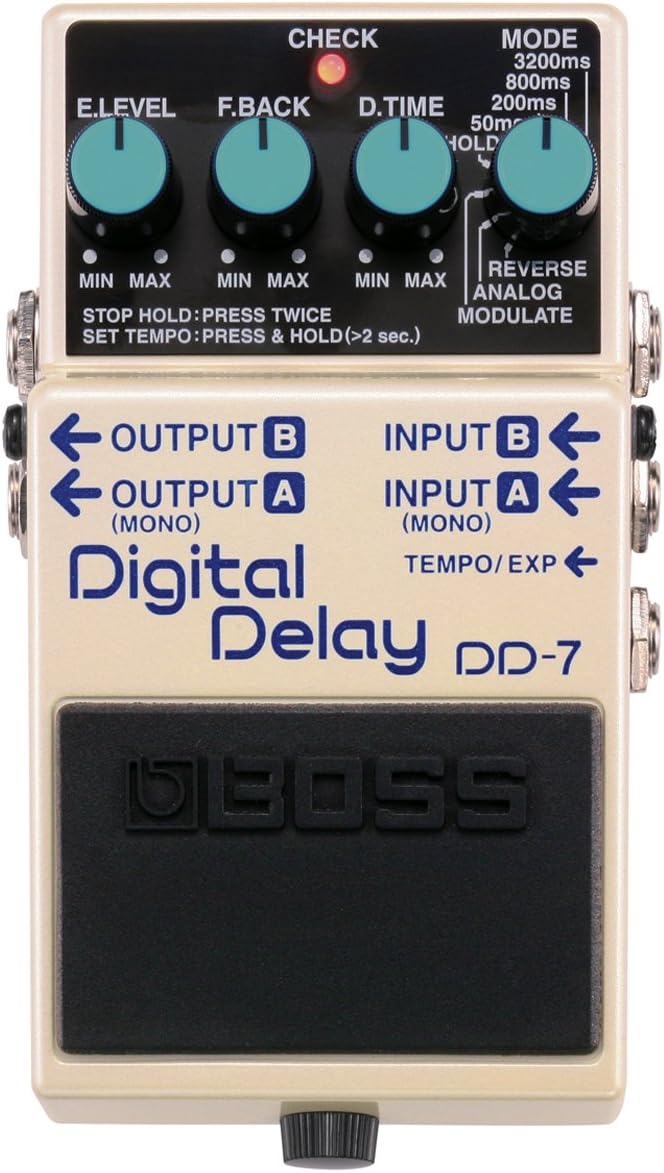
Figure 1: Front panel of the BOSS DD-7 Digital Delay Pedal, showing all knobs, jacks, and indicators.
Control Knobs
- E.LEVEL (Effect Level): Adjusts the volume of the delay sound. Turn clockwise for more effect, counter-clockwise for less.
- F.BACK (Feedback): Controls the number of delay repeats. Higher settings result in more repeats.
- D.TIME (Delay Time): Sets the duration of the delay. This knob's function varies depending on the selected MODE.
- MODE Knob: Selects the delay type and maximum delay time.
- 3200ms: Standard digital delay with a maximum delay time of 3200 milliseconds.
- 800ms: Standard digital delay with a maximum delay time of 800 milliseconds.
- 200ms: Standard digital delay with a maximum delay time of 200 milliseconds.
- 50ms: Standard digital delay with a maximum delay time of 50 milliseconds.
- HOLD: Loop playback mode. Allows recording and looping of phrases up to 40 seconds.
- REVERSE: Plays the delayed sound in reverse.
- ANALOG: Simulates the warm, organic sound of classic analog delay pedals.
- MODULATE: Adds modulation (chorus-like effect) to the delay sound.
Indicators and Switches
- CHECK Indicator: Indicates the pedal's on/off status, battery condition, and tap tempo/hold recording status.
- Pedal Switch: Toggles the effect on/off. Also used for Tap Tempo and Hold mode operations.
- STOP HOLD: Press the pedal switch twice quickly.
- SET TEMPO: Press and hold the pedal switch for more than 2 seconds.
Input/Output Jacks
- INPUT A (MONO) / INPUT B: Connect your instrument or the output of another effect pedal here. Use INPUT A for mono operation.
- OUTPUT A (MONO) / OUTPUT B: Connect to your amplifier or the input of another effect pedal. Use OUTPUT A for mono output.
- TEMPO/EXP Jack: Connect an external footswitch (e.g., BOSS FS-5U, FS-6) for tap tempo control or an expression pedal (e.g., Roland EV-5) for real-time control of delay time, feedback, or effect level.
Setup
Power Supply
The DD-7 can be powered by a 9V battery or an optional AC adapter (BOSS PSA series). When using a battery, the CHECK indicator will dim when the battery is low. Always disconnect cables from the INPUT A jack when not in use to conserve battery life.
Connections
- Mono Connection: Connect your instrument to INPUT A and your amplifier to OUTPUT A.
- Stereo Connection: Connect your instrument to INPUT A and your amplifier's left input to OUTPUT A, and the amplifier's right input to OUTPUT B.
- External Control: Connect an optional footswitch or expression pedal to the TEMPO/EXP jack for expanded control.
Operating Modes
The DD-7 offers various delay modes, each with unique characteristics:
- Standard Digital Delay (3200ms, 800ms, 200ms, 50ms): Provides clear, pristine digital delay repeats. The different settings determine the maximum delay time available via the D.TIME knob.
- ANALOG Delay: Emulates the warm, slightly degraded repeats of vintage analog delay units.
- MODULATE Delay: Adds a subtle, swirling modulation to the delay repeats, creating a chorus-like texture.
- REVERSE Delay: Produces delay repeats that play backward, creating unique atmospheric effects.
- HOLD Mode (Loop Playback): This mode allows you to record and loop a phrase for up to 40 seconds.
- Recording: While in HOLD mode, press the pedal switch once to start recording. The CHECK indicator will light.
- Playback: Press the pedal switch again to stop recording and begin loop playback. The CHECK indicator will blink.
- Overdubbing: While playing back, press the pedal switch once to overdub.
- Stopping: To stop playback, press the pedal switch twice quickly.
Advanced Features
Tap Tempo
The DD-7 allows you to set the delay time by tapping the pedal switch or an external footswitch. To activate Tap Tempo using the built-in switch, press and hold the pedal switch for more than 2 seconds. The CHECK indicator will blink. Tap the switch two or more times at your desired tempo. The delay time will synchronize with your taps.
External Expression Pedal Control
Connecting an expression pedal to the TEMPO/EXP jack allows for real-time control over various parameters. The specific parameter controlled depends on the MODE setting and the expression pedal's configuration. Consult the full manual for detailed assignments.
Maintenance
- Cleaning: Use a soft, dry cloth to clean the unit. Do not use abrasive cleaners or solvents.
- Battery Replacement: When the CHECK indicator dims or the pedal does not power on, replace the 9V battery. To replace, loosen the thumbscrew on the front of the pedal, open the pedal, and replace the battery. Ensure correct polarity.
- Storage: If storing the unit for an extended period, remove the battery to prevent leakage.
Troubleshooting
- No Sound:
- Check all cable connections (instrument, amplifier, power).
- Ensure the instrument and amplifier volumes are turned up.
- Verify the battery is fresh or the AC adapter is properly connected.
- No Effect Sound:
- Ensure the pedal is switched ON (CHECK indicator lit).
- Check the E.LEVEL knob setting; it might be set to minimum.
- Verify the F.BACK and D.TIME knobs are not set to minimum.
- CHECK Indicator Does Not Light:
- The battery may be dead; replace it.
- The AC adapter may not be connected or functioning correctly.
Specifications
| Feature | Specification |
|---|---|
| Model | DD-7 |
| Nominal Input Level | -20 dBu |
| Input Impedance | 1 M ohm |
| Nominal Output Level | -20 dBu |
| Output Impedance | 1 k ohm |
| Recommended Load Impedance | 10 k ohms or greater |
| Delay Time | 1 ms to 6400 ms (up to 3200 ms in some modes) |
| Hold Time | Up to 40 seconds |
| Controls | E.LEVEL knob, F.BACK knob, D.TIME knob, MODE knob, Pedal switch |
| Indicator | CHECK indicator (Serves also as battery check indicator) |
| Connectors | INPUT A (MONO) jack, INPUT B jack, OUTPUT A (MONO) jack, OUTPUT B jack, TEMPO/EXP jack, AC adapter jack (DC 9 V) |
| Power Supply | 9V DC battery (6F22/6LR61) or AC adapter (PSA series, sold separately) |
| Current Draw | 55 mA (DC 9 V) |
| Dimensions (W x D x H) | 73 x 129 x 59 mm (2-7/8 x 5-1/8 x 2-3/8 inches) |
| Weight | 440 g (1 lb.) (including battery) |
| Accessories | Owner's Manual, Leaflet |
| Options (sold separately) | AC adapter (PSA series), Footswitch (FS-5U, FS-6, FS-7), Expression Pedal (Roland EV-5, FV-500L, FV-500H) |
* 0 dBu = 0.775 Vrms
* The specifications are subject to change without notice.
Warranty and Support
BOSS products are manufactured to high-quality standards. For warranty information and customer support, please refer to the warranty card included with your product or visit the official BOSS website. Keep your purchase receipt as proof of purchase.


