Introduction
The Alesis SR-18 is a studio-grade standalone drum machine designed for musicians, producers, and performers. It features a comprehensive sound library, versatile connectivity options, and built-in effects to enhance your musical creations. This manual provides detailed instructions for setting up, operating, maintaining, and troubleshooting your SR-18.
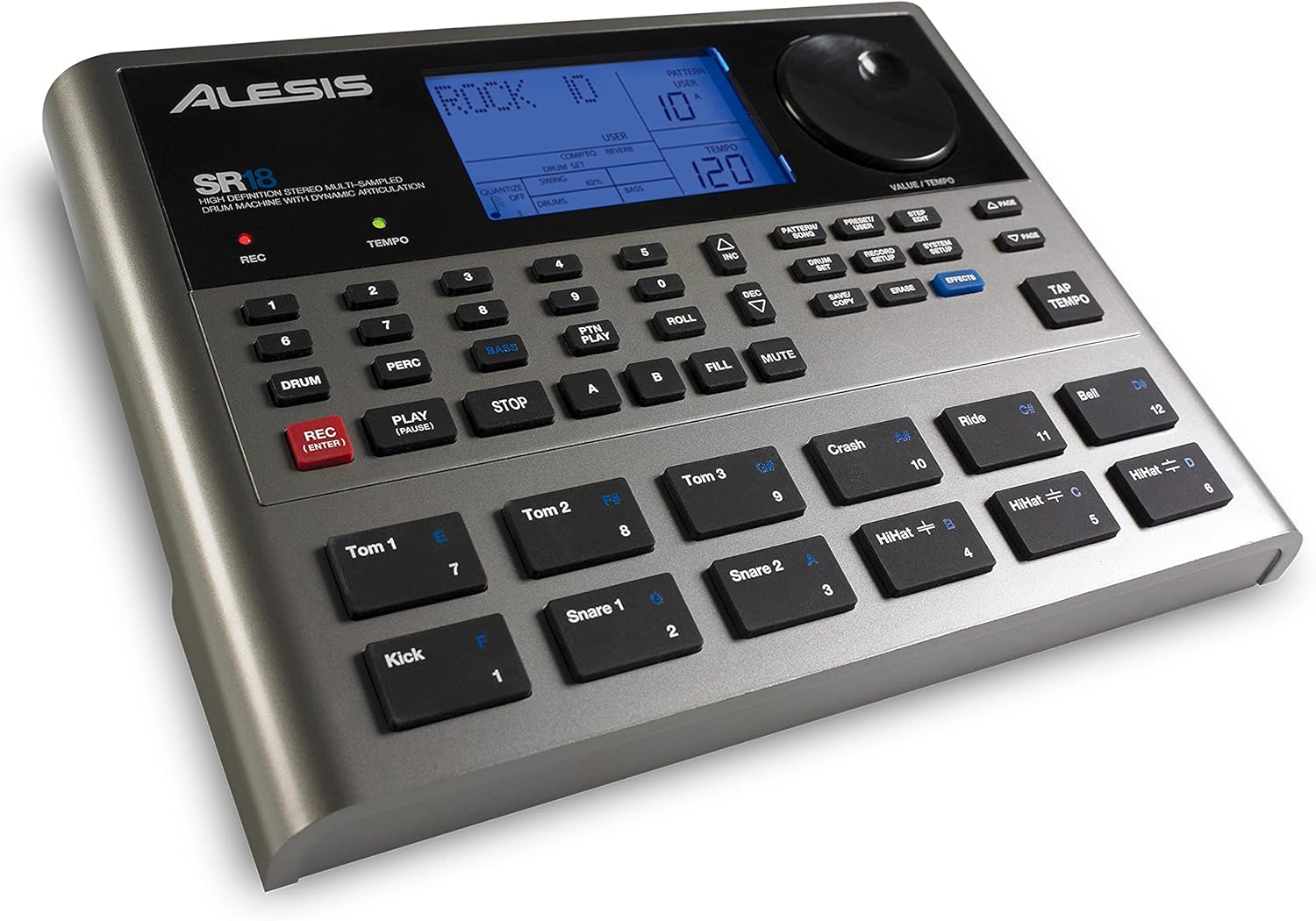
The Alesis SR-18 features a clear LCD display, velocity-sensitive pads, and dedicated buttons for various functions, allowing for intuitive control over your beats and patterns.
Setup
Unpacking and Initial Inspection
Carefully remove all components from the packaging. Verify that all items listed in the 'What's in the Box' section are present and undamaged.
Powering the SR-18
The SR-18 can be powered by either the included AC adapter or six AA batteries (not included).
- AC Power: Connect the included AC adapter to the 12V DC input on the rear panel of the SR-18 and then to a power outlet.
- Battery Power: Open the battery compartment on the underside of the unit and insert six AA batteries, ensuring correct polarity.
Connecting Audio and MIDI
The SR-18 offers various input and output options for integration into your studio or live setup.
- Main Outputs: Connect the Main Left and Main Right outputs to your mixer, audio interface, or amplifier using 1/4-inch TRS cables.
- Auxiliary Outputs: Use the Aux L/R outputs for additional routing flexibility.
- Headphones: Connect headphones to the 1/4-inch headphone jack for private monitoring.
- Instrument Input: Plug an instrument, such as a guitar, into the 1/4-inch Instrument input to play along with your programmed beats.
- MIDI I/O: Connect MIDI devices (keyboards, computers, DAWs) using the MIDI In and Out/Thru ports for advanced control and synchronization.
- Footswitches: Connect optional footswitches to the dedicated inputs for hands-free control of start/stop and count/A/B/fill functions.

The rear panel provides comprehensive connectivity, including main and auxiliary audio outputs, headphone jack, instrument input, MIDI In/Out/Thru, and footswitch inputs, alongside the power input.
Operating the SR-18
Basic Operation
- Power On/Off: Use the power switch on the rear panel to turn the unit on or off.
- Volume Control: Adjust the master output volume using the dedicated knob.
- Navigation: Use the INC (Increment) and DEC (Decrement) buttons, along with the VALUE / TEMPO dial, to navigate menus and adjust parameters on the LCD screen.
- Pad Functions: The 12 velocity-sensitive pads are used to trigger drum sounds and can also be used for playing bass parts.
Pattern and Song Modes
The SR-18 allows you to create and manage patterns and arrange them into songs.
- Pattern Play Mode: Trigger different patterns directly from the pads.
- Preset Patterns: Access 100 professionally recorded preset patterns.
- User Patterns: Create and save up to 200 customized user patterns.
- Song Mode: Arrange patterns into complete song structures, including A/B sections and fills.
Sound Library and Effects
The SR-18 boasts a rich sound library and built-in effects for sound shaping.
- 500 Professional Sounds: Explore a wide range of drum sets, electronic drums, one-shot hits, and modern percussion sounds.
- 50 Bass Sounds: Utilize dedicated bass sounds for creating rhythmic bass lines.
- Dynamic Articulation™: Experience realistic sound changes in color and timbre based on playing dynamics.
- Built-in Effects: Apply Alesis reverb, EQ, and compression to your sounds for enhanced realism and production quality.
Maintenance
- Cleaning: Use a soft, dry cloth to clean the unit. Avoid abrasive cleaners or solvents.
- Storage: Store the SR-18 in a cool, dry place away from direct sunlight and extreme temperatures.
- Battery Replacement: If using batteries, replace them when the low battery indicator appears or when performance degrades. Remove batteries if the unit will not be used for an extended period.
- Firmware Updates: Check the Alesis website periodically for any available firmware updates to ensure optimal performance.
Troubleshooting
| Problem | Possible Cause | Solution |
|---|---|---|
| No Power | AC adapter not connected or faulty; Batteries drained or incorrectly inserted. | Ensure AC adapter is securely connected and functional. Replace batteries or check polarity. |
| No Sound Output | Volume too low; Cables incorrectly connected; External audio device issues. | Increase master volume. Check all audio cable connections. Verify external mixer/amplifier settings. |
| Pads Not Responding | Pad sensitivity setting; Unit in incorrect mode. | Check system settings for pad sensitivity. Ensure unit is in a mode where pads are active (e.g., Pattern Play). |
| MIDI Communication Issues | Incorrect MIDI settings; Cable issues. | Verify MIDI In/Out settings on the SR-18 and connected devices. Check MIDI cable connections. |
For further assistance, refer to the official Alesis support resources.
Specifications
- Sounds: 500 professional drum & percussion sounds, 50 bass sounds
- Patterns: 100 preset, 200 user-programmable
- Pads: 12 velocity-sensitive pads
- Effects: Reverb, EQ, Compression
- Connectivity: Main Left/Right Outputs (1/4" TRS), Aux L/R Outputs (1/4" TRS), Headphone Output (1/4" TRS), Instrument Input (1/4" TRS), MIDI In/Out/Thru, Footswitch Inputs (Start/Stop, Count/A/B/Fill)
- Power: 12V DC 500mA AC adapter (included) or 6 AA batteries (not included)
- Dimensions (L x W x H): 9.25 x 13 x 4 inches
- Weight: 1.15 pounds
- Model Number: SR18
- Manufacturer: Alesis
Warranty and Support
The Alesis SR-18 comes with a manufacturer's warranty. Please refer to the official Alesis website or the warranty card included with your product for specific terms and conditions.
For technical support, product registration, or to download the full user guide, please visit the official Alesis support page: www.alesis.com/support.
A PDF version of the user guide is also available for download: Alesis SR-18 User Guide (PDF).