
Introduction
This manual provides instructions for the proper use, care, and maintenance of the Apex 440-1x 1/4 Phillips Hex Insert Bit, model 27522. This bit is designed for driving Phillips head screws with a compatible power tool or hand driver.
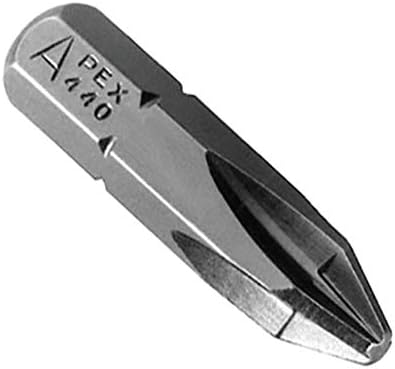
Image: The Apex 440-1x 1/4 Phillips Hex Insert Bit, showing its hexagonal shank and Phillips head tip. The bit is silver-colored with "APEX 440" engraved on the shank.
Safety Information
Always observe basic safety precautions when using power tools and accessories. Failure to do so may result in injury or damage to property.
- Wear appropriate personal protective equipment (PPE), including safety glasses, to protect against flying debris.
- Ensure the bit is securely seated in the driver before operation.
- Do not use damaged or worn bits. Replace them immediately.
- Keep hands and loose clothing away from rotating parts.
- Use the correct bit size for the fastener to prevent stripping.
Setup
- Select the Correct Driver: Ensure your power drill or hand driver has a 1/4-inch hex shank receiver.
- Insert the Bit: Slide the hexagonal end of the Apex bit into the driver's chuck or bit holder.
- Secure the Bit: Tighten the chuck or engage the locking mechanism of the bit holder to ensure the bit is firmly secured and does not wobble. A loose bit can cause damage to the fastener or injury.
Operating Instructions
Follow these steps for effective and safe operation:
- Position the Fastener: Place the Phillips head screw into the material you intend to fasten.
- Engage the Bit: Align the Phillips tip of the Apex bit with the head of the screw. Apply firm, steady pressure to keep the bit engaged with the screw head.
- Begin Driving: Start the power tool at a low speed, gradually increasing as the screw begins to turn. Maintain consistent pressure to prevent cam-out (the bit slipping out of the screw head).
- Complete Driving: Continue driving until the screw is fully seated or to the desired depth. Avoid over-tightening, which can strip the screw head or damage the material.
Maintenance and Storage
Proper maintenance extends the life of your Apex bit:
- Cleaning: After use, wipe the bit clean of any debris, dust, or residue. A dry cloth is usually sufficient.
- Inspection: Regularly inspect the bit for signs of wear, such as rounded edges on the Phillips tip or cracks in the shank.
- Storage: Store the bit in a dry environment to prevent rust. Keep it in a bit holder, case, or tool box to protect it from damage and loss.
- Lubrication: No lubrication is required for this type of bit.
Troubleshooting
| Issue | Possible Cause | Solution |
|---|---|---|
| Bit slips out of screw head (cam-out) | Insufficient pressure, incorrect bit size, worn screw head, or worn bit. | Apply more downward pressure. Ensure bit matches screw size. Replace worn screws or bits. |
| Screw head strips | Too much torque, incorrect bit size, or worn bit. | Reduce torque setting on power tool. Use correct bit size. Replace worn bit. |
| Bit breaks | Excessive force, side loading, or material defect. | Use appropriate force. Ensure bit is straight. Replace bit. |
Specifications
| Feature | Detail |
|---|---|
| Brand | Apex |
| Model Number | 27522 |
| Part Number | 071-440-1X |
| Head Style | Phillips |
| Drive Bit Shank Style | Hex (1/4 inch) |
| Compatible Fastener Range | Phillips head screws |
| Item Package Quantity | 1 |
| Color | Multicolor (typically metallic silver/grey) |
Warranty and Support
For information regarding warranty coverage or technical support for your Apex 440-1x Phillips Hex Insert Bit, please refer to the official Apex website or contact their customer service directly. Specific warranty terms may vary by region and retailer.
Manufacturer: Apex
Date First Available: April 12, 2008