
Shift 1612679
Shift3 Outdoor Speaker System User Manual
Model: 1612679 | Brand: Shift
Introduction
This manual provides detailed instructions for the setup, operation, and maintenance of your Shift3 Wireless Indoor/Outdoor Speaker System. Designed for versatile audio enjoyment, this system allows you to transmit music wirelessly from various audio sources throughout your home or yard.
Please read this manual thoroughly before using the product to ensure proper operation and to maximize your listening experience.
Package Contents
Verify that all items are present in the package:
- Multi-directional Wireless Speaker Unit
- Wireless Transmitter
- Audio Cable
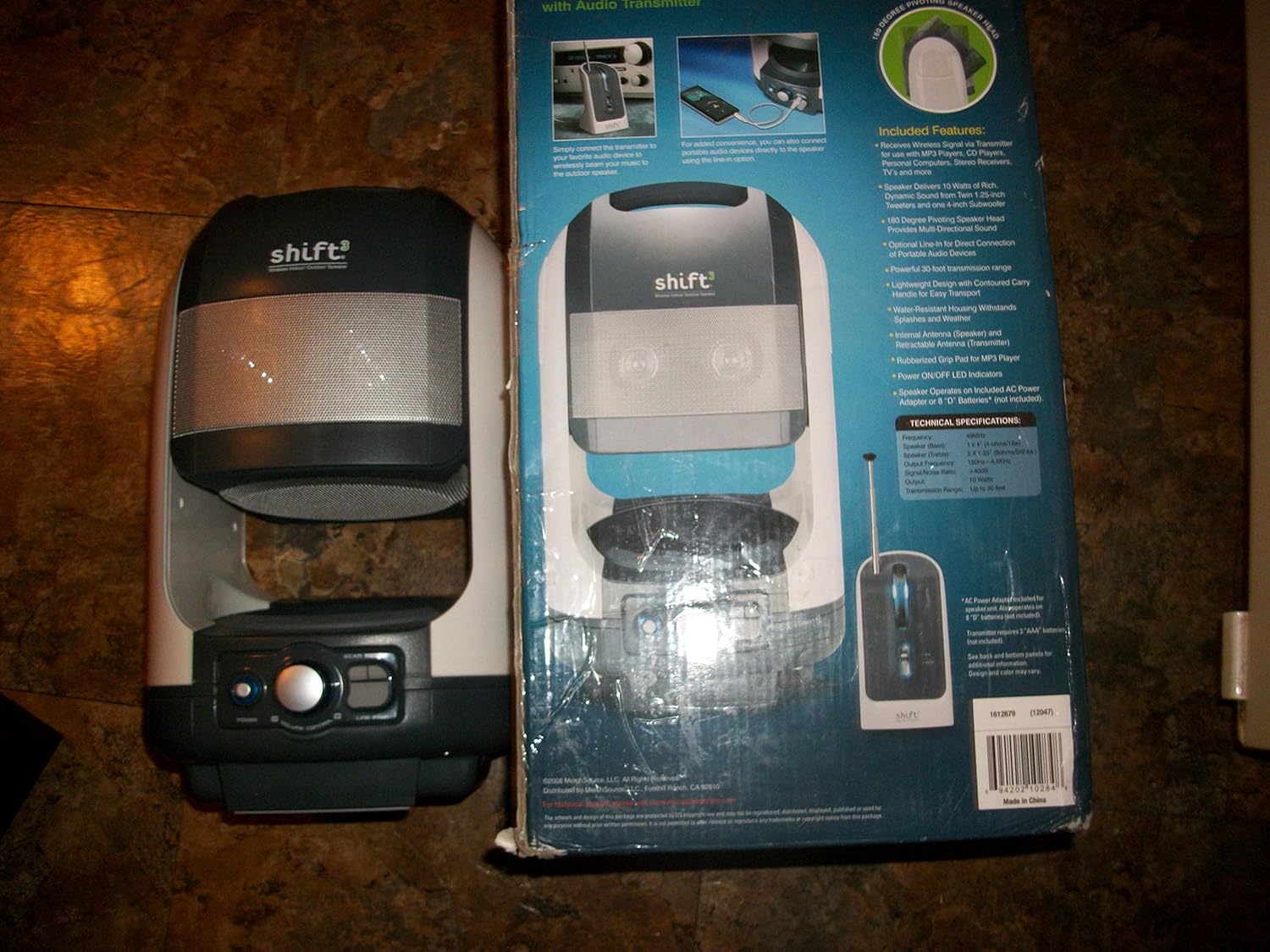
Image: The Shift3 Outdoor Speaker System, showing the main speaker unit and its retail packaging. The packaging highlights key features and specifications.
Setup
1. Powering the Speaker Unit
The speaker unit can be powered by either the included AC adapter or 8 'D' batteries (not included).
- AC Power: Connect the AC adapter to the speaker unit's power input and plug it into a standard wall outlet.
- Battery Power: Open the battery compartment on the speaker unit and insert 8 'D' batteries, ensuring correct polarity.
2. Setting up the Wireless Transmitter
The transmitter sends audio signals to the speaker unit.
- Power: Connect the transmitter's power adapter to a wall outlet.
- Audio Connection: Connect the included audio cable from your audio source (e.g., MP3 player, CD player, computer, TV) to the "Audio In" jack on the transmitter.
- Antenna: Extend the retractable antenna on the transmitter for optimal signal transmission.

Image: The Shift3 Outdoor Speaker System, showing the main speaker unit and the separate wireless transmitter with its extended antenna. This illustrates the two main components of the system.
Operating Instructions
Wireless Operation
- Ensure both the speaker unit and the transmitter are powered on.
- Select the desired audio source (e.g., MP3 player) and begin playback.
- Adjust the volume on your audio source and on the speaker unit using its volume control knob.
- The speaker has a 180-degree pivoting head; adjust its angle for optimal sound direction.
- The system has a powerful 10-meter range, transmitting through walls, floors, and ceilings.
Direct Line-In Connection
For direct audio connection without the transmitter:
- Connect an audio cable directly from your audio source to the "Line In" jack on the speaker unit (if available, based on product description).
- Ensure the speaker unit is powered on.
- Adjust volume as needed.
Maintenance
- Cleaning: Wipe the speaker and transmitter with a soft, dry cloth. Do not use liquid cleaners or abrasive materials.
- Storage: When not in use for extended periods, store the system in a cool, dry place. If using batteries, remove them to prevent leakage.
- Water Resistance: While designed for outdoor use, avoid submerging the unit in water or exposing it to heavy rain. It is water-resistant, not waterproof.
Troubleshooting
| Problem | Possible Cause | Solution |
|---|---|---|
| No Sound | Speaker or transmitter not powered on. Volume too low. Audio cable not connected properly. Out of range. | Ensure both units are powered. Increase volume. Check all cable connections. Move speaker closer to transmitter. |
| Distorted Sound | Volume too high. Weak signal. Interference. | Lower volume on source and speaker. Extend transmitter antenna. Move away from other electronic devices. |
| Short Wireless Range | Obstructions (walls, furniture). Transmitter antenna not extended. | Ensure clear line of sight if possible. Extend transmitter antenna fully. |
Specifications
- Model Name: 1612679
- Speaker Type: Tweeter
- Special Feature: Wireless
- Recommended Uses: For Surround Sound Systems, Gaming Consoles, Computers, Televisions, Smartphones or Tablets, Music Players, DVD Players
- Compatible Devices: Smartphone
- Surround Sound Channel Configuration: 2.0
- Colour: White/Grey
- Included Components: Multi-directional Wireless Speaker Unit, Wireless Transmitter, audio cable
- Manufacturer: Shift3
- Item Model Number: 1612679
- Parcel Dimensions: 43.18 x 22.86 x 22.86 cm; 3.83 kg
- Brand: Shift
- Speaker Maximum Output Power: 10 Watts
- Connectivity Technology: Bluetooth, USB
- Audio Output Mode: Stereo
- Mounting Type: Wall Mount
Warranty and Support
Specific warranty information for the Shift3 Outdoor Speaker System is not provided in this manual. For details regarding warranty coverage, returns, or technical support, please contact Shift3 customer service directly or refer to the product's original packaging or purchase documentation.
You may also visit the official Shift store for more information: Shift Official Store
Ask a question about this manual
Ask about setup, troubleshooting, compatibility, parts, safety, or missing instructions. Manuals+ will review the question and use this page’s manual context to help answer it.