
Introduction
This manual provides detailed instructions for the installation, operation, and maintenance of the Multipure Aquaversa Model MP750 Drinking Water System. This system is designed to provide cleaner, healthier drinking water for your home or office and includes a below-sink kit and a chrome faucet for convenient access.
The Aquaversa features a durable stainless-steel housing and utilizes advanced filtration technology to reduce a wide range of contaminants from your tap water.
Product Features
- NSF Certified Contaminant Reduction: Certified by NSF to standards 42 (Aesthetic Concerns), 53 (Health Concerns), and 401 (Emerging Contaminants/Incidental Compounds) for comprehensive water purification.
- Durable Construction: Features a robust stainless-steel housing for longevity and reliability.
- Cost-Effective Water Solution: Provides an economical alternative to purchasing bottled water.
- Reliable Performance: Designed for long-term use, ensuring consistent water quality.
- Enhanced Water Quality: Delivers cleaner, healthier drinking water by reducing harmful contaminants.
- Improved Taste and Convenience: Enhances the flavor of drinking water and beverages, offering on-demand access to filtered water directly from your sink.
Package Contents
Verify that all components are present before beginning installation:
- Multipure Aquaversa Model MP750 Filter Unit (Stainless Steel)
- Below Sink Installation Kit
- Chrome Faucet
- Installation Hardware and Tubing
- User Manual (this document)
Setup and Installation
The Multipure Aquaversa MP750 is designed for under-sink installation. It is recommended to have basic plumbing knowledge or consult a professional plumber for installation to ensure proper setup and prevent leaks.
Installation Overview
- Prepare the Installation Area: Ensure sufficient space under the sink for the filter unit and access to water supply lines. Turn off the main water supply before starting.
- Install the Faucet: Mount the chrome faucet in a suitable location on your sink or countertop. If replacing an existing sprayer, use that opening. Secure the faucet according to the included instructions.
- Mount the Filter Unit: Securely mount the Aquaversa filter unit under the sink using the provided bracket and hardware. Ensure it is easily accessible for future filter changes.
- Connect Water Lines: Connect the cold water supply line to the filter inlet and the filtered water outlet to the new chrome faucet using the provided tubing and connectors. Ensure all connections are tight to prevent leaks.
- Flush the System: Once all connections are secure and the water supply is turned back on, open the new faucet and allow water to run for several minutes (e.g., 10-15 minutes) to flush out any carbon fines and air from the system.
- Check for Leaks: Carefully inspect all connections for any signs of leaks.

Image: The Multipure Aquaversa MP750 filter unit (stainless steel cylinder) shown with its accompanying chrome faucet, ready for installation.

Image: A close-up view of the Multipure Aquaversa MP750 filter unit, highlighting the inlet and outlet connections for water tubing.
Operating Instructions
Once installed and flushed, your Multipure Aquaversa MP750 system is ready for use.
- Dispensing Water: To obtain filtered water, simply lift the handle or turn the knob on your chrome faucet.
- Initial Use: For the first few uses, you may notice a slight discoloration or air bubbles in the water. This is normal and will clear up after a few minutes of continuous flow.
- Flow Rate: The system is designed to provide a steady flow of filtered water. A maximum flow rate of 0.75 gallons per minute is typical.
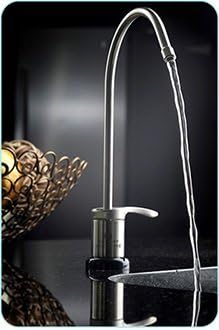
Image: The chrome faucet, part of the Aquaversa system, shown actively dispensing a stream of filtered water into a sink.
Maintenance
Regular maintenance ensures optimal performance and water quality from your Aquaversa system.
Filter Replacement
- The filter cartridge (Model CB6) should be replaced approximately once per year, or after filtering 750 gallons, whichever comes first.
- To replace the filter, turn off the water supply to the unit.
- Carefully open the filter housing, remove the old cartridge, and insert the new one.
- Close the housing securely and slowly turn the water supply back on.
- Flush the new filter as described in the "Setup and Installation" section.
Cleaning
- Wipe the exterior of the stainless-steel housing and faucet with a soft, damp cloth as needed to keep it clean.
- Avoid using abrasive cleaners or solvents, as these can damage the finish.
Troubleshooting
If you encounter issues with your Aquaversa system, refer to the following common problems and solutions:
| Problem | Possible Cause | Solution |
|---|---|---|
| Slow Water Flow | Clogged filter cartridge; low water pressure. | Replace the filter cartridge. Check household water pressure. |
| Water Leaks | Loose connections; damaged O-rings; faulty faucet. | Tighten all connections. Inspect and replace O-rings if damaged. If the faucet is leaking, contact support or consider replacement. |
| Unpleasant Taste/Odor | Expired or saturated filter cartridge. | Replace the filter cartridge. |
| No Water Flow | Water supply turned off; severely clogged filter. | Ensure water supply is on. Replace filter if severely clogged. |
If problems persist after attempting these solutions, please contact Multipure customer support.
Specifications
| Attribute | Detail |
|---|---|
| Brand | Multipure |
| Model Name | MP750 |
| Special Feature | NSF certified |
| Product Dimensions | 5.8"L x 5.8"W x 8.5"H |
| Material | Stainless Steel |
| Capacity | 750 Gallons (filter life) |
| Installation Type | Under Sink |
| Purification Method | Carbon Block |
| Power Source | Manual Operation |
| Item Weight | 5 Pounds |
| Maximum Flow Rate | 0.75 Gallons Per Minute |
| Supported Water TDS Level Maximum (PPM) | 500 |
| UPC | 815578005162 |
Warranty and Support
Return Policy: This product is eligible for a refund or replacement within 30 days of purchase, subject to the retailer's return policy.
For specific warranty details, technical assistance, or to purchase replacement parts, please contact Multipure customer support directly. Refer to the product packaging or the official Multipure website for current contact information.


