
Sky-Watcher Skywatcher Mercury-707
Sky-Watcher 70/700 AZ2 Refractor Telescope User Manual
Model: Skywatcher Mercury-707 | Brand: Sky-Watcher
1. Introduction
The Sky-Watcher 70/700 AZ2 Refractor Telescope is designed for beginners, offering a blend of quality, value, functionality, and optical power. This telescope is suitable for both astronomical and terrestrial observations, making it an ideal choice for families and amateur astronomers looking for an affordable instrument to explore the night sky and distant landscapes.
Its 70mm aperture and 700mm focal length provide a good balance between portability and magnification capabilities, allowing for clear views of the Moon, planets, and brighter deep-sky objects.
2. Safety Information
- Never look directly at the Sun through the telescope or its finder scope without a professionally manufactured solar filter. Permanent and irreversible eye damage, including blindness, can result.
- Do not leave the telescope unattended in direct sunlight. Sunlight concentrated by the telescope can cause damage to objects or ignite flammable materials.
- Handle optical components with care to avoid scratches or damage.
- Ensure the tripod is stable on a level surface to prevent tipping.
3. Package Contents
Before assembly, please ensure all components listed below are present in your package:
- Refractor Telescope Optical Tube
- AZ2 Altazimuth Mount
- Aluminum Tripod (pre-assembled)
- Eyepieces: 20mm (35x magnification), 4mm (175x magnification) - 31.8mm diameter
- 3x Barlow Lens (triples magnification)
- 90° Diagonal (31.8mm diameter, erect image for terrestrial viewing)
- 5x24 Finder Scope
4. Setup and Assembly
Follow these steps to assemble your Sky-Watcher telescope:
- Set up the Tripod: Extend the aluminum tripod legs to a stable height. Ensure the accessory tray is securely attached to provide additional stability.
- Attach the Mount: The AZ2 Altazimuth mount should be pre-attached to the tripod. If not, secure it using the provided bolt.
- Mount the Optical Tube: Place the telescope optical tube onto the mount's cradle. Secure it firmly using the tube rings and locking screws.
- Install the Finder Scope: Slide the 5x24 finder scope into its bracket on the optical tube. Tighten the retaining screw.
- Insert the Diagonal: Insert the 90° diagonal into the focuser drawtube. Secure it with the thumbscrew.
- Insert an Eyepiece: Insert the desired eyepiece (e.g., 20mm for lowest magnification) into the diagonal. Secure it with the thumbscrew.
- Attach the Barlow Lens (Optional): If using the Barlow lens, insert it into the diagonal first, then insert the eyepiece into the Barlow lens.

Figure 4.1: Fully assembled Sky-Watcher 70/700 AZ2 Refractor Telescope.

Figure 4.2: Detailed view of the focuser, diagonal, eyepiece, and finder scope assembly.
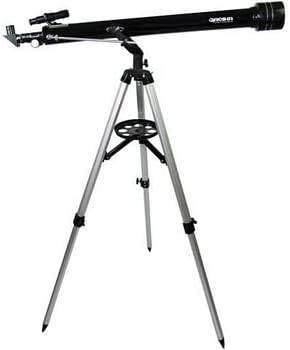
Figure 4.3: Another perspective of the assembled telescope, highlighting its compact design.
5. Operating Instructions
5.1 Aligning the Finder Scope
The finder scope is crucial for locating objects. To align it:
- Point the main telescope at a distant, stationary object (e.g., a treetop or street light) during daylight hours.
- Center the object in the main telescope's eyepiece (using the lowest magnification eyepiece, 20mm).
- Look through the finder scope. Use its adjustment screws to move the crosshairs until they are centered on the same object.
- Once aligned, objects centered in the finder scope will also be visible in the main telescope's eyepiece.
5.2 Focusing
To achieve a sharp image, rotate the focuser knobs until the object appears clear and crisp. Fine-tuning may be required as objects move across the field of view or when changing eyepieces.
5.3 Changing Magnification
Magnification is determined by the focal length of the telescope divided by the focal length of the eyepiece. Your telescope has a 700mm focal length.
- 20mm Eyepiece: 700mm / 20mm = 35x magnification
- 4mm Eyepiece: 700mm / 4mm = 175x magnification
To change magnification, simply swap eyepieces. Always start with the lowest magnification (20mm eyepiece) to locate and center objects, then switch to higher magnifications for more detailed views.
5.4 Using the 3x Barlow Lens
The 3x Barlow lens triples the magnification of any eyepiece. Insert the Barlow lens into the diagonal first, then insert the eyepiece into the Barlow lens.
- 20mm Eyepiece with 3x Barlow: 35x * 3 = 105x magnification
- 4mm Eyepiece with 3x Barlow: 175x * 3 = 525x magnification (Note: This magnification may exceed the practical limit for a 70mm telescope, resulting in a dim or blurry image, especially under typical viewing conditions.)
5.5 Altazimuth Mount Operation
The AZ2 Altazimuth mount allows for simple up-down (altitude) and left-right (azimuth) movement. Use the slow-motion controls for precise adjustments to track celestial objects as they move across the sky.
6. Maintenance and Care
- Cleaning Optics: Use a soft, lint-free cloth specifically designed for optical lenses. Breathe lightly on the lens to fog it, then gently wipe. For stubborn spots, use a small amount of optical cleaning fluid on the cloth, not directly on the lens.
- Storage: When not in use, store the telescope in a dry, dust-free environment. Replace all lens caps to protect the optics.
- Handling: Always handle the telescope and its components with clean hands to avoid transferring oils or dirt.
- Avoid Extreme Temperatures: Do not expose the telescope to rapid temperature changes or extreme heat/cold, as this can affect optical performance and material integrity.
7. Troubleshooting
- Image is blurry: Adjust the focuser knobs slowly until the image is sharp. Ensure the eyepiece is fully inserted and secured. Check for condensation on the lenses.
- Cannot find objects: Ensure the finder scope is properly aligned with the main telescope. Start with the lowest magnification eyepiece (20mm) to get a wider field of view.
- Image is upside down or reversed: This is normal for astronomical telescopes. The 90° diagonal provides an erect but laterally reversed image, which is suitable for astronomical viewing. For terrestrial viewing, the diagonal provides an erect and corrected image.
- Mount feels unstable: Ensure all tripod leg locks are tightened and the accessory tray is securely in place. Operate the slow-motion controls gently.
- Finder scope adjustment screws are loose/damaged: The finder scope's plastic adjustment screws can be delicate. Tighten them gently. If damaged, replacement parts may be available from Sky-Watcher or authorized dealers.
8. Specifications
| Feature | Specification |
|---|---|
| Optical Design | Achromatic Refractor |
| Aperture | 70 mm |
| Focal Length | 700 mm |
| Focal Ratio | f/10 |
| Light Gathering Power | 100x (compared to human eye) |
| Optical Coatings | Anti-reflection coatings on all optical surfaces |
| Mount Type | Altazimuth AZ2 with micrometric movement |
| Tripod | Pre-assembled Aluminum |
| Total Weight | 3.5 kg |
| Eyepieces Included | 20mm (35x), 4mm (175x) - 31.8mm diameter |
| Barlow Lens | 3x |
| Diagonal | 90° Erect Image, 31.8mm diameter |
| Finder Scope | 5x24 |
| Product Dimensions | 100 x 32.5 x 26 cm |
| Model Number | Skywatcher Mercury-707 |
| Country of Origin | China |
9. Warranty and Support
For information regarding product warranty and returns, please refer to the retailer's specific policies at the time of purchase. Generally, if you wish to return a product within 30 days of receipt because you have changed your mind, please consult the retailer's help page on returns. If you have received a defective or damaged product, consult the retailer's help page on defective items. For specific information on purchases made through a marketplace, consult the relevant marketplace help page.
For technical support or inquiries not covered in this manual, please contact Sky-Watcher customer service or your authorized dealer.
Ask a question about this manual
Ask about setup, troubleshooting, compatibility, parts, safety, or missing instructions. Manuals+ will review the question and use this page’s manual context to help answer it.