
1. Product Overview
The PAC AOEM-MAZ2 is an amplifier integration interface designed to facilitate the addition or replacement of an amplifier in select Mazda vehicles. This interface is specifically for vehicles that do not have a factory Bose sound system. It provides four female RCA output jacks for connecting to an aftermarket amplifier and includes an amplifier turn-on lead.

Image 1.1: The PAC AOEM-MAZ2 interface module with its integrated wiring harness and RCA output connections.
2. Key Features
- Transformer isolated design.
- Maintains audio phase integrity.
- Linear frequency response from 20 Hz to 20,000 Hz.
- Provides 2:1 gain and infinite attenuation for signal level adjustment.
- Input connectors plug directly into the factory stereo and vehicle harness.
- Includes an amplifier turn-on lead for remote power control.
3. Compatibility
The PAC AOEM-MAZ2 is compatible with select Mazda vehicles manufactured between 2000 and 2008 that utilize a 24-pin harness. This interface is designed for vehicles without a factory Bose sound system. It is not intended for use with Bose-equipped systems.
For the latest application information and specific vehicle compatibility, please visit the official PAC website: www.pac-audio.com or www.pac-integrate.com.
4. Package Contents
Upon opening the package, verify that all components are present:
- PAC AOEM-MAZ2 Interface Module
- Integrated Wiring Harness with RCA Outputs
- Instruction Manual (this document)

Image 4.1: The PAC AOEM-MAZ2 interface as packaged for retail.
5. Setup and Installation
Important: Disconnect the vehicle's negative battery terminal before beginning any electrical installation to prevent short circuits and damage to the vehicle's electrical system. Professional installation is recommended.
5.1. Locating the Factory Harness
The PAC AOEM-MAZ2 connects to the factory stereo's harness. The exact location of this harness may vary by vehicle model and year. Common locations include behind the glove box or near the factory amplifier unit.
5.2. Connection Steps
- Carefully remove the necessary trim panels to access the factory stereo harness. Refer to your vehicle's service manual for specific instructions on panel removal.
- Locate the factory 24-pin harness connected to your vehicle's audio system.
- Disconnect the factory harness from the vehicle's audio unit.
- Connect the white connector of the PAC AOEM-MAZ2 harness to the factory harness that was just disconnected from the audio unit. This is typically the male connector from the vehicle's wiring.
- Connect the brown connector of the PAC AOEM-MAZ2 harness to the audio unit's input where the factory harness was originally connected. This is typically the female connector on the audio unit.
- Connect the four female RCA output jacks from the AOEM-MAZ2 to the corresponding RCA inputs on your aftermarket amplifier. Ensure correct channel assignment (e.g., Left Front, Right Front, Left Rear, Right Rear).
- Connect the blue amplifier turn-on lead from the AOEM-MAZ2 to the remote turn-on input of your aftermarket amplifier. This will power on the amplifier when the vehicle's audio system is activated.
- Secure the PAC AOEM-MAZ2 module and all wiring to prevent rattles or interference.
- Reconnect the vehicle's negative battery terminal.
- Test the audio system to ensure proper functionality.
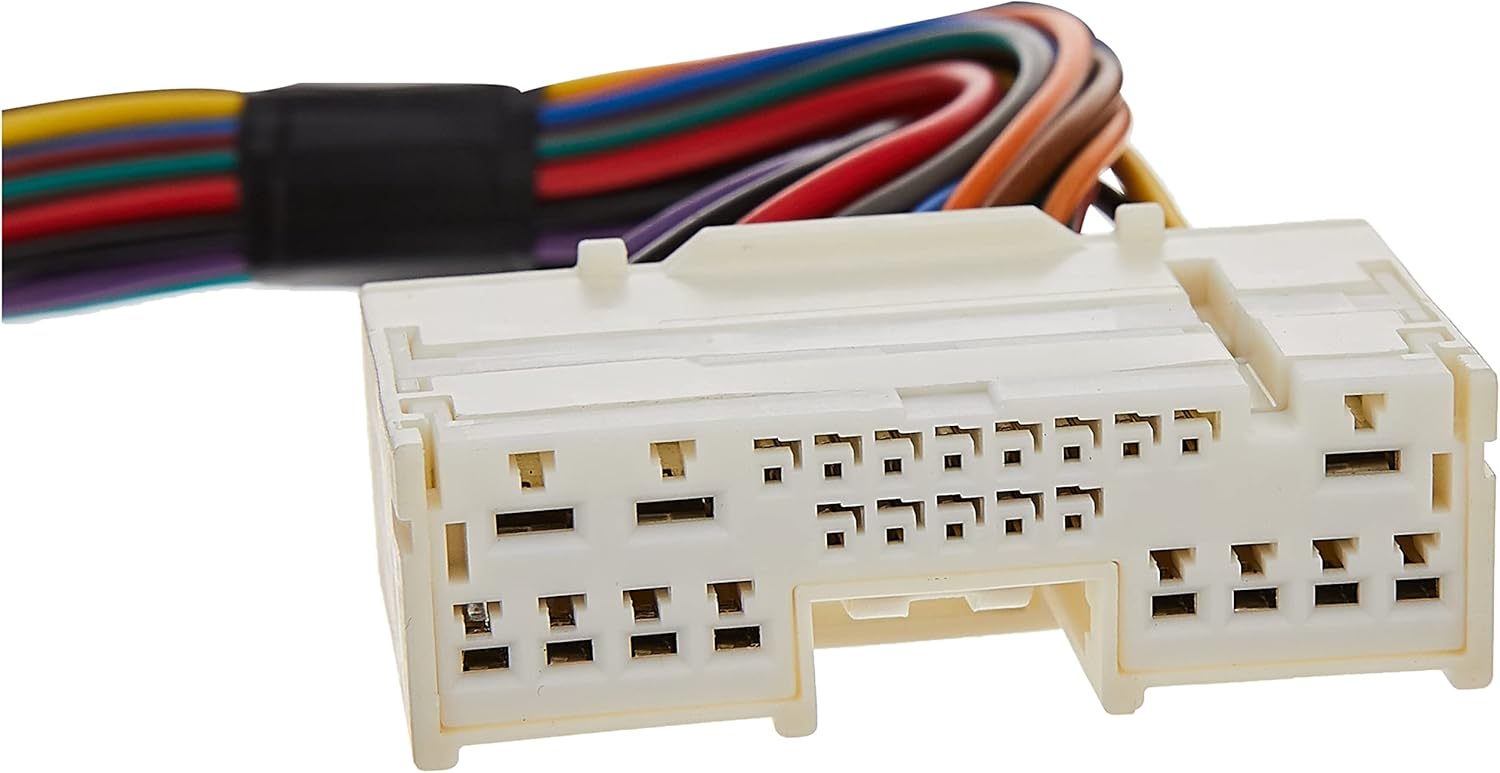
Image 5.1: The white connector of the AOEM-MAZ2, which connects to the vehicle's factory harness.

Image 5.2: The brown connector of the AOEM-MAZ2, which connects to the factory audio unit.
6. Operating Instructions
The PAC AOEM-MAZ2 is a passive interface that converts speaker-level signals to line-level RCA outputs. Once installed, its operation is integrated with your vehicle's audio system and the connected aftermarket amplifier.
6.1. Gain Adjustment
The interface provides 2:1 gain and infinite attenuation. This allows for fine-tuning of the signal level sent to your amplifier. Adjust the gain on the AOEM-MAZ2 (if applicable, refer to the module itself for controls) and your amplifier to achieve optimal sound quality without distortion. Start with the gain at its lowest setting and gradually increase it until the desired volume and clarity are achieved.
7. Troubleshooting
- No Sound:
- Verify all connections are secure, especially the factory harness connections and RCA cables.
- Ensure the amplifier turn-on lead is correctly connected and receiving power.
- Check the amplifier's power, ground, and remote connections.
- Confirm the amplifier is powered on and its gain settings are not at minimum.
- Distorted Sound:
- Reduce the gain settings on both the AOEM-MAZ2 and the aftermarket amplifier.
- Ensure the factory stereo's volume is not excessively high, which could cause clipping before the signal reaches the interface.
- Check for proper grounding of the amplifier.
- Intermittent Sound:
- Inspect all wiring for loose connections or damaged insulation.
- Ensure the interface module is securely mounted and not subject to excessive vibration.
8. Specifications
| Model Number | AOEM-MAZ2 |
| Brand | PAC |
| Dimensions (L x W x H) | 15.5 x 12 x 2 inches (Product) |
| Item Weight | 8 ounces |
| Number of Channels | 4 (RCA Outputs) |
| Frequency Response | 20 Hz - 20,000 Hz |
| Gain | 2:1 gain and infinite attenuation |
| Operating Temperature | Up to 85 Degrees Celsius |
| UPC / GTIN | 00606523107457 |
9. Support and Warranty
For technical assistance, product support, or warranty information, please contact PAC directly:
- Email: support@aampglobal.com
- Phone: 866-931-8021
- Website: www.pac-audio.com or www.pac-integrate.com
Warranty details are provided by the manufacturer. Please refer to the official PAC website or contact customer support for specific warranty terms and conditions.


