
1. Introduction
This manual provides essential instructions for the proper installation, operation, and maintenance of your Eclipse SW6210 12-Inch 1500 Watt Subwoofer. Please read this manual thoroughly before attempting to install or use the subwoofer to ensure optimal performance and safety.
The Eclipse SW6210 is a high-performance 12-inch component subwoofer designed to deliver powerful and accurate bass reproduction in your vehicle's audio system. It features a durable Kevlar Composite Cone and is engineered for robust power handling.
2. Safety Information
Important Safety Precautions:
- Always disconnect the vehicle's battery negative terminal before beginning any electrical work to prevent short circuits.
- Ensure all wiring is properly insulated and secured to prevent damage from vibration or sharp edges.
- Do not expose the subwoofer to excessive moisture or water. This product is not waterproof.
- Avoid installing the subwoofer in locations where it could obstruct vehicle operation or safety devices.
- Use appropriate gauge wiring for power and speaker connections to handle the subwoofer's power requirements (up to 1500W Peak, 500W RMS).
- Prolonged exposure to high sound pressure levels can cause permanent hearing damage. Operate your audio system responsibly.
3. Setup and Installation
Proper installation is crucial for the performance and longevity of your subwoofer. It is recommended that installation be performed by a qualified professional.
3.1 Unpacking
Carefully remove the subwoofer from its packaging. Inspect for any signs of damage during transit. Retain the packaging for future transport or service needs.
3.2 Mounting Considerations
The Eclipse SW6210 is a 12-inch component subwoofer designed for flush mounting in a suitable enclosure. The enclosure design (sealed, ported, bandpass) will significantly impact the subwoofer's performance. Consult with an audio specialist or refer to recommended enclosure specifications for optimal results.
- Subwoofer Diameter: 12 Inches
- Mounting Type: Flush Mount
- Product Dimensions: Approximately 14.9 x 14.6 x 9.6 inches
- Item Weight: 19.2 pounds
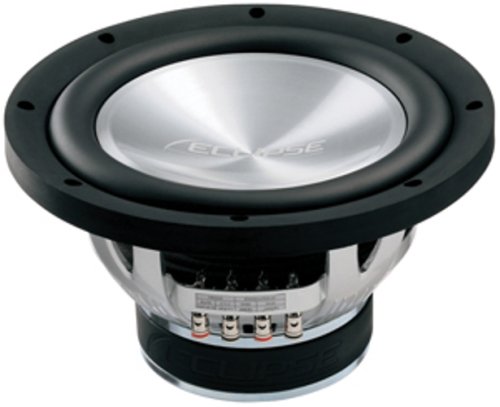
Image: Eclipse SW6210 12-Inch Subwoofer. This image shows the front view of the subwoofer, highlighting its cone and surround.
3.3 Wiring Connections
The subwoofer requires a dedicated amplifier capable of providing sufficient power. Ensure the amplifier is stable at a 4 Ohm impedance load.
- Impedance: 4 Ohms
- RMS Power Handling: 450W - 500W
- Peak Power Handling: 1300W - 1500W
Connect the subwoofer's terminals to the amplifier's speaker output terminals, observing correct polarity (+ to + and - to -). Incorrect polarity can lead to reduced bass output and poor sound quality. Use high-quality speaker wire of adequate gauge for the power levels involved.
The subwoofer operates on a Corded Electric power source, meaning it draws power from your vehicle's electrical system via an amplifier.
4. Operation
Once installed and wired correctly, the subwoofer will operate in conjunction with your car audio system. Follow these guidelines for optimal performance:
- Amplifier Gain Setting: Adjust the amplifier's gain setting carefully. Start with the gain at its minimum and slowly increase it until the desired volume is achieved without distortion. Over-driving the subwoofer can cause damage.
- Crossover Settings: Utilize your amplifier's or head unit's low-pass filter (LPF) to send only low-frequency signals to the subwoofer. A typical LPF setting for a 12-inch subwoofer is between 60Hz and 100Hz.
- Phase Control: Experiment with the phase switch (0° or 180°) on your amplifier or head unit to find the setting that provides the most cohesive bass response with your front speakers.
- Break-in Period: Allow a break-in period of several hours of moderate listening before operating the subwoofer at high volumes. This allows the suspension components to loosen up, improving performance and longevity.
5. Maintenance
The Eclipse SW6210 subwoofer requires minimal maintenance to ensure long-term performance.
- Cleaning: Use a soft, dry cloth to wipe down the subwoofer cone and surround. Avoid using harsh chemicals or abrasive cleaners.
- Inspection: Periodically check all wiring connections to ensure they are secure and free from corrosion. Inspect the subwoofer's cone and surround for any signs of damage or wear.
- Environment: Ensure the subwoofer is not exposed to extreme temperatures, direct sunlight for prolonged periods, or excessive moisture. Remember, it is not waterproof.
6. Troubleshooting
If you experience issues with your Eclipse SW6210 subwoofer, refer to the following common problems and solutions:
| Problem | Possible Cause | Solution |
|---|---|---|
| No sound from subwoofer |
|
|
| Distorted or weak bass |
|
|
| Subwoofer gets too hot |
|
|
If problems persist after attempting these solutions, contact a qualified car audio technician or Eclipse customer support.
7. Specifications
Detailed technical specifications for the Eclipse SW6210 Subwoofer:
- Model Number: SW6210
- Subwoofer Diameter: 12 Inches
- Speaker Type: Component Subwoofer
- Mounting Type: Flush Mount
- Cone Material: Kevlar Composite Cone
- Nominal Impedance: 4 Ohms
- RMS Power Handling: 450W - 500W
- Peak Power Handling: 1300W - 1500W
- Product Dimensions: 14.9 x 14.6 x 9.6 inches
- Item Weight: 19.2 pounds
- Power Source: Corded Electric (via amplifier)
- Waterproof: No (FALSE)
- UPC: 873549001223
- ASIN: B0016HPAEM
8. Warranty Information
The Eclipse SW6210 Subwoofer comes with a ONE YEAR limited warranty from the date of purchase. This warranty covers defects in materials and workmanship under normal use. It does not cover damage resulting from improper installation, accident, misuse, abuse, neglect, unauthorized modification, or normal wear and tear.
To obtain warranty service, please retain your original purchase receipt. Contact Eclipse customer support for instructions on how to proceed with a warranty claim.
9. Customer Support
For technical assistance, troubleshooting beyond this manual, or warranty inquiries, please contact Eclipse customer support. Have your product model number (SW6210) and purchase information ready when you call or email.
Please refer to the official Eclipse website or your retailer for the most current contact information.