Introduction
This manual provides essential information for the proper setup, operation, and maintenance of your Sennheiser MKE 400 Shotgun Microphone. The MKE 400 is a compact shotgun microphone designed for camcorders, offering a supercardioid lobar frequency response, switchable sensitivity, and a switchable wind noise filter. Its rugged all-metal housing ensures durability.
Safety Information
Please read and follow all safety instructions to prevent damage to the device or injury to yourself. Keep this manual for future reference.
- Do not expose the microphone to extreme temperatures, humidity, or direct sunlight.
- Avoid dropping or subjecting the microphone to strong impacts.
- Do not attempt to disassemble or modify the microphone. Repairs should only be performed by authorized service personnel.
- Keep batteries out of reach of children. Dispose of used batteries according to local regulations.
Package Contents
Ensure all items are present in your package:
- Sennheiser MKE 400 Shotgun Microphone
- 1 AAA battery
- Foam Windshield
Product Overview
Familiarize yourself with the components of your MKE 400 microphone.

Figure 1: Sennheiser MKE 400 Shotgun Microphone mounted on a camcorder, showing its compact size and position.
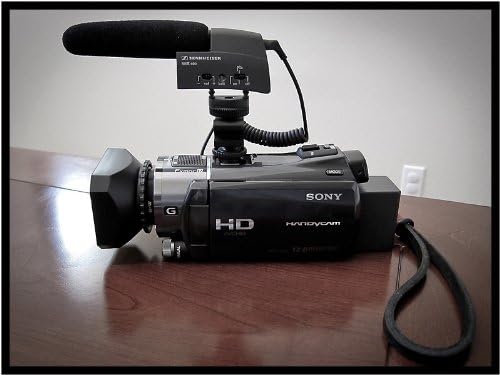
Figure 2: Rear view of the MKE 400 microphone, highlighting the 3.5mm MIC OUT port for connecting to your camera.

Figure 3: Side view of the MKE 400, showing the control switches for sensitivity adjustment and the wind noise filter.

Figure 4: Underside view of the MKE 400, illustrating the battery compartment for the single AAA battery.
Setup
- Battery Installation:
- Locate the battery compartment on the underside of the microphone (refer to Figure 4).
- Slide open the battery cover.
- Insert one AAA battery, ensuring correct polarity (+/-).
- Close the battery cover securely.
- Mounting the Microphone:
- The MKE 400 features an integral shock mount with a standard hot shoe mount. Slide the microphone onto your camera's hot shoe until it clicks into place.
- Alternatively, the microphone base includes a threaded end for mounting onto a tripod or stand.
- Connecting to Camera:
- Connect the 3.5mm audio cable from the microphone's "MIC OUT" port (refer to Figure 2) to your camera's external microphone input.
Operating Instructions
- Powering On/Off:
- Locate the ON/OFF switch on the side of the microphone (refer to Figure 3).
- Slide the switch to the "ON" position to power on the microphone. A battery indicator light will illuminate.
- Slide the switch to the "OFF" position when not in use to conserve battery life.
- Adjusting Sensitivity:
- The MKE 400 features a switchable sensitivity setting for long and short distances.
- Use the volume control switch (labeled "+ Vol -" or similar, refer to Figure 3) to adjust the microphone's input level.
- For louder sound sources or closer proximity, select a lower sensitivity setting. For quieter sources or greater distance, select a higher sensitivity setting.
- Using the Wind Noise Filter:
- The microphone includes a switchable wind noise filter to reduce unwanted ambient noise, especially in outdoor environments.
- Locate the wind noise filter switch (often labeled with a wind icon, refer to Figure 3) and activate it when needed.
- For optimal wind noise reduction, attach the included foam windshield (refer to Figure 1).
- Battery Indicator:
- The battery indicator light provides feedback on battery status. A steady light typically indicates sufficient power, while a flashing light may signal low battery.
Maintenance
- Cleaning: Use a soft, dry cloth to clean the microphone's exterior. Do not use liquid cleaners or solvents.
- Battery Replacement: Replace the AAA battery when the battery indicator signals low power. Always use fresh, high-quality batteries.
- Storage: Store the microphone in a dry, cool place away from direct sunlight and extreme temperatures. When storing for extended periods, remove the battery to prevent leakage.
Troubleshooting
| Problem | Possible Cause | Solution |
|---|---|---|
| No sound output | Microphone is off; low battery; incorrect cable connection; camera input settings. | Ensure microphone is ON; replace battery; check cable connection to camera's MIC IN; verify camera's audio input settings. |
| Distorted sound | Input level too high; microphone too close to sound source. | Reduce microphone sensitivity using the switch; increase distance from sound source. |
| Excessive wind noise | Wind noise filter is off; no foam windshield. | Activate the wind noise filter; attach the foam windshield. |
Specifications
- Model: MKE 400
- Polar Pattern: Unidirectional (Supercardioid Lobar)
- Power Source: 1 AAA Battery (included)
- Operating Time: More than 300 hours (from 1 AAA battery)
- Connector Type: 3.5 mm Jack
- Housing: Rugged all-metal
- Dimensions (L x W x H): Approximately 0.83 x 5.12 x 2.44 inches
- Item Weight: Approximately 9.4 ounces
- Compatible Devices: Camera (with standard hot shoe mount and external microphone input)
Warranty and Support
Sennheiser products are designed for reliability and performance. This product is covered by a manufacturer's warranty. For detailed warranty information, product registration, or technical support, please visit the official Sennheiser website or contact their customer service.
You can find more information and support resources on the Sennheiser Store on Amazon.


