
1. Introduction
Thank you for purchasing the Silverlit V-Beat Air Guitar. This electronic musical accessory allows users to simulate playing a guitar through motion sensing technology. This manual provides essential information for the safe and effective use of your V-Beat Air Guitar. Please read it thoroughly before use and retain it for future reference.
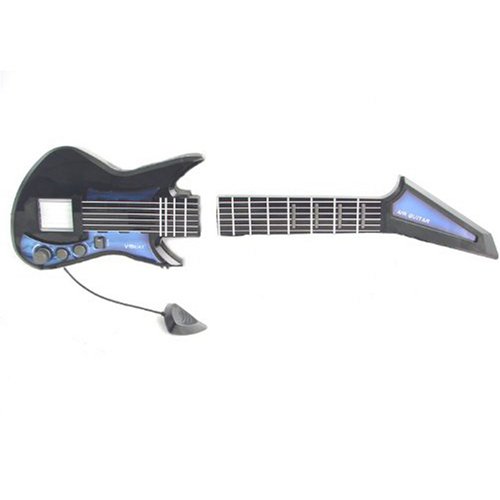
Figure 1: Silverlit V-Beat Air Guitar product packaging. The box displays the guitar with illuminated strings and fretboard, highlighting features such as MP3 player connection and motion sensing.
2. Safety Information
- Age Recommendation: This product is recommended for ages 8 years and above.
- Battery Safety:
- Use only the specified type and size of batteries.
- Do not mix old and new batteries, or different types of batteries.
- Insert batteries with correct polarity (+ and -).
- Remove exhausted batteries promptly.
- Remove batteries if the product will not be used for an extended period.
- Do not dispose of batteries in fire; they may explode or leak.
- Keep batteries out of reach of small children.
- Choking Hazard: This product contains small parts and is not suitable for children under 3 years due to potential choking hazards.
- Electrical Safety: Do not attempt to modify or disassemble the product. Refer all servicing to qualified personnel.
- Usage Environment: Avoid using the product in wet or dusty environments. Keep away from direct sunlight and heat sources.
3. Package Contents
Please check the package contents to ensure all items are present:
- V-Beat Air Guitar Body Unit
- V-Beat Air Guitar Neck Unit
- Connecting Cable (integrated)
- Instruction Manual (this document)

Figure 2: The V-Beat Air Guitar disassembled, showing the main body unit, the neck unit, and the connecting cable between them.
4. Product Overview
Familiarize yourself with the main components of your V-Beat Air Guitar:

Figure 3: The V-Beat Air Guitar body unit. This section contains the main controls, including volume, select buttons, and a mode switch. The "V-Beat" logo is visible.

Figure 4: The V-Beat Air Guitar neck unit. This part features the fretboard with four interactive buttons used for selecting notes and chords.
- Body Unit: Houses the main electronics, speaker, battery compartment, volume control, selection buttons, and mode switch. This is where the "strumming" motion is detected.
- Neck Unit: Features the fretboard with four buttons. These buttons are pressed in various combinations to produce different notes and chords.
- Connecting Cable: Permanently connects the body and neck units.
- MP3 Input Jack: (Refer to product box, typically on the body unit) Allows connection to an external audio device for playing along with music.
5. Setup
5.1 Battery Installation
The V-Beat Air Guitar requires batteries (not included) for operation.
- Locate the battery compartment on the back of the main body unit.
- Using a screwdriver, open the battery compartment cover.
- Insert the required number and type of batteries (e.g., AA or AAA, check compartment markings) according to the polarity indicators (+/-).
- Replace the battery compartment cover and secure it with the screw.
5.2 Assembly
The V-Beat Air Guitar comes in two main parts, the body and the neck, connected by a cable. No further assembly is typically required beyond connecting the cable if it was detached for packaging, or simply ensuring the cable is not tangled.

Figure 5: The V-Beat Air Guitar components laid out, demonstrating the connection between the body and neck units via the integrated cable.
6. Operating Instructions
The V-Beat Air Guitar uses motion sensing to simulate guitar playing. The plectrum (pick) inside the body unit detects downward striking motions, while the neck buttons control notes.
6.1 Basic Play
- Power On: Locate the power switch on the body unit and slide it to the "ON" position.
- Hold the Guitar: Hold the body unit as you would a regular guitar body, and the neck unit in your other hand.
- Select Notes/Chords: Press combinations of the four buttons on the neck unit to select different notes or chords. Experiment with single presses and multiple presses.
- Strum: Make a downward striking motion with the body unit, simulating strumming guitar strings. The internal sensor will detect this motion and play the selected note/chord. You do not need to physically strum between the body and neck; the motion of the body unit is sufficient.
- Varying Sound: The distance between the neck and body units can influence the sound, allowing for pitch bending or other effects.

Figure 6: A user demonstrating the playing posture for the V-Beat Air Guitar. The body unit is typically worn or held near the waist, and the neck unit is held by the other hand to press fret buttons.
6.2 Modes and Effects
The V-Beat Air Guitar offers various modes and effects:
- Mode Switch: Use the "MODE" switch on the body unit to cycle through different guitar sounds (e.g., electric, acoustic, bass).
- Chords: Press specific combinations of the neck buttons to play full chords. Refer to the quick start guide (if included) or experiment to discover chord patterns.
- Tremolo Effect: Rapidly shaking or moving the body unit can create a tremolo effect, adding vibrato to the sound.
6.3 Connecting to an MP3 Player
To play along with your favorite music:
- Locate the MP3 input jack on the V-Beat Air Guitar body unit.
- Connect one end of a standard 3.5mm audio cable (not included) to the MP3 input jack.
- Connect the other end of the audio cable to the headphone jack or line-out port of your MP3 player or other audio device.
- Adjust the volume on both your MP3 player and the V-Beat Air Guitar for a balanced sound.
7. Maintenance
- Cleaning: Wipe the surface of the V-Beat Air Guitar with a soft, dry cloth. Do not use abrasive cleaners or solvents.
- Storage: Store the product in a cool, dry place away from direct sunlight when not in use. If storing for an extended period, remove the batteries.
- Avoid Impact: Do not drop or subject the product to strong impacts, as this may damage internal components.
8. Troubleshooting
| Problem | Possible Cause | Solution |
|---|---|---|
| No sound or weak sound. |
|
|
| Guitar not responding to strumming. |
|
|
| Notes/chords not changing. |
|
|
9. Specifications
- Model: AirGuitar
- Brand: Silverlit
- Product Dimensions: 50 x 10 x 30 cm (L x W x H)
- Weight: 400 grams
- Recommended Age: 8 years and up
- Batteries Required: Yes (Type and quantity to be confirmed from product packaging, typically AA or AAA)
- Batteries Included: No
- Main Material: Wood (Note: This specification from product data may refer to a component or general category; the product appears to be primarily plastic.)
- ASIN: B00152E23S
10. Warranty and Support
Specific warranty information for the Silverlit V-Beat Air Guitar is not available in this document. For warranty claims, technical support, or inquiries regarding spare parts, please contact the retailer where the product was purchased or refer to the official Silverlit website for customer service contact details in your region.
Please retain your proof of purchase for any warranty-related issues.