
1. Introduction
Welcome to the user manual for your H-TRONIC AL600plus Lead Acid Battery Charger. This manual provides essential information for the safe and efficient operation, maintenance, and troubleshooting of your device. The AL600plus is designed for charging and maintaining 2V, 6V, and 12V lead-acid batteries, including gel and maintenance-free types.
Please read this manual thoroughly before using the charger to ensure proper function and to prevent damage to the unit or your battery.
2. Safety Instructions
Always observe the following safety precautions when operating the H-TRONIC AL600plus battery charger:
- Ensure adequate ventilation during charging to prevent the accumulation of explosive gases.
- Wear eye protection and protective clothing when working with batteries.
- Do not smoke or allow open flames or sparks near the battery or charger.
- Disconnect the charger from the mains power supply before making or breaking connections to the battery.
- Avoid short-circuiting the charging cables. The AL600plus features integrated short-circuit protection.
- Ensure correct polarity when connecting to the battery. The AL600plus includes reverse polarity protection.
- Do not attempt to charge non-rechargeable batteries.
- Keep the charger away from moisture and extreme temperatures.
3. Package Contents
Upon unpacking, please verify that all components are present:
- H-TRONIC AL600plus Lead Acid Battery Charger Unit
- Crocodile Clamps (Red for positive, Black for negative)
- User Manual (this document)
4. Product Overview
The H-TRONIC AL600plus is an advanced, intelligent battery charger designed for optimal charging and maintenance of various lead-acid battery types. It incorporates multi-stage I/U charging technology, including U1 and U2 phases, and an automatic battery care mode to ensure the longevity and performance of your batteries. The intelligent software continuously monitors battery conditions, controlling the charging process accordingly. It also features a battery test function and defect detection prior to charging.
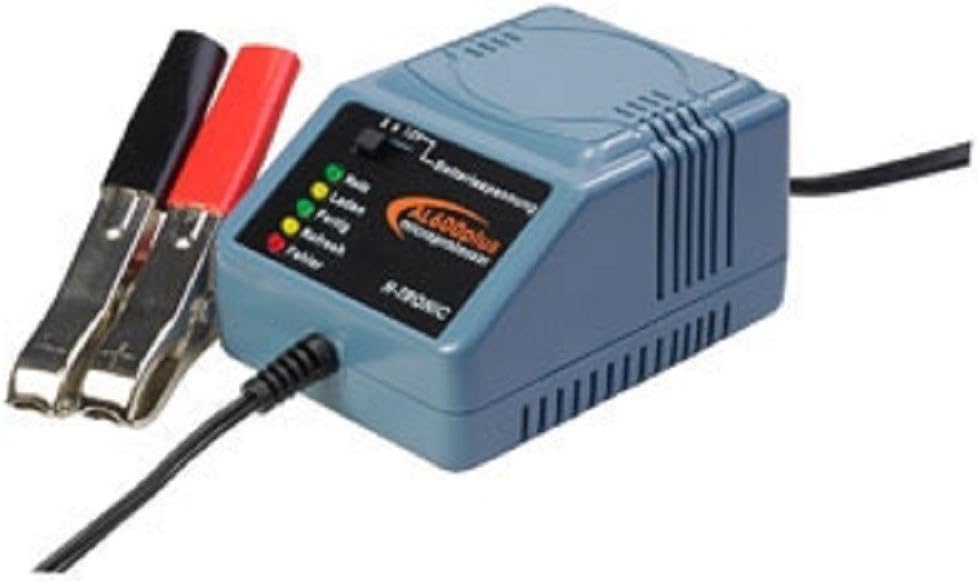
An image showing the H-TRONIC AL600plus lead acid battery charger. The charger unit is light blue-grey with a black front panel displaying the 'AL600plus' logo and LED indicators for status (Ready, Charge, Full, Refresh, Error). To the left, red and black crocodile clamps are connected, ready for battery attachment. A black power cable extends from the right side of the unit.
Key Features:
- Compatible with 2V, 6V, and 12V lead-acid batteries (including gel and maintenance-free).
- Multi-stage I/U charging characteristic (U1, U2 phase).
- Automatic battery care mode for long-term connection (hibernation).
- Trickle charging capability.
- Software-controlled battery diagnosis, test function, and defect detection.
- Automatic charge current adjustment.
- Integrated short-circuit protection.
- Integrated reverse polarity protection.
- Five LED status indicators for operational feedback.
5. Setup
Follow these steps to set up your H-TRONIC AL600plus battery charger:
- Prepare the Battery: Ensure the battery terminals are clean and free of corrosion. If charging a wet cell battery, check the electrolyte level and top up with distilled water if necessary (refer to battery manufacturer's instructions).
- Connect to Battery:
- Connect the red crocodile clamp to the positive (+) terminal of the battery.
- Connect the black crocodile clamp to the negative (-) terminal of the battery.
- Ensure connections are secure.
- Connect to Power: Plug the charger's power cord into a standard 230V AC wall outlet.
- Automatic Voltage Detection: The AL600plus automatically detects the battery voltage (2V, 6V, or 12V) and adjusts the charging parameters accordingly. There is no manual voltage selection switch.
6. Operating Instructions
Once connected, the charger will automatically begin its diagnostic and charging process:
- Initial Diagnosis: The intelligent software first performs a battery diagnosis to check for defects and determine the battery's condition.
- Charging Process: If the battery is healthy and requires charging, the charger will initiate the multi-stage I/U charging process. The LED indicators will provide status updates.
- LED Indicators: The five LEDs on the front panel indicate the current operational status:
- Ready: Indicates the charger is connected and ready, or the battery is fully charged.
- Charge: Indicates the battery is currently being charged.
- Full: Indicates the battery has reached full charge.
- Refresh: Indicates the charger is in a refresh or maintenance mode.
- Error: Indicates a fault condition (e.g., reverse polarity, short circuit, defective battery).
- Automatic Battery Care (Hibernation Mode): The AL600plus can remain connected to the battery for extended periods, such as during winter storage. It will automatically switch to a maintenance charge mode to prevent self-discharge and ensure the battery remains optimally charged without overcharging.
- Disconnection: To disconnect the charger, first unplug it from the mains power outlet, then remove the black (-) clamp from the battery, followed by the red (+) clamp.
7. Maintenance
Proper care of your H-TRONIC AL600plus charger will ensure its longevity and reliable performance:
- Cleaning: Disconnect the charger from all power sources before cleaning. Wipe the exterior with a soft, dry cloth. Do not use harsh chemicals or abrasive cleaners.
- Storage: Store the charger in a cool, dry place when not in use. Keep it away from direct sunlight and extreme temperatures.
- Cable Inspection: Periodically inspect the power cord and charging cables for any signs of damage, such as cuts or fraying. Do not use the charger if cables are damaged.
- Battery Terminals: Ensure battery terminals are clean before connecting the charger to facilitate good electrical contact.
8. Troubleshooting
If you encounter issues with your H-TRONIC AL600plus, refer to the following common problems and solutions:
| Problem | Possible Cause | Solution |
|---|---|---|
| No LEDs illuminate when connected to power. | No power supply, faulty outlet, or damaged charger. | Check the power outlet with another device. Ensure the charger is securely plugged in. If the problem persists, the charger may be faulty. |
| Error LED is illuminated. | Reverse polarity, short circuit, or defective battery. | Disconnect the charger. Verify that the red clamp is on the positive (+) terminal and the black clamp is on the negative (-) terminal. Check for any short circuits between the clamps or battery terminals. If connections are correct, the battery may be defective and unable to accept a charge. |
| Charger does not seem to charge the battery. | Battery deeply discharged, defective battery, or poor connection. | Ensure connections are clean and secure. Allow more time for deeply discharged batteries. If the battery is severely sulfated or internally damaged, it may not accept a charge. The charger's diagnostic function should detect this. |
| Charger gets warm during operation. | Normal operation. | It is normal for the charger to generate some heat during the charging process. Ensure it is in a well-ventilated area. If it becomes excessively hot or emits smoke/unusual odors, disconnect immediately. |
9. Specifications
| Feature | Specification |
|---|---|
| Brand | H-Tronic |
| Model | AL600plus |
| Product Model Number | 4260003173149 |
| Input Voltage | 230 V AC |
| Output Voltage (Nominal) | 2 V, 6 V, 12 V DC (Automatic Detection) |
| Max Charge Current (12V) | 0.6 A |
| Max Charge Current (2V/6V) | 0.3 A |
| Recommended Battery Capacity (Min) | 1.2 Ah |
| Recommended Battery Capacity (Max) | 40 Ah |
| Compatible Battery Types | Lead-acid, Lead-gel, Lead-fleece (AGM), Maintenance-free |
| Operating Temperature Range | -25 °C to +45 °C |
| Product Dimensions (L x W x H) | 9.5 cm x 5.5 cm x 7 cm |
| Product Weight | 9 g |
| Color | Grey/Black |
10. Warranty and Support
For warranty information and technical support, please refer to the documentation provided with your purchase or contact your retailer. H-Tronic ensures spare parts availability in the EU for 1 year from the date of purchase. Please retain your proof of purchase for any warranty claims.


