
Introduction
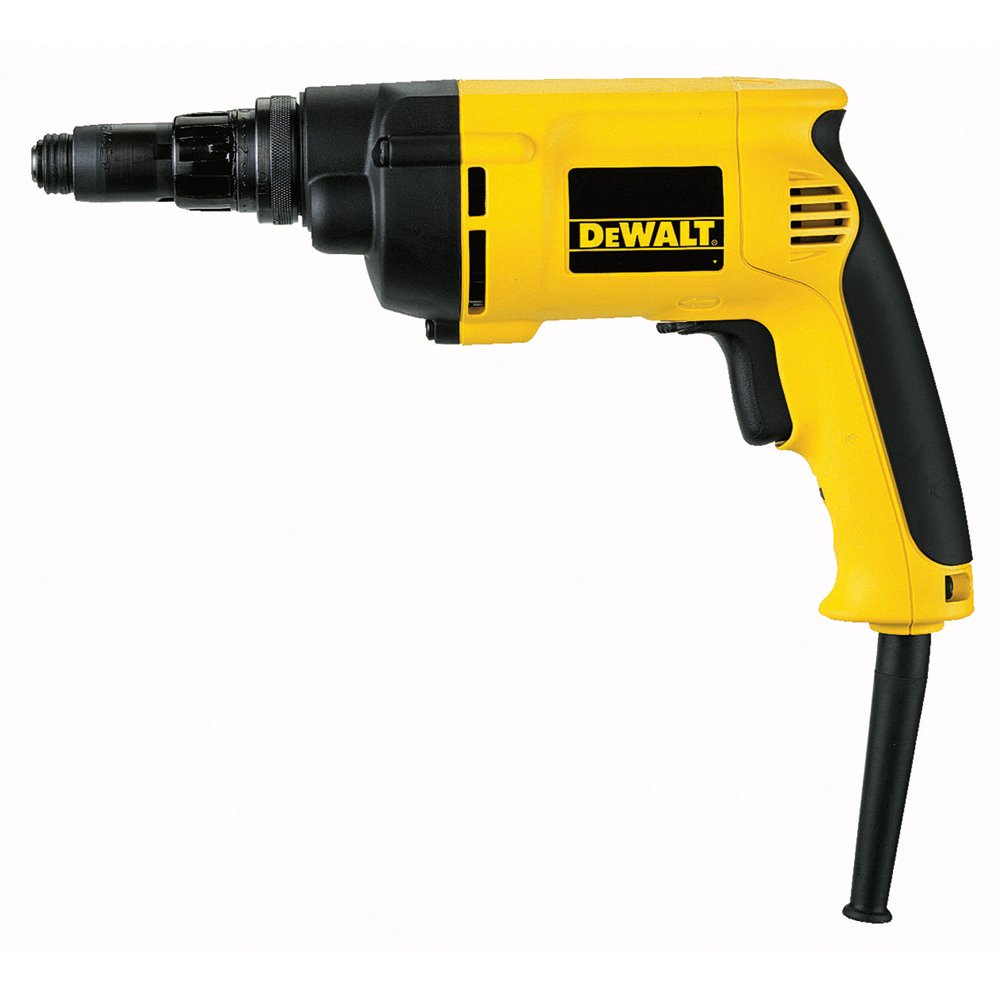
The DeWALT DW269K-QS Universal Screwdriver is a robust and versatile power tool designed for various screwing applications. This manual provides essential information for safe operation, proper setup, effective maintenance, and troubleshooting to ensure optimal performance and longevity of your tool.
Safety Instructions
Always adhere to basic safety precautions when using electric tools to reduce the risk of fire, electric shock, and personal injury. Keep this manual for future reference.
- Work Area Safety: Keep the work area clean and well-lit. Cluttered or dark areas invite accidents. Do not operate power tools in explosive atmospheres, such as in the presence of flammable liquids, gases, or dust.
- Electrical Safety: Power tool plugs must match the outlet. Never modify the plug in any way. Avoid body contact with earthed or grounded surfaces such as pipes, radiators, ranges, and refrigerators.
- Personal Safety: Always wear eye protection. Use personal protective equipment such as dust masks, non-skid safety shoes, hard hats, or hearing protection when appropriate. Dress properly; avoid loose clothing or jewelry.
- Tool Use and Care: Do not force the power tool. Use the correct power tool for your application. Disconnect the plug from the power source before making any adjustments, changing accessories, or storing power tools.
- Maintenance: Maintain power tools. Check for misalignment or binding of moving parts, breakage of parts, and any other condition that may affect the power tool’s operation.
Product Features
The DeWALT DW269K-QS is engineered for efficiency and durability:
- Torque Settings: Features 44 distinct torque settings for precise control across various materials and screw types.
- Versa Clutch: Patented 'Versa Clutch' system provides short-term torque bridging, ideal for heavy-duty screwing tasks, preventing overtightening and material damage.
- Durable Construction: Equipped with a robust metal gear housing for enhanced durability and extended tool life.
- Ergonomic Design: An ergonomic rubberized handle and responsive switch ensure a comfortable and secure grip during prolonged use.
- Optimal Performance: Designed with an optimal power-to-weight ratio, delivering 540 W of power for efficient operation.
Components Included
The following items are typically included with your DeWALT DW269K-QS (K version):
- DeWALT DW269K-QS Universal Screwdriver
- Carrying Case (for K version)
- Bit Holder
- Belt Clip
- Depth Stop
Setup
Before operating the screwdriver, ensure it is properly set up.
- Power Connection: Ensure the tool is disconnected from the power supply before making any adjustments. Connect the power cord to a suitable 230 Volt power outlet.
- Bit Installation: Insert the desired 1/4 inch hex screwdriver bit firmly into the tool holder. Ensure it is securely seated.
- Depth Stop Adjustment: If using the depth stop, slide it onto the bit and adjust its position to control the screw depth. Tighten the depth stop securely once the desired depth is set.
Operating Instructions
Follow these steps for safe and effective operation:
- Power On/Off: Connect the tool to the power supply. Press the trigger switch to start the tool. Release the trigger to stop.
- Torque Adjustment: Rotate the torque adjustment collar to select one of the 44 available torque settings. Start with a lower setting and increase as needed for the material and screw type.
- Versa Clutch Engagement: The patented Versa Clutch automatically engages to provide additional torque for heavy-duty applications, then disengages to prevent overtightening.
- Forward/Reverse Switch: Use the forward/reverse switch, typically located near the trigger, to change the direction of rotation for driving or removing screws. Ensure the tool is stopped before changing direction.
- Application: Position the bit on the screw head. Apply firm, steady pressure and press the trigger. Allow the tool to do the work.
Maintenance
Regular maintenance ensures the longevity and safe operation of your DeWALT screwdriver.
- Cleaning: Disconnect the tool from the power supply. Use a soft cloth to wipe down the exterior. Do not use harsh chemicals or abrasive cleaners. Keep ventilation openings clear of dust and debris.
- Inspection: Periodically inspect the power cord for damage. Check the bit holder for wear and ensure it securely holds bits. Examine the housing for cracks or damage.
- Storage: Store the tool in its carrying case in a dry, secure location, out of reach of children. Avoid storing in areas with extreme temperatures or high humidity.
- Service: All repairs and maintenance not described in this manual should be performed by an authorized DeWALT service center.
Troubleshooting
If you encounter issues with your DeWALT DW269K-QS, refer to the following common problems and solutions:
| Problem | Possible Cause | Solution |
|---|---|---|
| Tool does not start | No power supply; damaged cord/plug; faulty switch | Check power connection and outlet. Inspect cord for damage. If switch is faulty, seek authorized service. |
| Screws not driving fully | Insufficient torque setting; worn bit; incorrect depth stop setting | Increase torque setting. Replace worn bit. Adjust depth stop. |
| Tool overheats | Overloading; blocked ventilation slots | Reduce load. Ensure ventilation slots are clear. Allow tool to cool. |
| Bit slips in chuck | Bit not fully inserted; worn chuck | Ensure bit is fully inserted and locked. If chuck is worn, seek authorized service. |
Specifications
| Model Number | DW269K-QS |
| Power Input | 540 Watts |
| Voltage | 230 Volts |
| No-Load Speed | 0 - 1000 RPM |
| Max Torque | 4 - 42 Nm (Newton-meters) |
| Tool Holder | 6.35 mm (1/4 inch) Hex |
| Max Screw Diameter | 6.3 mm |
| Weight | 1.3 kg |
| Dimensions (L x W x H) | 20.8 x 7.5 x 28 cm |
| Material | Plastic |
| Power Type | Corded Electric |
| Recommended Uses | Construction, DIY, Workshop |
Warranty and Support
For detailed warranty information, service, or technical support, please visit the official DeWALT website or contact your local authorized DeWALT service center. Keep your purchase receipt as proof of purchase for any warranty claims.


