
Jamara Jamara_30412
Jamara HG-300 Control Rod User Manual
Model: Jamara_30412
Introduction
This manual provides essential information for the proper installation, operation, and maintenance of your Jamara HG-300 Control Rod. Please read this manual thoroughly before use to ensure optimal performance and longevity of the component.
Product Overview
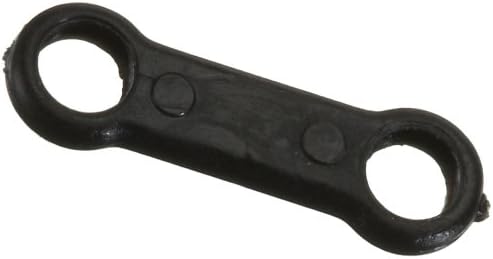
Figure 1: The Jamara HG-300 Control Rod. This black, rigid link features a circular eyelet at each end, designed for secure attachment within a mechanical system, typically in remote-controlled models.
The Jamara HG-300 Control Rod is a precision-engineered component designed for use in various mechanical and remote-controlled applications, particularly within the HG-300 model series. It serves as a crucial link for transmitting motion and control signals between different parts of a system.
Setup and Installation
Proper installation is critical for the functionality and safety of your model. Refer to your model's specific assembly instructions for detailed steps.
- Identify Connection Points: Locate the two points on your model where the control rod needs to be connected. These are typically servo horns, control surfaces, or other linkage points.
- Secure Attachment: Insert the appropriate pins, screws, or ball links through the eyelets of the control rod and secure them to the connection points. Ensure a snug fit without excessive play.
- Check for Free Movement: After attachment, manually move the connected components to ensure the control rod allows for full, unrestricted movement without binding or excessive friction.
- Verify Alignment: Ensure the control rod is aligned correctly and does not put undue stress on the connected components during operation.
Operating Considerations
The control rod itself does not have operational controls. Its function is passive, transmitting movement. Ensure that the components it connects are operating within their specified parameters.
- Avoid applying excessive force that could bend or break the rod.
- Regularly inspect the connection points for wear or loosening.
- Ensure no foreign objects obstruct the movement of the rod or connected parts.
Maintenance
The Jamara HG-300 Control Rod requires minimal maintenance. Regular inspection is key to its longevity.
- Cleaning: If necessary, wipe the rod with a clean, dry cloth to remove dust or debris. Avoid harsh chemicals.
- Inspection: Periodically check the rod for any signs of bending, cracks, or damage. Inspect the eyelets for wear, especially if they are frequently disconnected and reconnected.
- Connection Points: Ensure that the screws, pins, or ball links securing the rod are tight and not corroded.
Troubleshooting
Most issues related to the control rod stem from improper installation or damage.
- Binding/Sticking:
- Check for proper alignment.
- Ensure no other components are interfering with its movement.
- Verify that the connection points are not overtightened, causing friction.
- Excessive Play:
- Ensure all fasteners are securely tightened.
- Inspect the eyelets for wear that might have enlarged the holes.
- If wear is significant, replacement may be necessary.
- Broken Rod:
- The rod may have been subjected to excessive force or impact.
- Replace the damaged rod immediately with an authentic Jamara replacement part.
Specifications
| Product Name | Control Rod for HG-300 Model |
| Brand | Jamara |
| Model Number | Jamara_30412 |
| ASIN | B00139THK6 |
| Product Dimensions | 11.81 x 11.81 x 11.81 inches (approximate packaging dimensions) |
| Item Weight | 2.88 ounces |
| Material | Durable composite material (typical for control rods) |
Warranty and Support
For information regarding warranty, returns, or technical support, please refer to the official Jamara website or contact their customer service directly. Keep your purchase receipt as proof of purchase.
Note: Specific warranty details are not provided in this document.
Ask a question about this manual
Ask about setup, troubleshooting, compatibility, parts, safety, or missing instructions. Manuals+ will review the question and use this page’s manual context to help answer it.