
Introduction
The TFA 30.1033 Digital Probe Thermometer is designed for precise temperature measurement. It features a digital display, functions for current, highest, and lowest temperatures, a hold function, and optical and acoustic alarms. The stainless steel penetration sensor is suitable for HACCP applications, with a measurement range of -40 to +200 °C. Its robust design is IP65 water-resistant, making it suitable for various environments. The device can be wall-mounted or placed on a table using its integrated stand and magnet.
Package Contents
- TFA 30.1033 Digital Display Unit
- Stainless Steel Penetration Probe with Cable
- CR2032 Battery (pre-installed or included separately)
- Table Stand / Magnet (integrated)
Setup
- Battery Installation: If the battery is not pre-installed, open the battery compartment on the back of the device. Insert the CR2032 battery with the positive (+) side facing up. Close the compartment securely.
- Probe Connection: Connect the stainless steel penetration probe cable to the designated port on the display unit. Ensure a firm connection.
- Placement: The thermometer can be placed on a flat surface using its integrated table stand or attached to a metallic surface using the magnet on its back.

Image: The TFA 30.1033 Digital Probe Thermometer showing the main display unit, the connected stainless steel probe, and its cable. The display unit is white with a grey stand/magnet, and the probe is silver with a black handle.
Operating Instructions
Power On/Off
- Press the ON/OFF button to turn the device on or off.
Temperature Measurement
- Insert the stainless steel probe into the substance or environment where temperature measurement is required.
- The current temperature will be displayed on the digital screen.
Min/Max Temperature Display
- Press the MIN/MAX button to view the lowest recorded temperature.
- Press again to view the highest recorded temperature.
- Press a third time to return to the current temperature display.
Hold Function
- Press the HOLD button to freeze the current temperature reading on the display. This is useful for reading temperatures in hard-to-reach areas.
- Press HOLD again to resume live temperature measurement.
Alarm Function (Optical and Acoustic)
- The device features an acoustic alarm with continuously adjustable upper and lower temperature limits.
- Refer to the specific button (likely labeled ALARM or similar, not explicitly detailed in JSON) on the device to set the desired high and low temperature thresholds.
- When the measured temperature exceeds the upper limit or falls below the lower limit, an optical and acoustic alarm will activate.
Maintenance
- Cleaning: Wipe the device and probe with a damp cloth. Do not use abrasive cleaners or immerse the display unit in water. The probe can be cleaned with appropriate sanitizing solutions.
- Water Resistance: The device is IP65 rated, meaning it is protected against dust ingress and low-pressure water jets from any direction. However, it is not designed for continuous submersion.
- Storage: Store the thermometer in a clean, dry place when not in use.
- Battery Replacement: Replace the CR2032 battery when the display becomes dim or the device stops functioning. Dispose of used batteries responsibly.
Troubleshooting
| Problem | Possible Cause | Solution |
|---|---|---|
| No display or dim display | Low or dead battery | Replace the CR2032 battery. |
| Inaccurate readings | Probe not fully inserted; probe damaged; environmental interference | Ensure probe is correctly positioned. Inspect probe for damage. Avoid extreme drafts or heat sources near the display unit. |
| Alarm not sounding | Alarm limits not set; alarm function disabled | Verify alarm settings and ensure the alarm function is active. |
Specifications
| Feature | Detail |
|---|---|
| Model Number | 30.1033 |
| Measurement Range | -40 °C to +200 °C (-40 °F to +392 °F) |
| Accuracy |
|
| Display Type | Digital |
| Power Source | 1 x CR2032 Battery (3V) |
| Dimensions (L x W x H) | 8.5 x 1.5 x 5 cm (3.35 x 0.59 x 1.97 inches) |
| Weight | 89 g (3.1 oz) |
| Material | PLA (Polylactic Acid), PE (Polyethylene), Stainless Steel |
| Water Resistance | IP65 |
| Special Features | High precision, Quick reading system, Min/Max function, Hold function, Optical and acoustic alarm, HACCP compliant, Table stand, Magnet for mounting. |
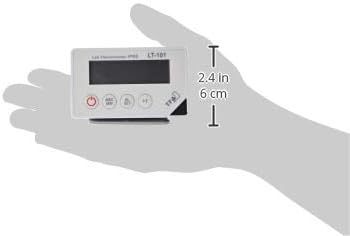
Image: The TFA 30.1033 display unit shown in a hand, illustrating its compact size. The image indicates a height of 2.4 inches (6 cm).
Warranty and Support
For warranty information or technical support, please refer to the documentation provided with your purchase or contact TFA Dostmann customer service directly. Contact details can typically be found on the manufacturer's official website or on the product packaging.
Manufacturer: TFA Dostmann
Website: www.tfa-dostmann.de


