
1. Introduction
This manual provides comprehensive instructions for the installation, operation, and maintenance of your AT&T 993 2-Line Corded Phone. Designed for efficiency, this phone supports two distinct telephone lines, features a speakerphone, and includes Caller ID capabilities, making it suitable for home offices or small business environments.
Please read this manual thoroughly before using your new phone to ensure proper setup and to take full advantage of its features.
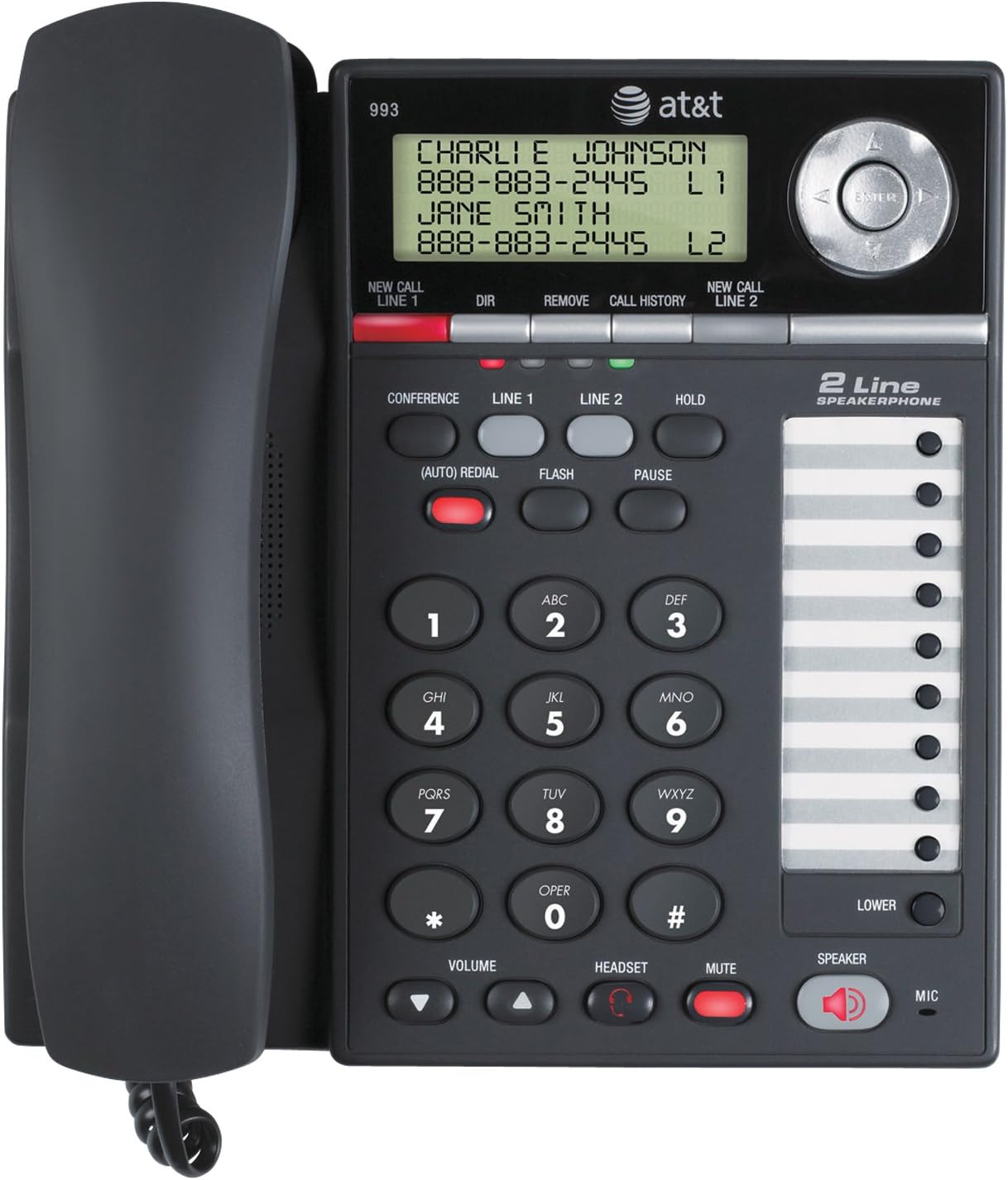
Figure 1: Front view of the AT&T 993 2-Line Corded Phone, displaying the handset, keypad, display screen, and speakerphone.
2. Safety Information
To reduce the risk of fire, electric shock, or injury, always follow basic safety precautions when using this product.
- Read and understand all instructions.
- Follow all warnings and instructions marked on the product.
- Unplug this product from the wall outlet before cleaning. Do not use liquid or aerosol cleaners. Use a damp cloth for cleaning.
- Do not use this product near water, such as a bathtub, wash bowl, kitchen sink, or laundry tub, in a wet basement, or near a swimming pool.
- Do not place this product on an unstable cart, stand, or table.
- Avoid placing the phone in areas with extreme temperatures, direct sunlight, or other heat sources.
- This product should be operated only from the type of power source indicated on the marking label. If you are not sure of the type of power supply to your home or office, consult your dealer or local power company.
- Do not allow anything to rest on the power cord. Do not locate this product where the cord will be walked on.
- Never push objects of any kind into this product through slots in the base or handset as they may touch dangerous voltage points or create a short circuit.
- Do not disassemble this product. Refer servicing to qualified service personnel.
3. Setup
3.1 Package Contents
Ensure all items are present in your package:
- AT&T 993 Phone Base
- Handset
- Handset Curly Cord
- 2 Telephone Line Cords
- AC Power Adapter
- Replacement Directory Card
- User's Manual (this document)
- Quick Start Guide
3.2 Connecting the Phone
Follow these steps to connect your AT&T 993 phone:
- Connect the Handset: Plug one end of the curly handset cord into the handset and the other end into the jack labeled HANDSET on the side of the phone base.
- Connect Telephone Line 1: Plug one end of a telephone line cord into the jack labeled LINE 1 on the back of the phone base. Plug the other end into your telephone wall jack for Line 1.
- Connect Telephone Line 2: Plug one end of the second telephone line cord into the jack labeled LINE 2 on the back of the phone base. Plug the other end into your telephone wall jack for Line 2.
- Connect Power: Plug the small end of the AC power adapter into the DC IN 9V jack on the back of the phone base. Plug the large end into a standard electrical wall outlet.
- Battery Installation (Optional/Required for some features): The phone requires 12V batteries for certain features (e.g., display backlight, memory retention during power outages). Refer to the battery compartment for specific instructions on installation.

Figure 2: Rear view of the AT&T 993 2-Line Corded Phone, illustrating the connection points for power, handset, and telephone lines.
3.3 Wall Mounting (Optional)
The phone base is designed for wall mounting. Use the integrated wall mount holes on the back of the unit and appropriate screws (not included) to secure it to a wall. Ensure the phone is securely fastened before use.
4. Operating Instructions
4.1 Making and Receiving Calls
- To Make a Call:
- Lift the handset or press the SPEAKER button.
- Select the desired line by pressing LINE 1 or LINE 2.
- Dial the telephone number.
- To Receive a Call:
- When the phone rings, lift the handset or press the SPEAKER button. The phone will automatically connect to the ringing line.
- To End a Call: Hang up the handset or press the SPEAKER button again if using speakerphone.
4.2 2-Line Operation
The AT&T 993 supports two independent telephone lines. You can switch between lines, place a call on hold, or use three-party conferencing.
- Switching Lines: During a call on one line, press the button for the other line (LINE 1 or LINE 2). The current call will automatically be placed on hold.
- Placing a Call on Hold: Press the HOLD button. The line indicator will flash. To retrieve the call, press the corresponding line button.
- Distinct Ringtones: Each line can be assigned a distinct ringtone to easily identify which line is ringing. Refer to the phone's menu settings for customization.
4.3 Speakerphone
To use the speakerphone function:
- Press the SPEAKER button to activate or deactivate the speakerphone.
- Adjust the speaker volume using the VOLUME buttons.
4.4 Caller ID
The phone stores up to 99 names and numbers in its Caller ID history. This feature requires a subscription to Caller ID service from your telephone service provider.
- Viewing Caller ID History: Use the navigation buttons (up/down arrows) to scroll through the Caller ID log.
- Dialing from Caller ID: Select an entry from the Caller ID history and press the DIAL button (or lift handset/press speaker) to call the number.
- Call Waiting Caller ID: If you subscribe to Call Waiting service, the display will show the incoming caller's information even if you are already on a call.
4.5 Directory and Speed Dial
The phone features a 100-entry directory and supports speed dialing for frequently called numbers.
- Storing Directory Entries: Access the directory menu to add, edit, or delete contact entries. Each entry can store a name and number.
- Speed Dial: The phone allows for programming up to 18 speed dial numbers. Refer to the specific instructions in the phone's menu for programming these slots. To use, press the designated speed dial button.
4.6 Three-Party Conferencing
This feature allows three parties to converse simultaneously on three different lines (two external calls and your phone).
- Establish a call on Line 1.
- Press LINE 2 to place Line 1 on hold and get a dial tone on Line 2.
- Dial the second party's number on Line 2.
- Once connected to the second party, press the CONFERENCE button to join all three parties.
4.7 Voicemail Indicator
If you subscribe to a voicemail service from your telephone service provider, a red light on the phone will blink when you have new voicemail messages waiting.
4.8 Headset Operation
For hands-free operation, you can connect a 2.5mm headset (not included) to the headset jack on the side of the phone base.
- Plug your 2.5mm headset into the dedicated headset jack.
- Press the HEADSET button to activate or deactivate headset mode.
5. Maintenance
5.1 Cleaning the Phone
To keep your phone in good condition:
- Unplug the phone from the wall outlet and power source before cleaning.
- Use a soft, damp cloth to clean the exterior surfaces of the phone.
- Do not use liquid or aerosol cleaners, or harsh chemicals.
- Avoid getting moisture into any openings.
5.2 General Care
- Protect the phone from extreme temperatures, direct sunlight, and moisture.
- Avoid dropping the phone or subjecting it to strong impacts.
- Ensure cords are not tangled or pinched.
6. Troubleshooting
If you experience issues with your AT&T 993 phone, try the following solutions:
- No Dial Tone:
- Ensure all phone line cords are securely plugged into the phone and the wall jacks.
- Verify the AC power adapter is properly connected to the phone and a working electrical outlet.
- Test the phone line with another known working phone.
- Caller ID Not Displaying:
- Confirm you have subscribed to Caller ID service from your telephone service provider.
- Ensure the phone is connected to a compatible telephone line.
- Speakerphone Volume Low/Distorted:
- Adjust the volume using the VOLUME buttons during a call.
- Ensure the microphone is not obstructed.
- Phone Not Ringing:
- Check the ringer volume settings in the phone's menu.
- Ensure the phone is not in "Do Not Disturb" or similar silent mode if such a feature exists.
- Buttons Sticky or Unresponsive:
- Clean the keypad area with a soft, slightly damp cloth.
- If the issue persists, contact customer support.
For further assistance, please refer to the support section.
7. Specifications
| Brand | AT&T |
| Model Number | 993 |
| Telephone Type | Corded |
| Number of Lines | 2 |
| Color | Charcoal |
| Material | Plastic |
| Power Source | Corded Electric |
| Batteries Required | 12V batteries (for certain features) |
| Item Weight | 3.05 pounds (approx. 1.38 kg) |
| Product Dimensions (L x W x H) | 3.98 x 7.87 x 8.27 inches (approx. 10.1 x 20 x 21 cm) |
| Display | LCD, 2-3/4 by 1 inches |
| Caller ID History | 99 names and numbers |
| Directory Memory | 100 entries |
| Headset Jack | 2.5mm |
| Hearing Aid Compatible | Yes |
8. Warranty and Support
8.1 Warranty Information
This product is covered by a limited warranty. Please refer to the warranty card included in your original packaging for details regarding the warranty period and terms. Keep your purchase receipt as proof of purchase.
8.2 Customer Support
For technical support, troubleshooting assistance, or warranty claims, please contact AT&T customer service. Contact information can typically be found on the AT&T official website or on the product packaging.
Online Resources: For the most up-to-date support information, FAQs, and additional resources, visit the official AT&T support website.


