
Introduction
The VCT VM200 Deluxe Step Down Voltage Converter is designed to allow you to use 110V/120V American electronic products in countries with 220V/240V electrical systems. This converter provides a maximum capacity of 200 watts, including power surge, making it suitable for various low-power electronic devices during international travel.

Image: The VCT VM200 Deluxe Step Down Voltage Converter, a compact device designed for international travel.
Important Safety Information
Please read and understand all safety instructions before using this product. Failure to follow these instructions may result in electric shock, fire, or damage to the converter or your devices.
- Maximum Capacity: This converter has a maximum capacity of 200 watts. DO NOT exceed this wattage.
- Incompatible Appliances: This converter is NOT designed for high-powered heating appliances or motor-driven devices. DO NOT USE with hair dryers, hair straighteners, curling irons, electric kettles, coffee makers, toasters, microwave ovens, power tools, or large household appliances. Using such devices will damage the converter and potentially the appliance, and poses a fire hazard.
- Ventilation: Ensure the converter is placed in a well-ventilated area during use. Avoid covering it or placing it on soft surfaces that may block airflow.
- Overheating: The converter may become warm during operation. If it becomes excessively hot, disconnect it immediately and allow it to cool down. Prolonged overheating can lead to damage.
- Indoor Use Only: This device is intended for indoor use only. Do not expose it to rain or moisture.
- Children and Pets: Keep the converter out of reach of children and pets.
- Fuse Protected: The unit is fuse protected. If the converter stops working, check the fuse.
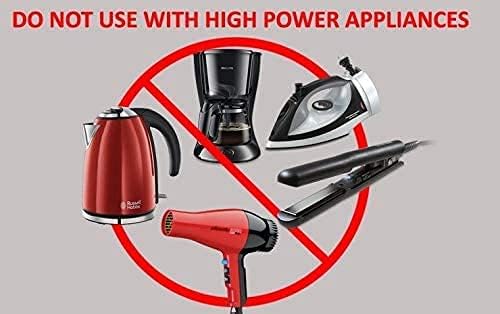
Image: A warning graphic indicating that the converter should not be used with high-power appliances such as hair dryers, irons, and kettles, which are shown with a red 'no' symbol.
Setup Instructions
- Check Device Wattage: Before connecting any device, verify its power consumption (wattage). Ensure the device's wattage is below 200 watts. This information is usually found on the device's label or in its instruction manual.
- Plug Converter into Wall Outlet: Insert the converter's plug (Type C) into a 220V/240V wall outlet in the foreign country.
- Connect Your Device: Plug your 110V/120V American electronic device into the outlet on the VCT VM200 converter.
- Power On: The converter typically operates automatically once plugged in. An LED indicator light will illuminate to show it is active.
Operating Instructions
Once properly set up, the VCT VM200 converter is ready for use. It converts the higher foreign voltage (220V/240V) down to the standard American voltage (110V/120V), allowing your devices to function safely.
- Compatible Devices: This converter is ideal for charging and powering low-wattage electronics such as:
- Smartphones (e.g., Blackberry, iPhones, Android phones)
- Tablets (e.g., iPads)
- Portable music players (e.g., iPods)
- Digital cameras
- Laptops
- Handheld gaming devices
- Fax machines (light portable models)
- Other light portable electronic equipment
- LED Indicator: A built-in LED light indicates when the converter is receiving power and is operational.
- Continuous Use: While designed for travel, avoid leaving the converter plugged in for extended periods when not in use, especially with devices that draw continuous power.
Maintenance
Proper maintenance ensures the longevity and safe operation of your VCT VM200 converter.
- Cleaning: Disconnect the converter from the power outlet before cleaning. Use a dry, soft cloth to wipe the exterior. Do not use liquid cleaners or abrasive materials.
- Storage: When not in use, store the converter in a cool, dry place, away from direct sunlight and moisture.
- Fuse Replacement: The converter is fuse protected. If the unit ceases to function, the fuse may need replacement. Consult a qualified technician or contact customer support for guidance on fuse replacement. Do not attempt to replace the fuse yourself unless you are knowledgeable about electrical safety.
Troubleshooting
If you encounter issues with your VCT VM200 converter, try the following steps:
- No Power/LED Off:
- Ensure the converter is securely plugged into the wall outlet.
- Check if the wall outlet is functional by plugging in another device.
- The internal fuse may have blown. Refer to the Maintenance section for fuse information.
- Device Not Working:
- Verify that your device's wattage does not exceed the converter's 200-watt limit.
- Ensure your device is properly plugged into the converter's outlet.
- Confirm that your device is designed for 110V/120V input.
- Converter Overheating:
- Immediately disconnect the converter and the connected device.
- Allow the converter to cool down completely.
- Re-check the wattage of your connected device. If it is close to or exceeds 200 watts, discontinue use with that device.
- Ensure adequate ventilation around the converter.
If these steps do not resolve the issue, please contact VCT customer support.
Specifications
| Model Number | VM200 |
| Brand | VCT |
| Input Voltage | 220V / 240V AC |
| Output Voltage | 110V / 120V AC |
| Maximum Capacity | 200 Watts (including power surge) |
| Number of Outlets | 1 |
| Plug Format | Type C |
| Color | Black |
Warranty and Support
For warranty information, technical support, or service inquiries regarding your VCT VM200 Deluxe Step Down Voltage Converter, please contact the manufacturer or your retailer directly. Keep your purchase receipt as proof of purchase.
Manufacturer: VCT Electronics
