
1. Introduction
The Olympus LS-10 Linear PCM Recorder is a portable device designed for high-fidelity audio recording. It captures sound with exceptional clarity, making it suitable for various applications, including live music, nature sounds, and interviews. This manual provides detailed instructions for the proper use and maintenance of your LS-10 recorder.
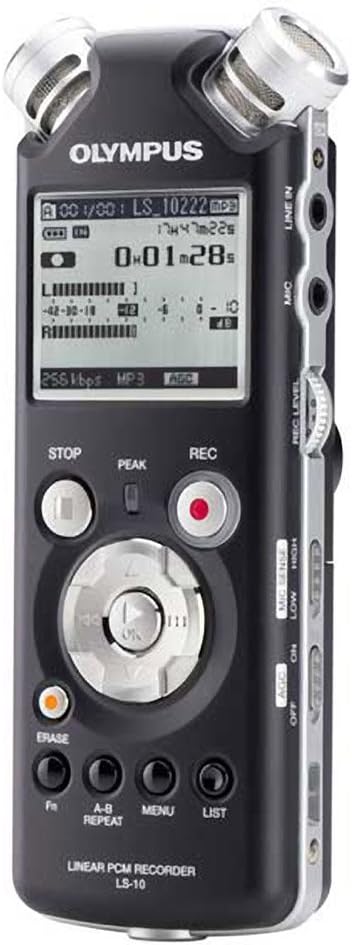
Figure 1: Front view of the Olympus LS-10 Linear PCM Recorder, showing the display, control buttons, and built-in microphones.
2. Setup
2.1 Battery Installation
The LS-10 operates on two AA batteries. For optimal performance, use alkaline, lithium, or NiMH rechargeable batteries.
- Locate the battery compartment cover on the back of the unit.
- Slide the cover in the direction indicated by the arrow to open it.
- Insert two AA batteries, ensuring correct polarity (+/-) as marked inside the compartment.
- Close the battery compartment cover securely.

Figure 2: Back view of the LS-10, illustrating the location of the battery compartment and built-in speakers.
2.2 Powering On/Off
To power on the device, press and hold the POWER button until the display illuminates. To power off, press and hold the POWER button again until the display turns off.
2.3 Inserting an SD/SDHC Card
The LS-10 features an SD/SDHC card slot for expanded storage capacity.
- Locate the SD card slot on the side of the recorder.
- Insert an SD or SDHC card into the slot until it clicks into place. Ensure the card is inserted in the correct orientation.
- To remove the card, gently push it inward until it clicks, then release to eject.
3. Operation
3.1 Recording Audio
The LS-10 supports uncompressed 24-bit/96kHz Linear PCM recording, as well as WAV, MP3, and WMA formats.
- Select Recording Mode: Use the MENU button to navigate to the recording settings and select your desired format (WAV, MP3, or WMA) and quality.
- Adjust Microphone Sensitivity: Use the MIC SENSE switch (LOW/HIGH) on the side of the device to match the recording environment. Use LOW for loud sounds and HIGH for quiet sounds.
- Set Recording Level: Use the REC LEVEL dial to adjust the input level. Monitor the level meter on the display to prevent clipping (distortion).
- Start Recording: Press the REC button (red circle) to begin recording. The REC indicator will illuminate.
- Stop Recording: Press the STOP button to end the recording.

Figure 3: Front panel of the LS-10, highlighting the REC, STOP, and navigation buttons essential for recording and playback.

Figure 4: Top view of the LS-10, displaying the two high-quality built-in stereo microphones.
3.2 Playback
Recordings can be played back through the built-in stereo speakers or via headphones.
- Select File: Use the navigation buttons to browse through your recorded files and select the desired track.
- Start Playback: Press the PLAY/OK button to begin playback.
- Adjust Volume: Use the VOLUME dial on the side of the unit to increase or decrease playback volume.
- Stop Playback: Press the STOP button.
- A-B Repeat: Use the A-B REPEAT button to loop a specific section of a recording.

Figure 5: Side view of the LS-10, showing the LINE IN, MIC, and EAR (headphone) jacks, along with the REC LEVEL and VOLUME controls.
3.3 Menu Navigation and Settings
The LS-10 features a menu system for configuring various settings.
- Press the MENU button to access the main menu.
- Use the navigation buttons (up/down) to scroll through menu options.
- Press PLAY/OK to select an option or enter a sub-menu.
- Common settings include:
- Rec Mode: Adjust recording quality and format.
- System Info: View device information.
- Time & Date: Set the current time and date.
- Auto Power Off: Configure automatic power-off duration.
- Press the LIST button to exit the menu.

Figure 6: The LS-10 display screen, illustrating the menu interface with various system settings.
3.4 File Management
The recorder organizes files into folders and allows for easy transfer to a computer.
- Folders: The LS-10 supports 5 folders, each capable of holding up to 200 messages, plus a dedicated MUSIC folder.
- Erasing Files: Select the file you wish to delete and press the ERASE button. Confirm the deletion when prompted.
- Connecting to a Computer: Connect the LS-10 to your computer using a USB cable. The device will appear as a removable drive, allowing you to transfer files. Compatible with Windows 2000/XP/VISTA and Mac OS 10.2 or later.
4. Maintenance
4.1 Cleaning
To maintain the recorder's performance and appearance:
- Wipe the unit with a soft, dry cloth.
- For stubborn dirt, lightly dampen the cloth with water and then wipe dry.
- Do not use abrasive cleaners, solvents, or alcohol, as these can damage the surface.
4.2 Battery Care
- Remove batteries if the unit will not be used for an extended period to prevent leakage.
- Dispose of used batteries according to local regulations.
4.3 Storage
Store the LS-10 in a cool, dry place away from direct sunlight, extreme temperatures, and high humidity.
5. Troubleshooting
If you encounter issues with your LS-10, refer to the following common problems and solutions:
- No Power:
- Check if batteries are inserted correctly with proper polarity.
- Replace with fresh batteries.
- Ensure the power button is pressed and held sufficiently.
- Cannot Record:
- Check available memory on internal storage or SD card. Delete unnecessary files if storage is full.
- Ensure the device is not in playback mode.
- Verify microphone sensitivity and recording level settings.
- Poor Sound Quality:
- Adjust microphone sensitivity (MIC SENSE) to match the environment.
- Ensure the recording level is not too high (causing distortion) or too low (causing noise).
- Record in a quiet environment if possible.
- Check if external microphones or line-in sources are properly connected.
- Computer Does Not Recognize Device:
- Ensure the USB cable is securely connected to both the recorder and the computer.
- Try a different USB port on your computer.
- Restart your computer and the LS-10.
6. Specifications
| Feature | Detail |
|---|---|
| Recording Formats | WAV (Linear PCM), MP3, WMA |
| Internal Memory | 2 GB |
| External Memory | SD/SDHC card slot |
| Battery Life | Approximately 14 hours (recording) |
| Batteries | 2 x AA (Alkaline, Lithium, or NiMH) |
| Microphone Jack | 3.5mm stereo mini-jack, impedance 2 kohms |
| Line-In Jack | 3.5mm stereo mini-jack, impedance 2 kohms |
| Earphone Jack | 3.5mm stereo mini-jack, impedance 8 ohms |
| Built-in Speaker | 2 x 16mm round dynamic speakers, 8 ohms, 200 mW output |
| Compatible Devices | Personal Computer |
| Hardware Interface | USB |
| Dimensions (W x H x D) | 3.4 x 6.3 x 6.5 inches (approximate) |
| Weight | 1 pound (approximate) |
7. Support Information
For further assistance, technical support, or information regarding warranty, please refer to the official Olympus website or contact their customer service department. Keep your purchase receipt and product serial number handy when seeking support.


