
1. Introduction
The Cobra CPI 1575 Power Inverter converts 12 Volt DC battery power into 120 Volt AC household power. This unit is designed to power a variety of electronic devices and small appliances from your vehicle, including laptops, TV sets, video games, CD/DVD players, and cellular phone chargers. It provides 1500 Watts of continuous power and up to 3000 Watts of peak power.
2. Important Safety Information
WARNING: This product can expose you to chemicals including lead, which is known to the State of California to cause cancer and birth defects or other reproductive harm. For more information go to www.P65Warnings.ca.gov.
- Read all instructions before operating the inverter.
- Do not open the inverter casing. There are no user-serviceable parts inside.
- Ensure adequate ventilation around the inverter. The outer case may become hot under extended use.
- Connect the inverter only to a 12V DC power source.
- Always install appropriate fusing as close to the battery as possible to protect the electrical system.
- Ensure proper grounding of the inverter to prevent electrical hazards.
Legal Disclaimer: Except as expressly set forth in the description, the seller makes no express or implied warranties of any kind whatsoever about this merchandise. The seller is not responsible for consequential, incidental, or punitive damages of any kind. The seller's liability is limited to the amount paid by the buyer, including shipping and handling charges.
3. Product Features
- 1500 Watts Continuous Power: Provides stable power for various devices.
- 3000 Watts Peak Power: Handles temporary power surges for starting certain appliances.
- 3 Grounded AC Outlets: Allows connection of multiple household appliances.
- USB Port: For charging USB-powered devices like smartphones and tablets.
- Volt/Watt Meter: Digital display to monitor input voltage and output power consumption.
- Remote On/Off Capability: Allows for convenient control from a distance.
- Pentagon Protection: Five levels of protection against common failures: thermal shutdown, reverse polarity protection, over-voltage shutdown, low voltage shutdown, and low voltage alarm.
4. Setup and Installation
Proper installation is crucial for the safe and efficient operation of your Cobra CPI 1575 power inverter.
4.1 Wiring Considerations
- Wire Gauge: For optimal performance and to minimize voltage drop, use heavy gauge wiring. For typical installations, #4 AWG wire is a minimum, and #2 AWG or thicker is recommended, especially for runs exceeding 10-15 feet.
- Fusing: A 150 Amp ANL fuse is required for this 1500W inverter. Install the fuse as close to the battery as possible (ideally within 3 feet) to protect your vehicle's electrical system in case of a short circuit.
- Grounding: Ensure the inverter is properly grounded. Firmly install the ground wire to the grounding screw on your 110V system. An improperly installed ground can lead to battery drain even when the inverter is off.
4.2 Connecting the Inverter
- Locate a suitable mounting position for the inverter, ensuring good ventilation and away from direct heat or moisture.
- Connect the positive (+) cable (red) from the inverter's positive terminal to the positive terminal of your 12V battery, passing through the inline fuse.
- Connect the negative (-) cable (black) from the inverter's negative terminal to the negative terminal of your 12V battery or a suitable chassis ground point.
- Ensure all connections are tight and secure.

Figure 1: Rear view of the Cobra CPI 1575 Power Inverter, illustrating the DC input terminals (red for positive, black for negative) and cooling fans. Ensure secure connections for optimal performance.
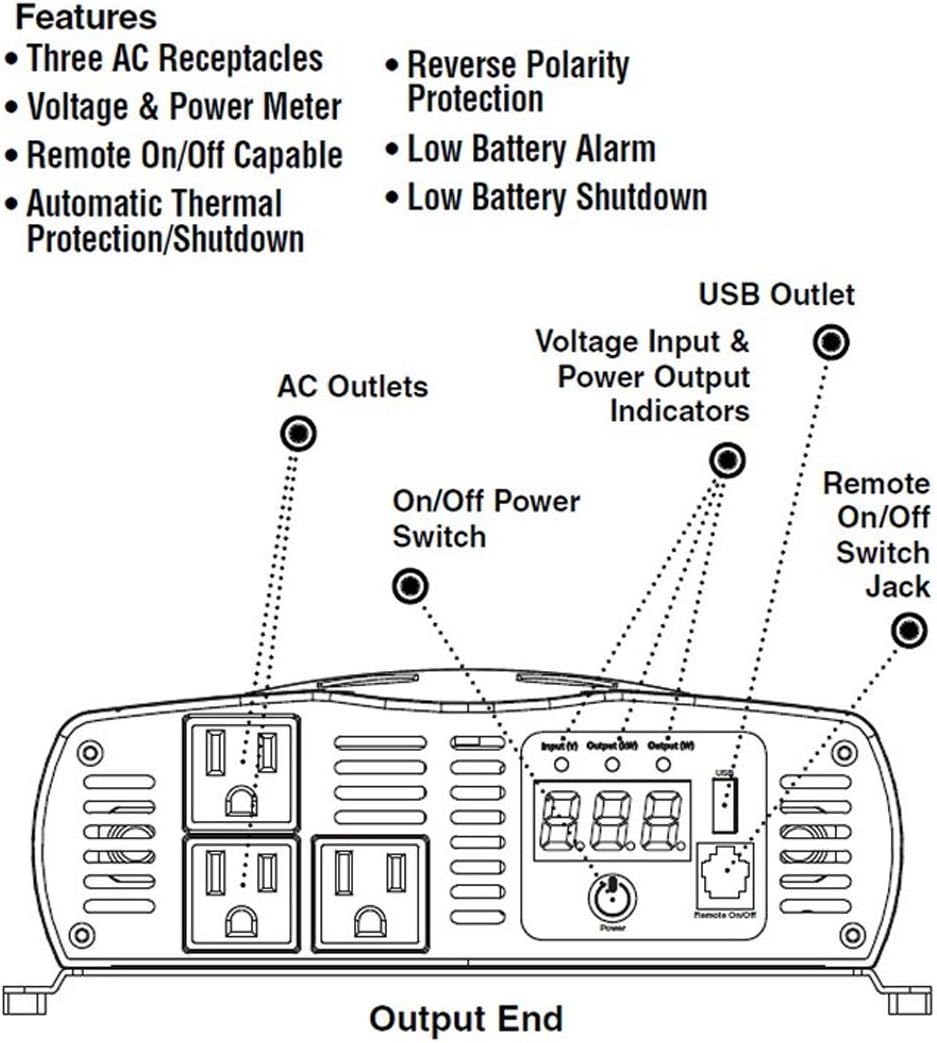
Figure 2: Diagram of the Cobra CPI 1575 Power Inverter's output end, highlighting the three AC outlets, USB port, On/Off power switch, voltage and power output indicators, and the remote On/Off switch jack.
5. Operating Instructions
Follow these steps to operate your Cobra CPI 1575 power inverter safely and effectively.
5.1 Powering On/Off
- After ensuring all connections are secure, press the Power button on the inverter to turn it on. The digital display will illuminate, showing the input voltage and output wattage.
- To turn off the inverter, press the Power button again.
- If using the remote On/Off capability, connect the remote switch to the designated jack and use it to control the inverter's power state.
5.2 Connecting Devices
- Plug your 120V AC appliances into the three grounded AC outlets. Ensure the total wattage of connected devices does not exceed 1500 Watts continuously.
- Connect USB-powered devices to the USB port for charging.
- Monitor the Volt/Watt meter to keep track of the input voltage and the power consumption of your connected devices.

Figure 3: Front view of the Cobra CPI 1575 Power Inverter, featuring three AC outlets, a USB charging port, and a digital display for monitoring input voltage and output wattage.

Figure 4: Close-up of the digital display and control panel on the Cobra CPI 1575, showing the input voltage (V), output in kilowatts (kW), output in watts (W) indicators, the USB port, power button, and remote On/Off port.
6. Maintenance
To ensure the longevity and optimal performance of your Cobra CPI 1575 power inverter, follow these maintenance guidelines:
- Keep Clean: Regularly wipe the exterior of the inverter with a dry, soft cloth. Do not use liquid cleaners or solvents.
- Ensure Ventilation: Periodically check that the cooling fans and ventilation openings are free from dust, dirt, or obstructions. Blocked vents can lead to overheating and thermal shutdown.
- Check Connections: Ensure all DC input cable connections remain tight and free from corrosion. Loose connections can cause power loss or overheating.
- Storage: When not in use for extended periods, store the inverter in a cool, dry place, disconnected from the battery.
7. Troubleshooting
The Cobra CPI 1575 features Pentagon Protection to safeguard against common issues. If you encounter problems, refer to the following:
7.1 Common Issues and Solutions
- Inverter Not Turning On:
- Check DC input connections for tightness and proper polarity.
- Verify the 12V battery has sufficient charge (above 12.1V).
- Check the inline fuse for continuity. Replace if blown.
- Low Voltage Alarm/Shutdown: The inverter will sound an alarm and eventually shut down if the input voltage drops too low (e.g., below 10.5V). This protects your battery from deep discharge.
- Recharge or replace the 12V battery.
- Ensure the vehicle engine is running to provide charging voltage if using the vehicle battery.
- Verify wire gauge is adequate for the load and distance to prevent excessive voltage drop.
- Thermal Shutdown: If the inverter overheats, it will shut down to prevent damage.
- Reduce the load on the inverter.
- Ensure adequate ventilation around the unit; clear any obstructions from the cooling fans.
- Allow the inverter to cool down before restarting.
- Over-Voltage Shutdown: The inverter will shut down if the input voltage exceeds a safe limit (e.g., above 15V).
- Check the charging system of your vehicle or power source.
- Reverse Polarity Protection: This feature prevents damage if the positive and negative input cables are accidentally reversed. Correct the wiring immediately.
- Unexpected Voltage Drop: If the inverter shows a significant voltage drop with a light load, re-check your grounding wire. An improperly secured ground can cause erratic voltage readings and battery drain.
8. Specifications
| Brand | COBRA |
| Model | CPI 1575 |
| Continuous Power | 1500 Watts |
| Peak Power | 3000 Watts |
| Input Voltage | 12 Volts DC |
| Output Voltage | 120 Volts AC |
| Outlets | 3 Grounded AC Outlets, 1 USB Port |
| Item Weight | 5.93 pounds |
| Product Dimensions | 3.3 x 8.8 x 9.4 inches |
| Power Source | Battery Powered, Corded Electric |
9. Warranty and Support
For warranty information or technical support, please refer to the documentation included with your purchase or contact Cobra Electronics directly. Keep your proof of purchase for any warranty claims.
Note: The manufacturer's liability is limited to the amount paid by the buyer for the product. Any express or implied warranties are as stated in the product description, and the manufacturer is not responsible for consequential, incidental, or punitive damages.
For further assistance, visit the official Cobra Electronics website or contact their customer service department.


