
Cooper 1246-02-1
Cooper-Atkins 1246-02-1 Bi-Metal Pocket Test Thermometer User Manual
Model: 1246-02-1 | Brand: Cooper-Atkins
1. Product Overview
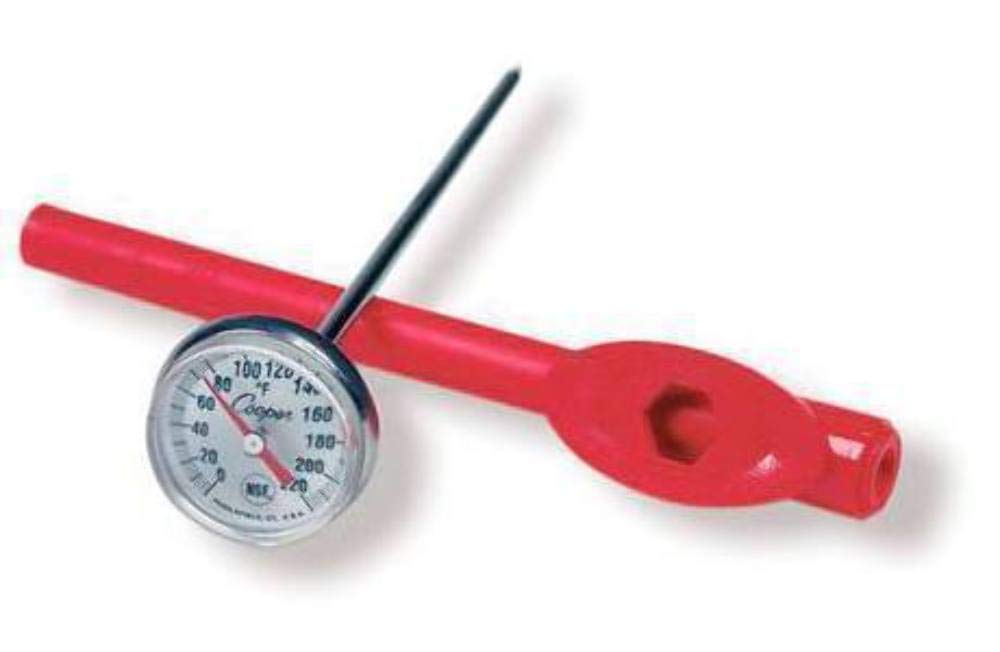
The Cooper-Atkins 1246-02-1 is a durable bi-metal pocket test thermometer designed for accurate temperature measurement in various applications. It features a 1-inch dial and a 5-inch stem, accompanied by an adjustable sheath for protection and calibration. This thermometer is NSF certified, ensuring its suitability for food service and other regulated environments, with a temperature range of 0°F to 220°F.
2. What's Included
Upon unboxing, please ensure all the following components are present:
- Cooper-Atkins 1246-02-1 Bi-Metal Pocket Test Thermometer
- Protective Sheath with integrated adjustment wrench and clip
3. Setup and Calibration
Before first use, or if accuracy is in question, the thermometer should be calibrated. The protective sheath doubles as an adjustment wrench.
3.1 Initial Cleaning
Wipe the thermometer stem and dial with a clean, damp cloth. For food contact, use a food-safe sanitizer. Ensure the thermometer is dry before use.
3.2 Calibration Procedure (Ice Point Method)
- Fill a large glass with finely crushed ice and top with cold tap water. Stir the mixture well.
- Insert the thermometer stem into the ice water mixture, ensuring the sensing area (at least 2 inches of the stem) is submerged and not touching the sides or bottom of the glass.
- Allow the temperature reading to stabilize for at least 30 seconds.
- The thermometer should read 32°F (0°C). If it does not, hold the thermometer head firmly and use the hexagonal opening in the protective sheath to turn the calibration nut located just below the dial until the pointer reads 32°F (0°C).


4. Operating Instructions
To obtain an accurate temperature reading, follow these steps:
- Ensure the thermometer is clean and calibrated.
- Insert the stem into the center of the substance being measured. For liquids, stir before inserting. For solids, ensure the sensing area (at least 2 inches of the stem) is fully immersed.
- Wait for the temperature reading to stabilize. This typically takes 15-30 seconds for bi-metal thermometers.
- Read the temperature indicated by the pointer on the dial.
- Remove the thermometer and clean it immediately after use.

5. Maintenance and Care
Proper care extends the life and accuracy of your thermometer.
5.1 Cleaning
After each use, wipe the thermometer clean with a damp cloth. For thorough cleaning, especially after contact with food, use warm soapy water or a mild sanitizing solution. Rinse thoroughly and dry completely before storing.
5.2 Storage
Always store the thermometer in its protective sheath when not in use. This prevents damage to the stem and dial. The sheath also features a clip for convenient pocket storage.

5.3 Recalibration
Regular recalibration is recommended to maintain accuracy, especially if the thermometer has been dropped or subjected to extreme temperature changes. Calibrate monthly or as needed using the ice point method described in Section 3.2.
6. Troubleshooting
| Problem | Possible Cause | Solution |
|---|---|---|
| Inaccurate Readings | Thermometer is out of calibration; Sensing area not fully immersed; Stem touching container. | Recalibrate using the ice point method (Section 3.2); Ensure at least 2 inches of stem are immersed; Avoid contact with container sides/bottom. |
| Slow Response Time | Insufficient immersion depth; Thermometer needs cleaning. | Ensure proper immersion depth; Clean the thermometer stem thoroughly. |
| Pointer Stuck/Not Moving | Physical damage; Extreme temperature shock. | Inspect for visible damage. If damaged, replacement may be necessary. Avoid sudden extreme temperature changes. |
7. Specifications
| Feature | Detail |
|---|---|
| Model Number | 1246-02-1 |
| Temperature Range | 0°F to 220°F |
| Dial Size | 1 inch |
| Stem Length | 5 inches |
| Certification | NSF Certified |
| Material | Metal (Outer Material) |
| Display Type | Analog |
| Included Components | Adjustment wrench and clip, Protective sheath |
| Product Dimensions | 0.44 x 2.17 x 0.44 inches |
| Item Weight | 1.06 ounces |
8. Warranty and Support
Cooper-Atkins products are manufactured to high standards and are designed for durability and accuracy. For specific warranty information and support inquiries, please refer to the official Cooper-Atkins website or contact their customer service directly. Keep your purchase receipt for warranty claims.
For further assistance, please visit the Cooper Store on Amazon.
Related documents1246-02-1


Ask a question about this manual
Ask about setup, troubleshooting, compatibility, parts, safety, or missing instructions. Manuals+ will review the question and use this page’s manual context to help answer it.