
Bostitch EPS4-BLUE
Bostitch Office Electric Pencil Sharpener User Manual
Model: EPS4-BLUE
Introduction
This manual provides instructions for the safe and efficient operation of your Bostitch Office Electric Pencil Sharpener. Designed for home and office use, this compact sharpener features a powerful motor and a high-capacity shavings tray for convenience.

Image: The Bostitch Office Electric Pencil Sharpener in blue, showcasing its compact design.
Safety Information
WARNING: This product contains chemicals known to the State of California to cause cancer and birth defects or other reproductive harm. For more information, visit www.P65Warnings.ca.gov.
- Always ensure the shavings tray is properly engaged before operation. The sharpener will not run if the tray is removed.
- Keep fingers and other objects away from the sharpening mechanism during operation.
- Do not attempt to sharpen anything other than standard graphite pencils.
- Unplug the sharpener when not in use or before cleaning.
Product Features
- HHC Cutter Technology: Hardened helical cutter for 4x longer cutting life.
- Powerful Motor: Designed for stall-free operation, ensuring consistent performance.
- Space Saver Design: Compact footprint fits easily in any office or classroom setting.
- Safety Switch: Prevents operation when the shavings tray is removed, enhancing user safety.
- High Capacity Shavings Tray: Reduces the frequency of emptying, providing extended use.

Image: The sharpener on a desk next to a laptop, highlighting its compact design.
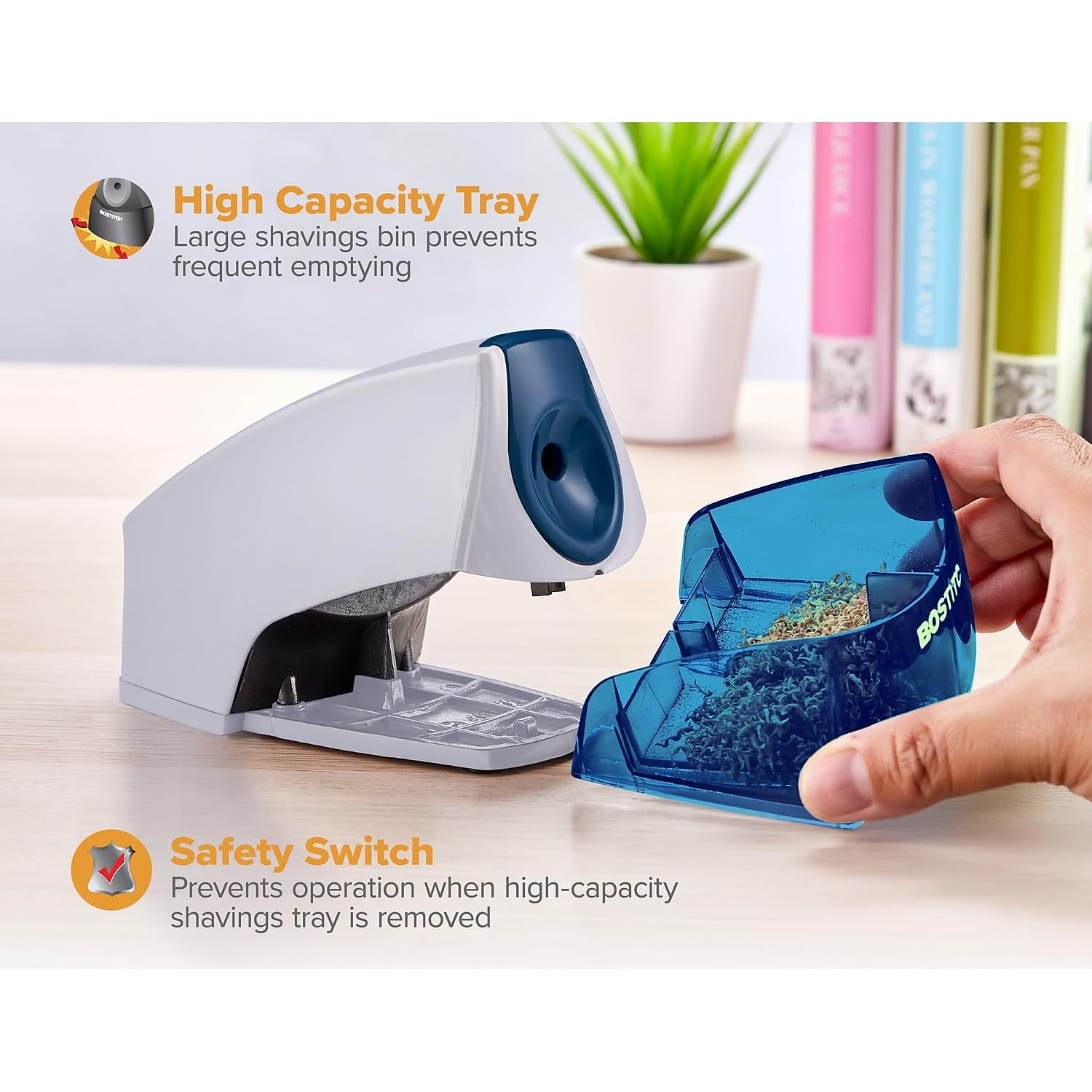
Image: A hand removing the high-capacity shavings tray from the sharpener, illustrating the safety switch feature.
Setup
- Unpack the pencil sharpener and its power adapter from the packaging.
- Place the sharpener on a stable, flat surface.
- Insert the power adapter plug into the power port located on the back of the sharpener.
- Plug the power adapter into a standard electrical outlet.
Operating Instructions
- Ensure the sharpener is plugged in and the shavings tray is securely in place.
- Insert a standard-sized pencil into the sharpening hole.
- Apply gentle downward pressure. The motor will activate automatically.
- Hold the pencil steady until the motor sound changes or the resistance lessens, indicating a sharp point.
- Remove the pencil. Avoid over-sharpening to prevent excessive wear on the pencil and cutter.
Maintenance
Cleaning the Shavings Tray:
- Unplug the sharpener from the electrical outlet.
- Gently pull the transparent shavings tray out from the front of the sharpener.
- Empty the pencil shavings into a waste bin.
- Wipe the tray clean with a dry cloth if necessary.
- Slide the clean tray back into the sharpener until it clicks securely into place.
Regular cleaning ensures optimal performance and prevents clogging.
Troubleshooting
| Problem | Possible Cause | Solution |
|---|---|---|
| Sharpener does not turn on. | Not plugged in; shavings tray not properly inserted. | Ensure power adapter is securely plugged into both the sharpener and the outlet. Verify the shavings tray is fully inserted and clicked into place. |
| Pencil does not sharpen or sharpens unevenly. | Dull cutter; pencil lead broken inside; excessive pressure. | Empty the shavings tray and check for broken lead. If the cutter is dull after extended use, consider contacting support for options. Apply gentle, consistent pressure. |
| Motor stalls during sharpening. | Overheating; excessive pressure; dull cutter. | Allow the sharpener to cool down. Reduce pressure on the pencil. If issues persist, refer to the warranty section. |
Specifications
- Model Number: EPS4-BLUE
- Brand: Bostitch
- Color: Blue
- Material: Plastic
- Power Source: Electric
- Product Dimensions: 8.38 x 4 x 4.25 inches (21.29 x 10.16 x 10.8 cm)
- Item Weight: 13.7 ounces (388.4 grams)
- Cutter Technology: HHC Cutter (Hardened Helical Cutter)
- Special Features: Compact, Quiet, Safety Switch, High Capacity Shavings Tray
Warranty
This product comes with a 7-Year Limited Warranty. For detailed warranty information or to make a claim, please contact the manufacturer directly.
Manufacturer: Amax Inc
Support
For further assistance, product inquiries, or technical support, please visit the official Bostitch website or contact their customer service department.
You can also visit the Bostitch Store on Amazon for more product information and related items.
Related documentsEPS4-BLUE


Ask a question about this manual
Ask about setup, troubleshooting, compatibility, parts, safety, or missing instructions. Manuals+ will review the question and use this page’s manual context to help answer it.