
1. Introduction
Thank you for choosing the Behringer Europower PMH880S Powered Mixer. This powerful and versatile mixer is designed to provide high-quality audio mixing and amplification for a wide range of applications, from live performances to studio recording. To ensure optimal performance and longevity of your unit, please read this manual thoroughly before operation.
2. Setup
2.1 Unpacking and Inspection
Carefully unpack your PMH880S and inspect it for any signs of damage that may have occurred during transit. If damage is found, do not operate the unit and contact your dealer immediately. Retain the original packaging for future transport.
2.2 Connecting Power
Connect the supplied AC power cord to the power inlet on the rear panel of the mixer and then to a suitable AC power outlet. Ensure the power switch is in the OFF position before connecting.
2.3 Connecting Inputs
The PMH880S features multiple input channels for various audio sources.
- Microphones: Use XLR cables to connect dynamic or condenser microphones to the MIC inputs (1-10).
- Line-Level Devices: Connect instruments, keyboards, or other line-level devices using 1/4" TRS or TS cables to the LINE inputs.
- Stereo Inputs: Channels 7/8 and 9/10 are designed for stereo line-level sources.

Figure 2.3.1: Front panel layout of the PMH880S, illustrating input and control sections.
2.4 Connecting Outputs
Connect your passive loudspeakers to the speaker outputs on the rear panel. The PMH880S provides two main power amplifier outputs (Output A and Output B) and can be configured for stereo or bridged mono operation.
- Main Speakers: Use appropriate speaker cables to connect your main loudspeakers to the OUTPUT A and OUTPUT B jacks.
- Monitor Outputs: Connect stage monitors or external recording devices to the dedicated monitor outputs.
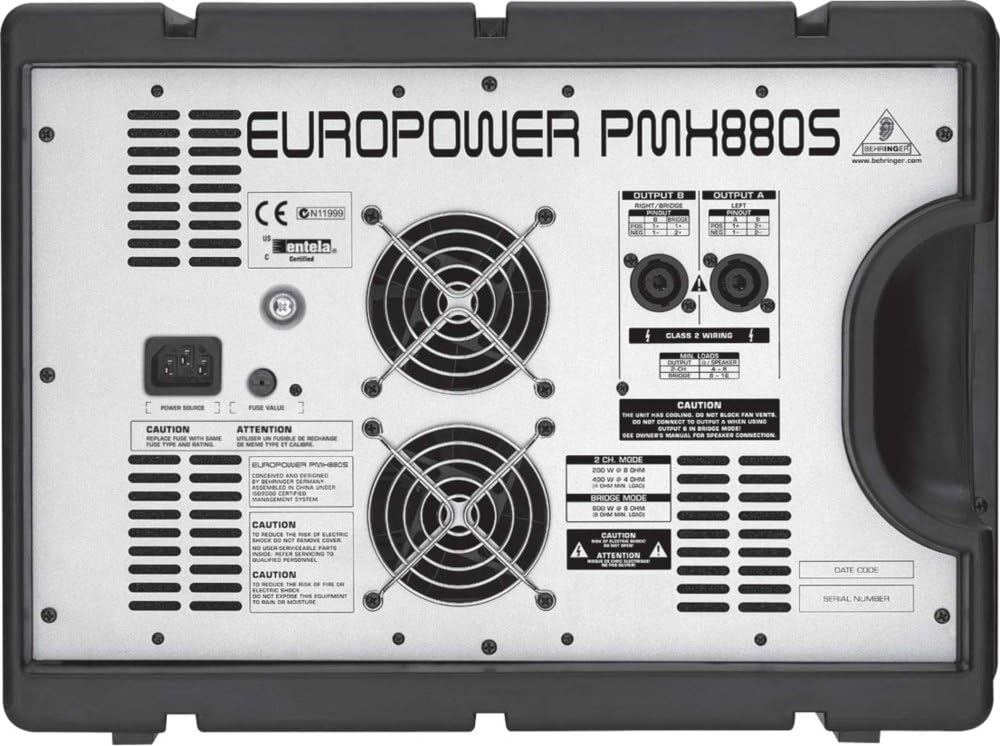
Figure 2.4.1: Rear panel connections, including power input, fuse holder, and speaker outputs.
3. Operating the PMH880S
3.1 Channel Controls
Each input channel features controls for gain, equalization (high, mid, low), monitor send, FX send, pan, and level. Adjust these to achieve the desired sound for each input source.
3.2 Master Section
The master section includes controls for the main mix level, monitor mix level, and built-in effects processor. The dual 7-band graphic EQs allow for precise frequency shaping of the main and monitor mixes.
3.3 Effects Processor
The PMH880S features a dual 24-bit stereo FX processor with 99 presets. Use the PROGRAM knob to select effects and the FX SEND controls on each channel to route audio to the effects processor.
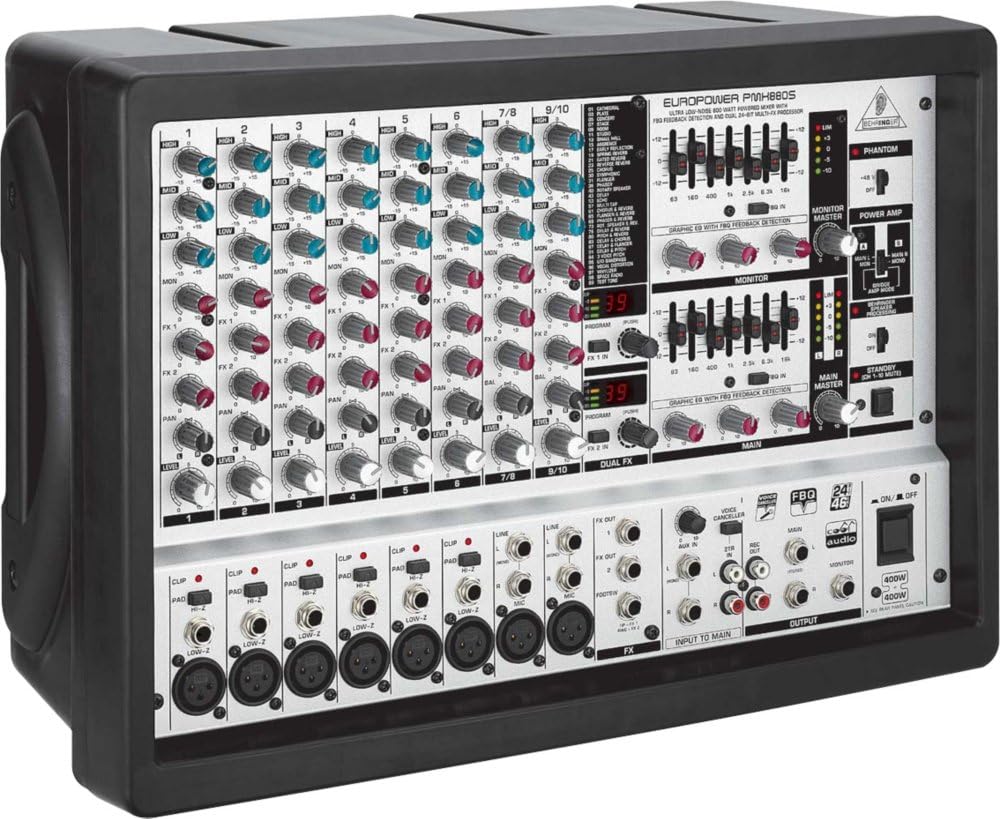
Figure 3.3.1: Angled view of the PMH880S, showing the comprehensive control surface.
3.4 Power Amplifier Operation
The integrated 2 x 400-Watt CoolAudio amplifier provides ample power for your loudspeakers. Ensure speaker impedance matches the amplifier's specifications to prevent damage. The PMH880S can operate in stereo or bridged mono mode for higher power output to a single speaker.
4. Maintenance
4.1 Cleaning
Clean the unit regularly with a soft, dry cloth. Do not use liquid cleaners or solvents. Ensure ventilation grilles are free from dust and debris to maintain proper cooling.
4.2 Storage
When not in use, store the PMH880S in a cool, dry place, away from direct sunlight and extreme temperatures. If possible, use the original packaging for protection.
4.3 Fuse Replacement
If the unit does not power on, check the fuse located near the power inlet on the rear panel. Replace it only with a fuse of the same type and rating as indicated on the unit. Refer to Figure 2.4.1 for fuse location.
5. Troubleshooting
| Problem | Possible Cause | Solution |
|---|---|---|
| No power | Power cable disconnected; Blown fuse | Check power cable connection; Replace fuse (see 4.3) |
| No sound from speakers | Speaker cables disconnected; Main level down; Channel level down; Amplifier protection mode | Check speaker connections; Increase Main/Channel levels; Power cycle unit |
| Distorted sound | Input gain too high; Speaker impedance mismatch | Reduce input gain; Ensure correct speaker impedance |
| Feedback (howling) | Microphone too close to speaker; EQ settings | Reposition microphone; Adjust EQ to cut problematic frequencies |
6. Specifications
- Model: Europower PMH880S
- Amplifier: 2 x 400-Watt CoolAudio amplifier
- Channels: 10 input channels
- Effects: Dual 24-bit stereo FX processor with 99 presets
- Equalization: Dual 7-band graphic EQs
- Manufacturer: Behringer
7. Warranty and Support
For warranty information and technical support, please refer to the warranty card included with your product or visit the official Behringer website. Do not attempt to service the unit yourself, as this may void your warranty. For service inquiries, contact an authorized Behringer service center.
Behringer Official Website: www.behringer.com


