
Introduction
The Behringer Europower PMP1000 is a powerful and compact 12-channel powered mixer designed for a wide range of audio applications, from live sound reinforcement to studio recording. It integrates a mixer, power amplifier, and a 24-bit stereo effects processor into a single, portable unit, delivering impressive performance and crystal-clear sound.
Key features include:
- 10 channels mixer with 6 IMP microphone preamplifiers with switchable +48 V phantom power.
- Powerful compact mixing console.
- Rich power of 2 x 250 watts at 4Ω / 2 x 135 watts at 8Ω.
- Creative 24-bit stereo effects processor with 100 presets.
- Integrated FBQ Feedback Detection System.

Important Safety Instructions
To reduce the risk of electric shock, do not remove the cover (or back). No user-serviceable parts inside. Refer servicing to qualified service personnel. Always follow basic safety precautions when using this product to avoid injury or damage.
- Read these instructions.
- Keep these instructions.
- Heed all warnings.
- Follow all instructions.
- Do not use this apparatus near water.
- Clean only with dry cloth.
- Do not block any ventilation openings. Install in accordance with the manufacturer’s instructions.
- Do not install near any heat sources such as radiators, heat registers, stoves, or other apparatus (including amplifiers) that produce heat.
- Do not defeat the safety purpose of the polarized or grounding-type plug. A polarized plug has two blades with one wider than the other. A grounding type plug has two blades and a third grounding prong. The wide blade or the third prong are provided for your safety. If the provided plug does not fit into your outlet, consult an electrician for replacement of the obsolete outlet.
- Protect the power cord from being walked on or pinched particularly at plugs, convenience receptacles, and the point where they exit from the apparatus.
- Only use attachments/accessories specified by the manufacturer.
- Use only with the cart, stand, tripod, bracket, or table specified by the manufacturer, or sold with the apparatus. When a cart is used, use caution when moving the cart/apparatus combination to avoid injury from tip-over.
- Unplug this apparatus during lightning storms or when unused for long periods of time.
- Refer all servicing to qualified service personnel. Servicing is required when the apparatus has been damaged in any way, such as power-supply cord or plug is damaged, liquid has been spilled or objects have fallen into the apparatus, the apparatus has been exposed to rain or moisture, does not operate normally, or has been dropped.
Product Overview
Front Panel Controls
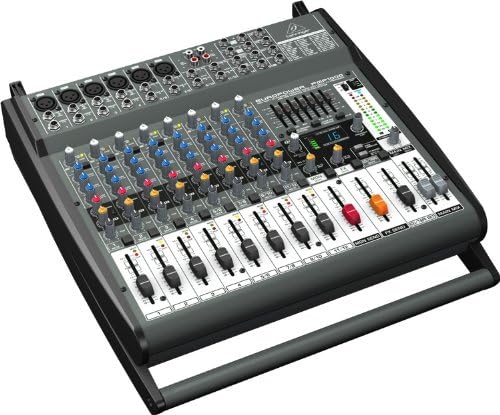
The front panel of the PMP1000 features all the controls necessary for mixing, effects processing, and power amplification. This includes individual channel strips for microphone and line inputs, master section controls, and the digital effects processor interface.
Rear Panel Connections
The rear panel provides essential connections for power, speaker outputs, and additional input/output options. It also houses the main ventilation fan for cooling the amplifier section.

Setup
Unpacking and Placement
Carefully unpack the PMP1000 and inspect it for any signs of damage. Place the unit on a stable, flat surface, ensuring adequate ventilation around the mixer. Avoid placing it near heat sources or in direct sunlight.
Power Connection
Connect the supplied power cord to the AC inlet on the rear panel of the PMP1000 and then to a suitable grounded AC outlet. Ensure the power switch is in the OFF position before connecting to power.
Audio Connections
Connect your microphones to the XLR inputs (channels 1-6) and line-level devices (keyboards, CD players) to the 1/4-inch TRS or RCA inputs. For speaker connections, use appropriate speaker cables to connect your passive speakers to the 1/4-inch or Speakon outputs on the rear panel. Ensure correct impedance matching (4Ω or 8Ω) for optimal performance and to prevent damage.
Operating the PMP1000
Channel Strips (Channels 1-12)
- GAIN: Adjusts the input sensitivity for each channel. Set this to achieve a healthy signal level without clipping.
- EQ (High, Mid, Low): Three-band equalizer for shaping the tone of each input.
- FX: Sends signal to the internal effects processor.
- MON: Sends signal to the monitor output for stage monitors.
- PAN/BAL: Pans mono signals left/right or balances stereo signals.
- MUTE: Mutes the individual channel.
- FADER: Controls the volume level of the channel in the main mix.
Master Section
- MAIN MIX FADERS: Control the overall output volume of the main stereo mix.
- FX SEND FADER: Controls the overall level sent to the internal effects processor.
- MON SEND FADER: Controls the overall level sent to the monitor output.
- CD/TAPE RET: Adjusts the level of external audio sources connected to the CD/Tape input.
Effects Processor
The PMP1000 features a 24-bit stereo effects processor with 100 presets. Use the PROGRAM knob to select different effects (e.g., reverb, delay, chorus). The FX TO MAIN fader controls how much of the processed signal is sent to the main mix.
FBQ Feedback Detection System
The FBQ Feedback Detection System helps identify and eliminate feedback frequencies. When feedback occurs, the corresponding LED on the graphic equalizer will illuminate, indicating which frequency band needs to be reduced to eliminate the feedback.
Maintenance
To ensure the longevity and optimal performance of your PMP1000, follow these maintenance guidelines:
- Cleaning: Use a soft, dry cloth to clean the exterior of the unit. Do not use liquid cleaners or solvents.
- Ventilation: Regularly check that the ventilation openings are clear of dust and debris. Ensure proper airflow around the unit.
- Storage: When not in use for extended periods, store the mixer in a cool, dry place, away from direct sunlight and extreme temperatures.
- Cables: Inspect all cables regularly for damage. Replace worn or damaged cables immediately.
Troubleshooting
| Problem | Possible Cause | Solution |
|---|---|---|
| No power | Power cord not connected; power switch off; blown fuse. | Check power cord connection; turn power switch on; replace fuse (refer to safety instructions). |
| No sound output | Main faders down; speaker cables disconnected; input gain too low; channel muted. | Raise main faders; check speaker connections; increase input gain; unmute channel. |
| Distorted sound | Input gain too high; speaker impedance mismatch; damaged speaker. | Reduce input gain; ensure correct speaker impedance (4Ω or 8Ω); check speakers. |
| Feedback (howling) | Microphone too close to speaker; high frequencies boosted too much. | Reposition microphone; use FBQ system to identify and cut feedback frequencies on EQ. |
Technical Specifications
| Feature | Specification |
|---|---|
| Model Number | PMP1000 |
| Product Dimensions | 47.2 x 44.3 x 18.6 cm |
| Item Weight | 9.07 kg (20 Pounds) |
| Power Output (RMS) | 2 x 250 watts @ 4Ω / 2 x 135 watts @ 8Ω |
| Number of Channels | 12 |
| Microphone Preamps | 6 IMP (Invisible Mic Preamp) with +48V Phantom Power |
| Effects Processor | 24-bit Stereo FX Processor with 100 Presets |
| Audio Input | XLR and 1/4 inch |
| Connectivity Technology | USB (for certain models/functions, not primary audio I/O) |
| Power Source | Corded Electric |
| Manufacturer | MUSIC Group |
| UPC | 989898857166, 689076414289 |
| GTIN | 00689076414289 |
Warranty and Support
For warranty information and technical support, please refer to the official Behringer website or contact your local authorized Behringer dealer. Keep your purchase receipt as proof of purchase for any warranty claims.
Official Behringer Website: www.behringer.com


