
1. Introduction
Welcome to the user manual for your new Zeppelin Classic Line 7410-2 Automatic Chronograph Watch. This manual provides comprehensive instructions for the proper setup, operation, maintenance, and troubleshooting of your timepiece. Please read this manual carefully to ensure optimal performance and longevity of your watch.
2. Product Overview
The Zeppelin Classic Line 7410-2 is an automatic chronograph watch featuring a robust titanium case, a sapphire crystal, and a comfortable leather strap. It is designed for precision timekeeping and includes a chronograph function for measuring elapsed time.
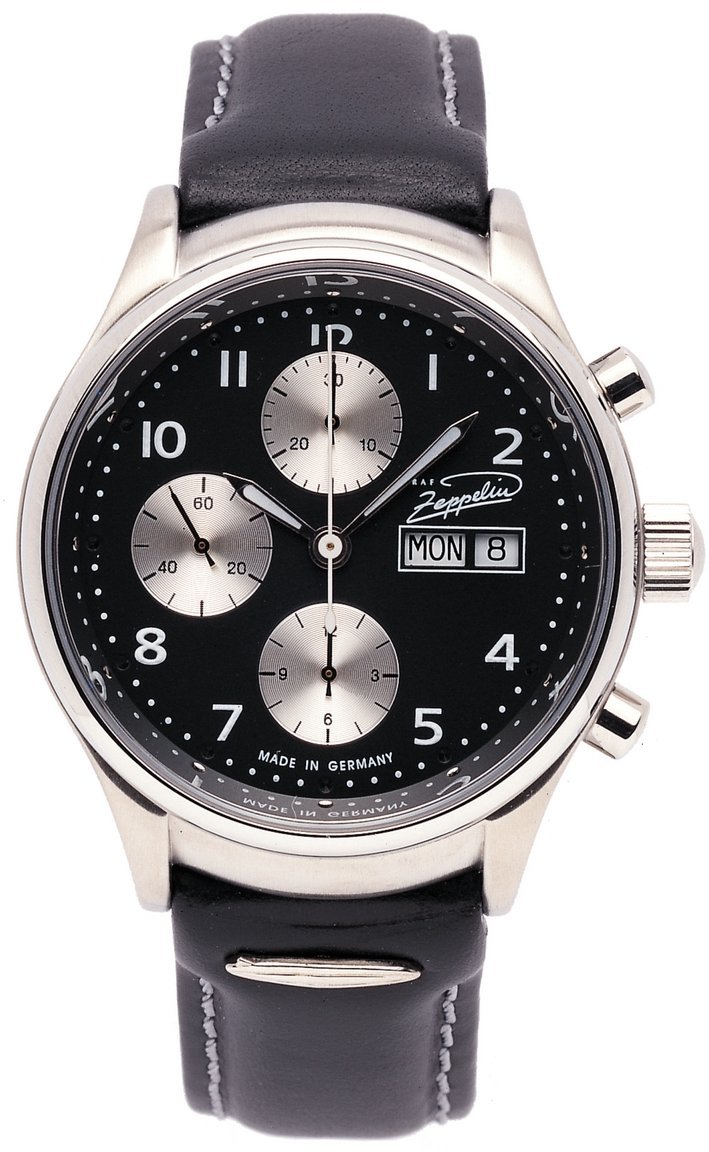
Image 1: Front view of the Zeppelin Classic Line 7410-2 Automatic Chronograph Watch. This image displays the watch's black dial with sub-dials, luminous hands, and the black leather strap with a buckle clasp. The watch features a round titanium case and a sapphire crystal.
Familiarize yourself with the main components of your watch:
- Crown: Used for winding the watch and setting the time.
- Pushers: Buttons located on the side of the case, typically used to operate the chronograph function.
- Dial: Displays the time, and includes sub-dials for the chronograph.
- Hands: Hour, minute, and second hands for time indication, plus chronograph hands.
- Strap: Black leather strap with a buckle clasp for secure wearing.
3. Setup
3.1 Initial Winding
Your Zeppelin Classic Line 7410-2 is an automatic watch, meaning it is powered by the motion of your wrist. However, if the watch has stopped or has not been worn for an extended period, it may require initial manual winding.
- Ensure the crown is in its normal, pushed-in position.
- Turn the crown clockwise approximately 20-30 times. This will provide sufficient power reserve to start the watch.
- The second hand should begin to move.
3.2 Setting the Time
To set the correct time:
- Pull the crown out to its outermost position. The second hand may stop (hacking feature).
- Turn the crown clockwise or counter-clockwise to move the hour and minute hands to the desired time.
- Once the time is set, push the crown back into its normal position. The second hand will resume movement.
4. Operating the Chronograph
The chronograph function allows you to measure elapsed time independently of the main time display.
4.1 Starting and Stopping the Chronograph
- To start the chronograph, press the upper pusher (button). The chronograph second hand will begin to move.
- To stop the chronograph, press the upper pusher again. The chronograph hands will stop, indicating the elapsed time.
4.2 Resetting the Chronograph
After stopping the chronograph, you can reset it to zero:
- Press the lower pusher (button). All chronograph hands will instantly return to their zero positions.
Note: Do not attempt to reset the chronograph while it is running, as this may damage the mechanism. Always stop the chronograph first before resetting.
5. Maintenance
Proper care and maintenance will help preserve the appearance and functionality of your Zeppelin watch.
5.1 Cleaning
- Wipe the watch case and sapphire crystal with a soft, dry, lint-free cloth.
- For the leather strap, avoid excessive moisture. If it gets wet, allow it to air dry naturally, away from direct heat.
- Do not use chemical cleaners or abrasive materials, as these can damage the watch's finish.
5.2 Water Resistance
While your watch is designed for durability, it is important to understand its water resistance. Always ensure the crown is fully pushed in before any contact with water. Avoid operating the pushers or crown when the watch is wet or submerged, as this can compromise the water seal.
5.3 Storage
When not wearing your watch, store it in a cool, dry place, away from direct sunlight, extreme temperatures, and strong magnetic fields. A watch box or pouch is recommended to protect it from dust and scratches.
6. Troubleshooting
If you encounter any issues with your watch, please refer to the following common problems and solutions:
- Watch has stopped or is running slowly:
As an automatic watch, it requires motion to power its movement. If it has stopped, manually wind it by turning the crown clockwise 20-30 times. Ensure you wear the watch regularly for sufficient power reserve.
- Time is inaccurate:
Check if the watch has sufficient power reserve. If it is fully wound and still inaccurate, it may require adjustment by a professional watchmaker. Avoid exposing the watch to strong magnetic fields, which can affect accuracy.
- Chronograph hands do not reset to zero:
Ensure the chronograph is stopped before pressing the lower pusher to reset. If the issue persists, a professional adjustment may be needed.
For issues not covered here, or if problems persist, please contact authorized service personnel.
7. Specifications
| Model Number | 7410-2 |
| Movement Type | Automatic |
| Display Format | Analog |
| Special Features | Chronograph |
| Case Material | Titanium |
| Crystal Type | Sapphire |
| Case Diameter | 40 Millimeters |
| Case Thickness | 15 Millimeters |
| Strap Material | Leather |
| Strap Color | Black |
| Strap Width | 20 Millimeters |
| Dial Color | Black |
| Weight | 84 Grams |
8. Warranty and Support
Your Zeppelin watch is manufactured to high standards and is covered by a manufacturer's warranty against defects in materials and workmanship. Please refer to the warranty card included with your purchase for specific terms and conditions, including the warranty period and coverage details.
For technical support, service, or warranty claims, please contact your authorized Zeppelin dealer or visit the official Zeppelin website for contact information. Ensure you retain your proof of purchase for any warranty-related inquiries.