
1. Introduction
The Lowell 100LVC is a robust 100-watt, 70/25-volt attenuator designed for precise control over audio signal levels in commercial and industrial sound systems. This device allows for the reduction of speaker output without affecting the overall amplifier load, ensuring balanced sound distribution across various zones. It is engineered for reliable performance and ease of integration into existing setups.
2. Safety Information
WARNING: To prevent fire or shock hazard, do not expose this appliance to rain or moisture. Do not open the casing; refer all servicing to qualified personnel.
- Always disconnect power before installation or servicing.
- Ensure all wiring connections comply with local electrical codes and standards.
- Do not exceed the specified power rating of 100 watts.
- Install in a well-ventilated area to prevent overheating.
- This device is intended for use by trained professionals or under their direct supervision.
3. Package Contents
Verify that all items are present in the package:
- Lowell 100LVC 100W 70/25V Attenuator
- Funnel (Note: The inclusion of a funnel with an attenuator is unusual. Please verify its intended use or discard if irrelevant to the attenuator's function.)
4. Setup and Installation
The Lowell 100LVC attenuator is designed for integration into 70V or 25V constant voltage audio systems. Proper wiring is crucial for optimal performance and safety.
- Power Disconnection: Before beginning installation, ensure that all power to the audio system and associated components is disconnected at the circuit breaker.
- Mounting: Mount the attenuator in a suitable location, such as a standard electrical box or rack, ensuring adequate ventilation.
- Wiring Connections:
- Connect the INPUT terminals of the attenuator to the 70V or 25V constant voltage output from your amplifier.
- Connect the OUTPUT terminals of the attenuator to the speaker(s) you wish to control.
- Ensure correct polarity (+ to + and - to -) for all connections.
- Use appropriate gauge wiring for the power and distance involved to minimize signal loss.
- Verification: Double-check all connections for security and correctness before restoring power.
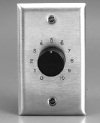
Figure 1: Front view of the Lowell 100LVC 100W 70/25V Attenuator, showing the control knob and mounting plate. This image illustrates the physical appearance of the attenuator for identification and installation reference.
5. Operating Instructions
The Lowell 100LVC attenuator provides stepped attenuation for precise volume control.
- Power On: After successful installation, restore power to the audio system.
- Adjusting Volume: Rotate the control knob on the front of the attenuator to adjust the output volume of the connected speakers.
- Turning the knob clockwise typically increases the volume.
- Turning the knob counter-clockwise typically decreases the volume.
- Setting Levels: Adjust the attenuator to the desired listening level for the specific zone or speaker group it controls. Ensure that the overall system gain structure is properly set at the amplifier to avoid distortion.
6. Maintenance
The Lowell 100LVC attenuator requires minimal maintenance to ensure long-term performance.
- Cleaning: Periodically wipe the exterior of the attenuator with a soft, dry cloth. Do not use harsh chemicals or abrasive cleaners.
- Inspection: Annually inspect wiring connections for any signs of wear, corrosion, or loosening. Ensure the attenuator is free from dust buildup, especially around ventilation points.
- Environmental Conditions: Ensure the attenuator is not exposed to excessive moisture, extreme temperatures, or direct sunlight, which can degrade performance and lifespan.
7. Troubleshooting
If you encounter issues with your Lowell 100LVC attenuator, refer to the following common problems and solutions:
| Problem | Possible Cause | Solution |
|---|---|---|
| No sound from speakers |
|
|
| Distorted sound |
|
|
| Volume control not working |
|
|
8. Specifications
| Brand | Lowell |
| Model Number | 100LVC |
| Power Rating | 100 Watts |
| Voltage Compatibility | 70V / 25V Constant Voltage Systems |
| Item Weight | 16 ounces (0.45 kg) |
| UPC | 811859030069 |
| GTIN | 811859030069 |
9. Warranty and Support
Lowell products are manufactured to high standards and are backed by a manufacturer's warranty. For specific warranty terms and conditions, please refer to the documentation included with your purchase or visit the official Lowell website.
For technical support, troubleshooting assistance beyond this manual, or to inquire about replacement parts, please contact Lowell customer service:
- Website: www.lowellmfg.com (Example link, please replace with actual Lowell support link if available)
- Phone: Refer to the Lowell website for regional contact numbers.
When contacting support, please have your model number (100LVC) and purchase date available.


